
2 Tools to Monitor Specific Processes and Trigger actions


 5 min. read
  Published on

We all know about Windows Task Manager and the fact you can use it to view, kill, change the priority and set the number of processor cores an application process uses. If you have a rogue process that is malicious or causing excessive CPU or memory usage, Task Manager is the first place you go to troubleshoot. Of course, in addition to processes, Task Manager can provide control over Windows Services and Application tasks and supply general computer and network performance information.
Although Windows Task Manager is good enough for most people, there are more complete and advanced task management tools like Process Explorer, Process Hacker and System Explorer. But if you want to monitor a specific application process for CPU or memory usage it becomes more difficult with these tools because they are designed to monitor all the system processes in general and are limited when you want to monitor a single program.
Here we’ll look at a few tools that can monitor a specific process over a period of time and then trigger certain actions when a process behaves abnormally or does something you don’t want, like closing itself down.
1. Kiwi Application Monitor
Application Monitor is program that can, as the name suggests, watch the activity of specific tasks or processes. Then once you have told Kiwi Application Monitor what to keep an eye on, the program will sit in the background, watch the resource usage and perform a number of actions based on what the target process is doing.
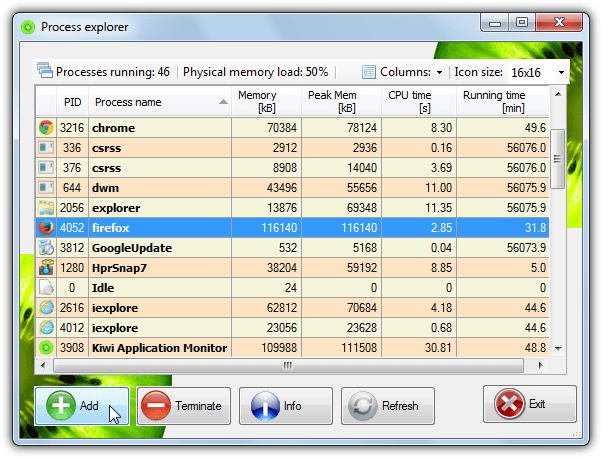
Once you install and run the Kiwi program, simply click the green Add button to choose a process. This doesn’t have to be a currently running process and you can either browse for an executable file or choose a running process from the built in “Process Explorer”, click Add after clicking on the process you want. The Process Explorer can also work as a basic task manager where you can kill running processes, the Info button shows quite detailed information where you can also alter the priority and the allowed usable maximum memory.
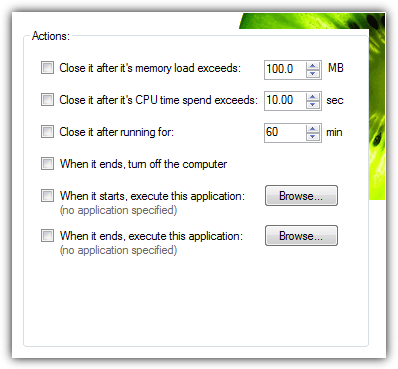
In the same window where you choose what program to monitor, there are options to set a number of rules. You can show an alert when the process opens or closes, when it’s memory load exceeds a certain threshold or when it’s been running for xx minutes. Action triggers can also be defined to close the process after a certain time, CPU load or memory usage limit has been reached. Even other programs can be launched when the monitored process is started or closed.
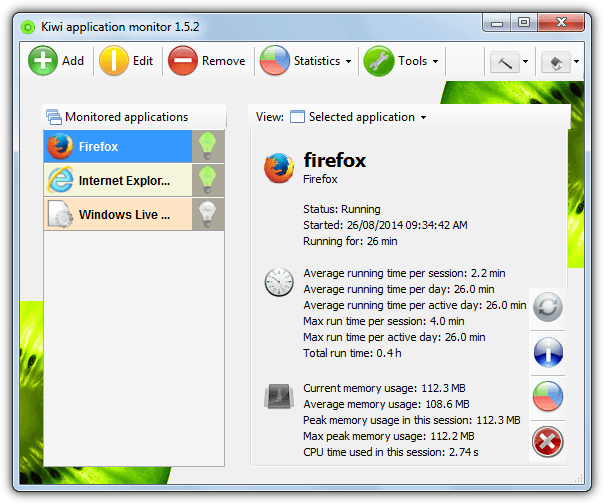
Kiwi Application Monitor can also tell you a great deal of information about the monitored program at a glance, such as when and how long it’s been running, average run time, how much and the peak memory used and also the same with CPU usage. Although the main statistics don’t work in the free version, you can still use the Statistics > Compare function to get information on process runtime, CPU load and memory usage over a period of time.
The Tools menu has a few other useful functions such as a Service Explorer to start, stop and pause Windows services, Kiwi System Info which is a hardware and system information program, and also a startup manager to add, remove or edit programs that start with Windows. Sadly several features like statistics and advanced rules are disabled in the Free version, to unlock these you need to buy the Pro version at a slightly pricey £37.
Download Kiwi Application Monitor
2. Bill2’s Process Manager
Unlike Kiwi Application Monitor Monitor above, Bill2’s Process Manager is completely free and unrestricted, so all the features available can be used. Another nice difference is this utility has a portable version so you don’t have to install it if you don’t want. A slight negative is the program defaults to the French language in the user interface (the website is in French too), this is easy to change though via the Options button at the bottom left and selecting English from the drop down.
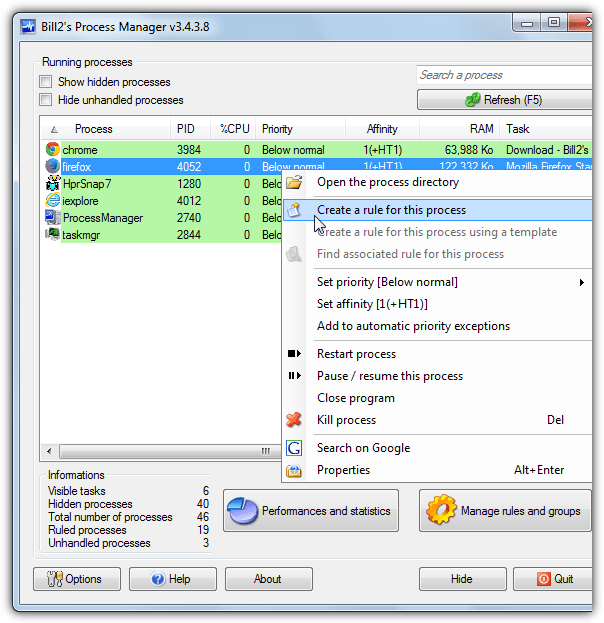
When you launch Process Manager it will display a list of running processes in a basic task manager style that can be started, stopped, paused, searched for on Google or have the priority or affinity changed. Windows and a few other select processes are hidden by default, so if you want to monitor one of those, untick “Show hidden processes” at the top. To create a rule for a chosen process right click on it and select “Create a rule for this process”.
While the affinity (number of available CPU cores) and priority of a process can be configured when it’s active or inactive, the “Special actions” tab is of special interest here. This can perform actions when the process is started or stopped, such as show a tooltip, kill or restart, launch or kill another specified program. The Inactivity tab can perform similar actions when the chosen process has been idle for xx number of minutes, while the Overactivity tab will do the same if a process goes over a specified CPU usage percentage for xx minutes.
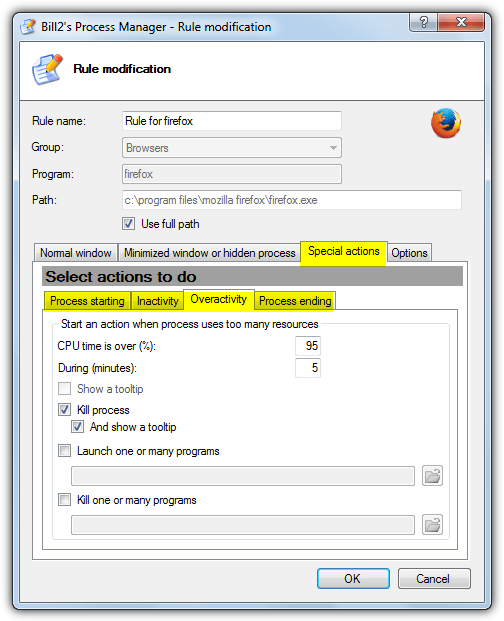
Bill2’s Process Manager is a clean and easy to use tool and uses about the same amount of system memory as Kiwi when monitoring in the background (about 20MB), but it can’t track or perform actions based on the memory usage of the chosen process. Process Manager works on Windows 2000 and above.



Improve this guide

User forum
0 messages