Multiple .net Frameworks Versions Installed – Is it Safe?
.NET Framework is a programming framework by Microsoft for developers to create applications more easily. It was something new back in Windows XP but is now commonly found built-in to Windows operating system. There are quite a few .NET Framework versions available which is 1.1, 2.0, 3.0, 3.5, 4.0, and 4.5 that can be installed in Windows and it concerns many users if installing too many .NET Frameworks can cause the system to slow down. This is easily seen in Windows XP where multiple versions of Microsoft .NET Framework are listed in Add or Remove Programs.
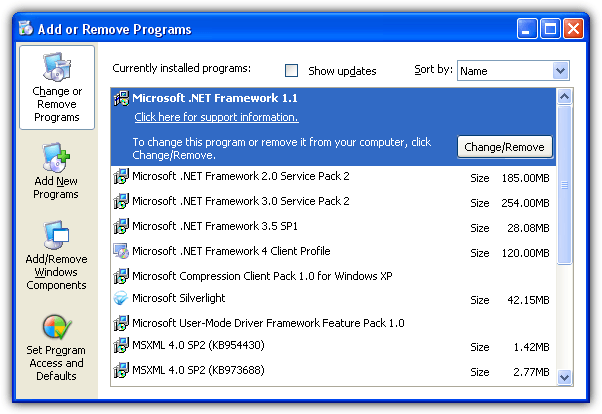
However in Windows 7, you probably won’t see any .NET Framework listed in Programs and Features and the most is only Microsoft .NET Framework 4.5.1 if you’ve opted to install it from Windows Update.
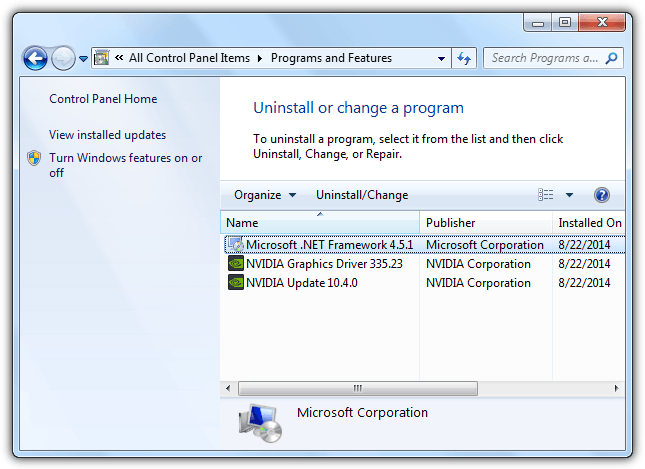
The reason why you’re seeing multiple versions of .NET Framework in the Add or Remove Programs for Windows XP but not in later version of Windows such as 7 is because when .NET Framework is included as part of the operating system, it will not appear in Programs and Features.
Windows 7 comes with .NET Framework 3.5, 3.0 and 2.0 pre-installed which is why you’ll never see these version listed in Programs and Features for you to uninstall. So if you install any other versions of .NET Framework such as 4.5.1 or even the old 1.1, these two versions will show up in Programs and Features. For Vista, .NET Framework 3.0 and 2.0 is included as part of the OS component but only the 2.0 is enabled by default while the 3.0 can be manually enabled from the Programs and Features.For Windows 8.1, .NET Framework 4.5.1 is pre-installed and enabled by default. If you have third party applications that is hardcoded to require older versions of .NET Framework such as 3.5, 3.0 or 2.0, good news is they are already included in the operating system but just not enabled. To enable older versions of .NET Framework in Windows 8.1, go to Control Panel > Programs and Features > and click on Turn Windows features on or off located at the left hand sidebar. Optionally, you can launch it by typing optionalfeatures.exe in Start menu.
Additional Tip: If Windows Features shows a blank or empty list which is quite a common problem, you can read this article on how to fix it.
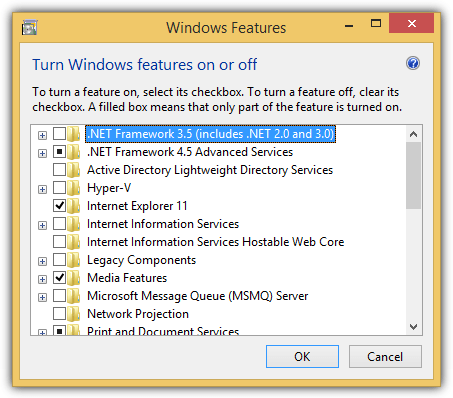
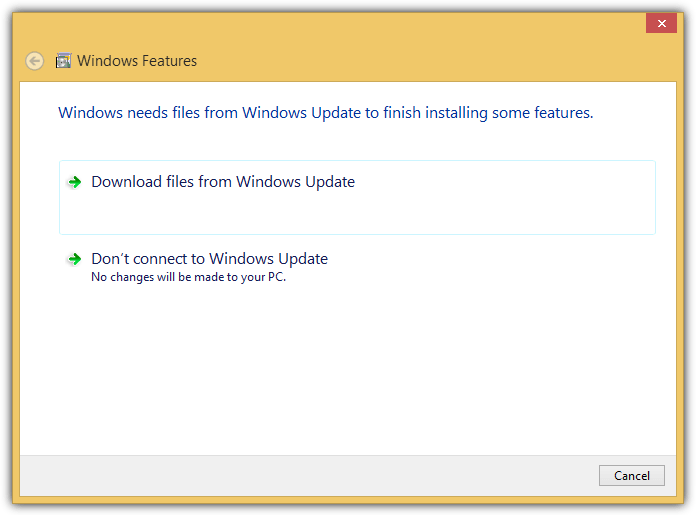
Simply tick the .NET Framework 3.5 (includes .NET 2.0 and 3.0) checkbox and click OK. The Windows Features will prompt you that it needs files from Windows Update to finish installing some features. Select the “Download files from Windows Option” to continue.
An important information that you need to know about .NET Framework 3.5 is whenever this specific version is installed, it comes together with version 3.0 and 2.0. This is why when you enable .NET Framework 3.5 is Windows 8.1, it also includes .NET 3.0 and 2.0. In Windows 7, all 3 version (3.5, 3.0, 2.0) are pre-installed. Finally for XP, if you have all versions of .NET framework installed, attempting to uninstall 3.0 or 2.0 will give you an error saying that it “cannot be uninstalled because it will affect other applications that are installed”.
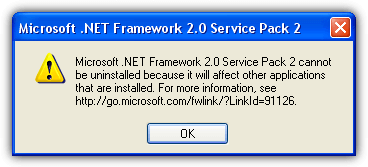
If you want to get rid of older version of .NET Framework in Windows XP, you must first remove version 3.5, followed by 3.0 and finally 2.0. Microsoft .NET Framework version 4 and the oldest 1 are independent and can be uninstalled at any time.
Additional Notes: It is actually unnecessary to keep the older versions of. NET Framework installed in the operating system because they are backward-compatible. This means that any applications that are built with older versions of .NET Framework will work with the most current version of .NET Framework. However some developers have bad practices by including additional checks to ensure that a specific version of .NET Framework is present in order to run and this causes backward-compatibility problems.
We’ve tested that having multiple versions of .NET Framework does not really slow down the computer. It does take a bit of disk space for the .NET Framework files but still not that much considering that an average hard disk today is at least a few hundred GBs in size. The only thing that you need to worry is that the computer will more subjected to security vulnerabilities which fortunately can be easily patched by making sure that Windows Update is set to install updates automatically.
You might also like:
 6 Ways to Test Websites in Multiple Versions of Internet Explorer
 Check .NET Compact Framework Version Installed on Windows Mobile
 Office Repair Tool for 2007, 2010, 2013, 2016 Versions
 .NET Framework Setup Verification Utility
 Fix Microsoft Office Word Has Not Been Installed For The Current User Error
I just reinstall Windows 7 in my PC, and the Workframe showing is 4.7. To be able to Install AutoCAD 2014 I have to install Workframe 4.0. To install 4.0, I have to remove 4.7 then install 4.0 then reload 4.7. Question: Why after installing 4.7, the 4.0 in not showing anymore?
Is AutoCAD specifically asking for .NET 4.0? Version 4.7 is just an update to 4.0 and the base .NET version is still 4, so it should work.
All Programing in VB.net must use 4.0 with Visual Studio for AutoCAD, and sometime installation for AutoCAD is not working. But my question is: Why I do not see the .NET Framework 4.0 in my system?
Thank’s!
The simple answer is .NET 4.7 is installed and it will replace 4.0, you can’t have both at the same time. If you specifically want 4.0 you will have to uninstall 4.7. Framework 4.5 replaced 4.0, 4.6 replaced 4.5 and 4.7 replaced 4.6.
Before I reinstall the Windows 7, I had Framework 3.5 and 4.0 and 4.5 and 4.6. So what change in Windows 7 today?
It’s not possible to have 4.0, 4.5 and 4.6 installed at the same time. What you had was 4.6 but it is backward compatible with any software that requires 4.5 and 4.0. If you had 4.0 and tried to install 4.5 or 4.6, they would replace the 4.0 files.
I am trying to remove .net framework anything under 4.0 but my company does not allow us to use any other programs. Is there a way to delete the other versions from the registry. We are using windows 7
Thank You for letting me know about this. that was my problem too.
thank you Raymond. I understand so much better now.
Thanks Raymond for looking into that. Another reason to stay away from anything Microsoft if at all possible. In essence it IS possible we will see 20 .net entries in Add/remove programs window when we get to .Net framework 21 for example? Microsoft should clean up it’s act like 10 years ago lol
Thanks so much for letting me know about this issue. I was just trying to clear up some space on my computer and noticed all the different versions and the amount of memory they took up. Glad I checked ahead so I wouldn’t be in a virtual bind :)
Thank you very much…you really help me a lot :)
Thanks for this info. Very much appreciated!
I’d looked everywhere for this info as I’ve multiple versions of .NEt and other s/w installed that are taking up space on my old disk. And it’s nearly full :)
thanks raymond…
Mate, you are a champion.
Microsoft mess up with .Net framework.
Bad thing about it is that some versions are in-dependent or dependent of others. Add/Remove shows each version installed.
Well, the definite solution is that they should corporate all version in one package. I want to see only 3.5 in Add/Remove program and I expects it includes other older version. Don’t show it in Add/Remove program.
This *F* .NET system. It is starting to be bigger than Windows itself, well maybe not that big, but it is also so complex.
I installed fresh Windows XP. So I also did Windows updates and .NET 3.5 was installed. Automatically it installed .NET 2.0 SP, and .NET 3.0 SP.
Now this: I try to install the Sonic cyber DVD player from Dell CD. it says” you must have .NET version 1.1 or later :)
So I had to install 1.1 and the 1.1 SP.
i removed the 2. and 3. version too. LOL
thx I had this problem few months ago!
Thanks very much for this article. I was also confused about Multiple Versions of Microsoft .NET Frameworkbut you help me. Thanks Ray.
great find ray.
Thanks for this article. I was also confused about it but you cleared everything. Thanks Ray.
Try as one might to avoid having version 1.0 or 1.1 (or its service packs or hotfixes) on one’s machine, it cannot be avoided. Despite the fact that version 2 covers all of version 1’s capabilities, many older pieces of software whose installers only check to see if version 1 is there, and, if not found, will put it there, will ultimately thwart one’s efforts to keep version 1 off one’s machine.
One can scream at the installer, saying, “but version 2 will cover you… it’s there… relax… don’t install version 1 on my machine please” all one wants. But at the time the software was written, version 1 was all there was; and the installer “looks” for version 1 and, if not found, puts it there.
Version 2 is supposed to proved the “hooks” to notify such installers that version 1 is present (even if it’s not) because version 2 will provide the application with all the version 1 stuff it needs…
…but, alas, many version 1 programmers scripted their installers to test for version 1 presence in the wrong way.
So, there’s no point, I’ve learned in my 32 years of IT experience, in fighting it. When I install a new Vista system, I install 3.5 and 3.5-SP1; and I also install 1.0 and 1.1 (and the updater will subsequently, eventually, install any service packs or hotfixes which 1.1 needs.
Version 1.1 is small compared with subsequent versions. It occupies so little disk space, by comparison, and behaves so innocuously (in terms of processess/CPU usage (compared with all subsequent versions) that it’s just not a big deal to have it on one’s system.
Or so it is my two cents worth… which my ex-wife is quick to point out is often pretty much ALL it’s worth.
__________________________
Gregg L. DesElms
gregg[at]greggdeselms.com
Napa, California
Another good piece of in-depth research – thank you Raymond.
lol..my problem solve!
thank u Raymond..
thanks for the great tip ray! :)