
Will .NET Framework 4 Slow Down My Computer?


 6 min. read
  Published on

Everybody runs applications on their Windows computer and there is a wealth of software out there to choose from. More and more software these days relies on the Microsoft .NET Framework because it makes things easier for programmers by including code and libraries which would otherwise need developing manually. While this is mostly a good thing and enables for faster and more efficient creation of software, it does also mean the .NET Framework needs to be installed on your computer for you to be able to run the software.
A major complaint about .NET over the years has been that it’s unnecessarily huge and bloated and slows down your computer. There are multiple versions of .NET, the latest is 4.6.x and if you want to run some of the latest applications you will sooner or later need it on your system. Windows 10 is pre-installed with .NET 4.6, but Windows 8 ships with 4.5 and Windows 7 comes with 3.5. A popular program like Paint.NET won’t work in Windows without installing .NET 4.6.1 first.
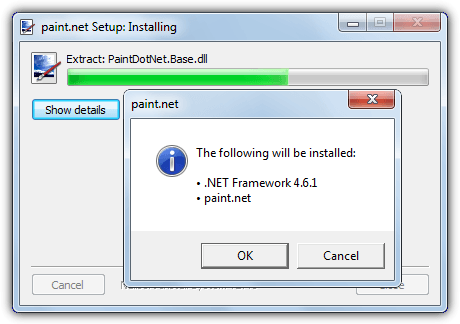
If you believe what some people tell you on the internet, installing .NET 4 on your Windows computer will slow it down by a huge amount, but is that really the case? To find out, we’ve run some tests on a system with and without .NET Framework 4.6 installed to see if there are any differences in performance.
The tests were run on a Windows 7 Professional 64-bit computer with an AMD Phenom II X4 955 CPU @3.2GHz, 4GB of DDR3 1333Mhz and a WD 7200RPM HDD. Windows is fully up to date (excluding .NET) while updates and any scheduled tasks were turned off, the version of .NET Framework used was 4.6.1.
Windows Registry Key Count and Size
The Windows registry is obviously an integral part of the operating system and if .NET adds too many entries into the registry it could have a negative effect on general performance. To see what .NET 4 adds to the registry we looked at how many registry keys and data values are created with Registry Browser.
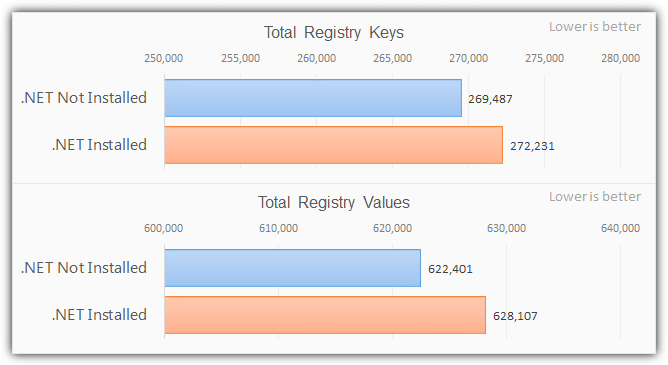
.NET 4.6 adds around 2,700 new keys to a clean registry and 5,700 new data values, that’s roughly a 1% increase. It’s a sizable amount but shouldn’t have any adverse affects on the system as something like Office adds several times that. Next let’s look at overall registry size, the size of the core registry files was checked with an old Microsoft tool called DuReg..
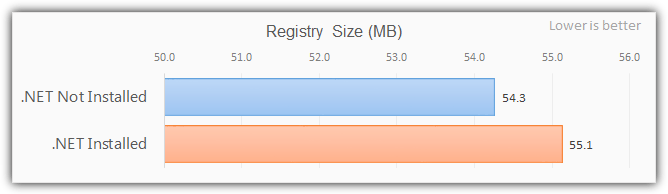
As you can see, the overall size of the registry increased by around 0.8MB after .NET was installed, which isn’t a massive amount and shouldn’t make any difference to general Windows performance.
Windows Boot Time
To see if the extra files, larger registry and startup services have any effect on the speed at which the system boots, we measured the boot time of our system. The system was rebooted 5 times with and 5 times without .NET taking the average from each. Windows Event Viewer was used to record the boot times.
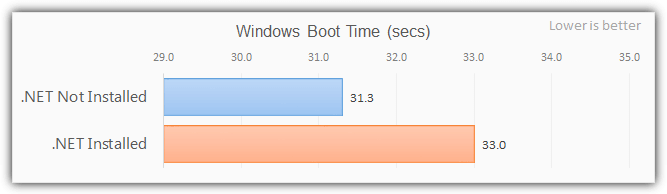
There was a difference of 1.7 seconds so it did appear to slow boot performance by about 5% with .NET installed. This could just about be within acceptable tolerance levels and other test runs could reveal slightly different or closer results. However, the numbers in this test say .NET will add as much as a second or two to your Windows boot time.
PCMark Vantage
Futuremark’s PCMark suite is the number one test suite when you want to get overall performance of a system, and useful to see if .NET has any noticeable impact on our system. PCMark tests performance for gaming, music, productivity, video, HDD and communications. We used PCMark Vantage and not later versions because they all require .NET 4 to function, so a without test would be impossible. The standard PCMark Suite test was run that is available in the free version.
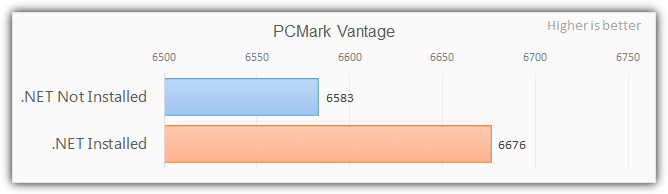
Rather weirdly the PCMark score with .NET installed is slightly higher than without, which is the reverse of what you’d expect. Like other scores this is within acceptable tolerance levels meaning it’s too close for a conclusive result.
PCWorld WorldBench 6
This benchmark suite was developed several years ago by website PCWorld to measure the performance of systems they had on test. Although it’s no longer publicly available we purchased a copy of WorldBench 6 when it was. Through scripting Worldbench runs a series of real world tests using a number of applications including Photoshop, 3DS Max, Firefox, Nero, Office and WinZip.
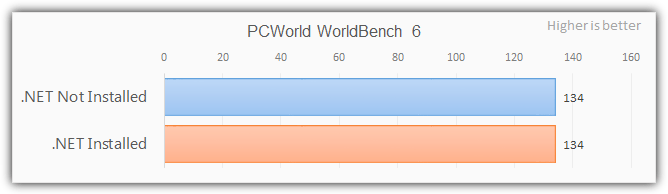
Whether .NET is installed or not makes no difference whatsoever in this testing suite, the score is exactly the same. Although the software used in the suite is getting old, it’s still a good test to see if .NET causes any slowdowns in general computing tasks, which it doesn’t here.
A Note About The .NET Framework Optimization Service
This is a Windows Service that gets installed along with .NET and it runs optimization routines on the .NET libraries whenever the framework gets an update. It happens when you first install a new version of .NET or when patches have been applied through Windows update. Mscorsvw.exe will appear in Task Manager when optimization is taking place.
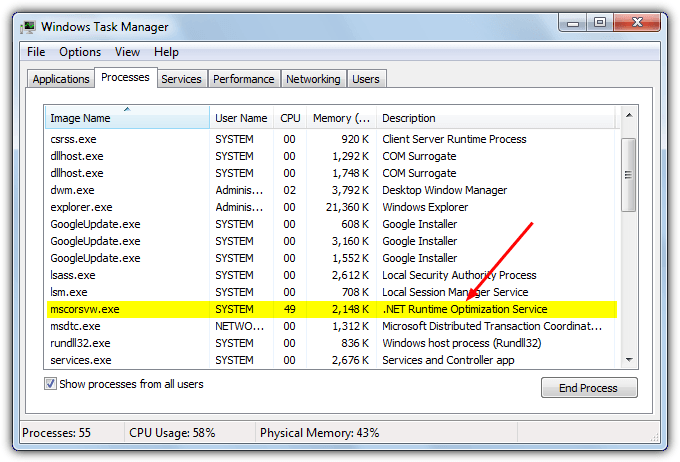
Although the mscorsvw.exe process runs in the background it can take up CPU cycles while the service is running. This should only be for a few minutes at the most and the only time under normal circumstances that .NET is supposed to slow down your computer. When you do get issues with .NET this is one of the first things that causes a slowdown and unnecessarily high CPU usage.
Will .NET Framework 4 Slow Down My Computer?
From looking at the test results we have to conclude that installing Microsoft .NET Framework 4.6 will not slow down your Windows computer to any great degree. It does add thousands of registry keys, a service and hundreds of Megabytes to your system drive, but under normal running conditions the only major slow down you might notice is just after installing or updating and the optimization service kicks in for a few minutes.
Apart from a possible slight increase in boot time, the .NET Framework itself will not slow things down due to its size or integration into the system. Of course, if the installation is faulty or has become corrupted in some way, then you might encounter issues. Repairing or removing .NET if there are problems will hopefully fix them but you can rest a little easier knowing that a correctly functioning .NET will not adversely your computer’s performance.



Improve this guide

User forum
0 messages