Registry Defrag Tools: 7 Best to Use in 2023
The Registry is very important in Windows because it stores information and settings for just about everything used by the system. One of the problems with the registry is it can become fragmented over time because of the amount of data constantly being added to, changed or deleted from it. Over time these constant changes leave gaps and spaces inside the registry which can degrade its performance, although in all but the most severe cases, this degradation is going to be very small.
A process known either as compacting, optimizing or defragging your registry aims to eliminate these gaps and improve overall performance when accessing data from it. Programs that optimize the registry in this way don’t make any changes to the contents of the data itself or physically defrag the files themselves, they simply read the registry, remove all the slack spaces and then write the compacted registry files back to the system. Here’s a selection of 7 tools that can remove these useless spaces and help restore a bit more performance, however small, back to the system registry.
Note: Before attempting to use a tool like this, it’s highly recommended to back up your registry with a tool such as ERUNT from the author of NTREGOPT, or the Tweaking.com Registry Backup tool. A system Restore point is also a good idea if the software below doesn’t include the option. Although the programs that perform this task are generally very reliable, outside influences such as other software on your computer could cause an unexpected problem. All the tools were installed and analyzed the same Windows 7 32-bit registry. The computer will need rebooting after a registry compact operation has been carried out.1. Free Registry Defrag
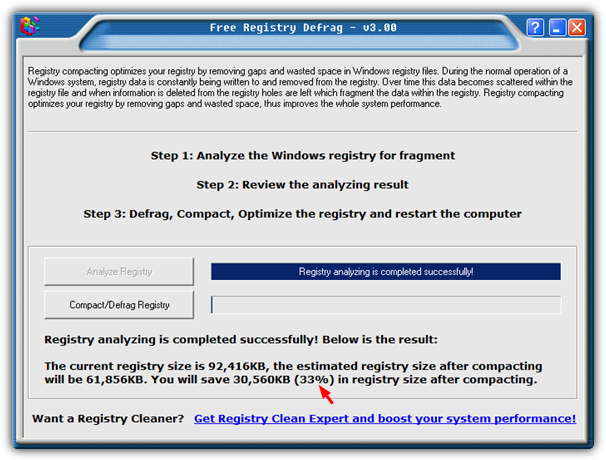
Free Registry Defrag is a simple to use and no fuss program that aims to compact the registry. There are no settings to speak of, just press the Analyze button, and when it’s finished you’ll get an idea of how much the registry can be compacted and the type of saving the program can offer. Then press Compact/Defrag to start the process. It claimed to be able to reduce 90MB of registry files by a reasonable 33%.
2. WinUtilities RegistryDefrag
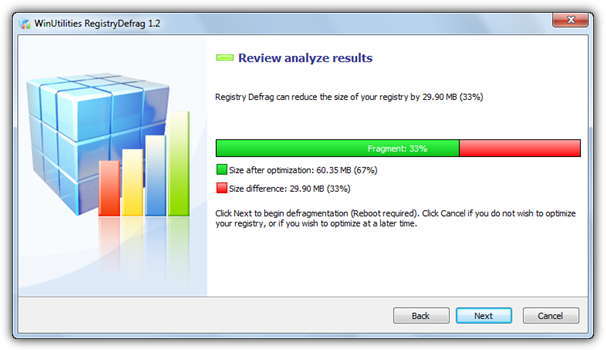
This program will popup an upgrade to WinUtilities Free Edition window on every third run and works by a series of screens where you keep clicking Next to analyze, then Defrag etc. Make sure if you don’t want to defrag the registry, press Cancel and not Next to leave the program. It said it could reduce the 90MB of registry files by 33% to around 60MB.
Download WinUtilities RegistryDefrag
3. Auslogics Registry Defrag
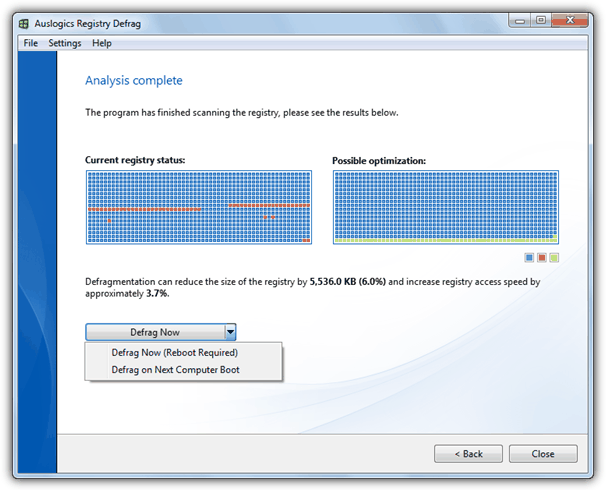
Like all Auslogics programs, Registry Defrag is a nice and clean looking tool, but do be aware of the Ask.com related adware during install. This program gives you a little extra fail safe option by offering to create a Restore Point via a tick box before defragging. You get a before and after graphic of what can be saved with a defrag now and reboot, or a defrag at next reboot option in the drop down. Registry Defrag said it could reduce the 90MB registry by 6% and increase access speed by 3.7%.
Download Auslogics Registry Defrag
4. Puran Registry Defrag
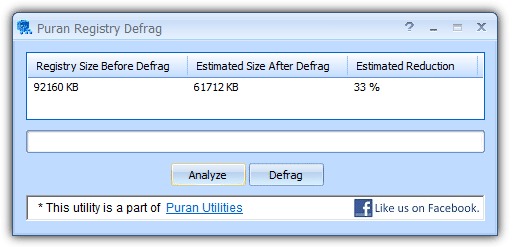
This tool is also part of the Puran Utilities suite of programs and is small and simple to use with no eye catching graphics or nice interfaces. You simply press the Analyze button, watch the progress type bar which doesn’t really do anything, and afterwards it will display the before defrag size, estimated after defrag size and estimated reduction percentage. Then press the Defrag button if you want to go ahead with the process. A 33% reduction was the estimate for the 90MB of registry files it scanned.
Download Puran Registry Defrag
5. Eusing Free Registry Defrag
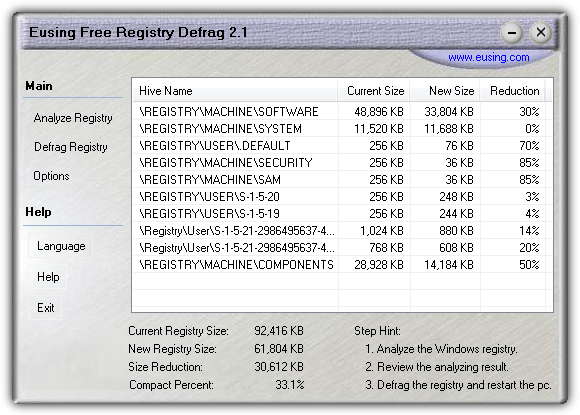
Although it’s freeware, the Eusing tool does pop up an annoying donate window every time the program is launched, you can just skip it though. Unlike most other tools here, Eusing will give you a breakdown of the registry hives that are analyzed and also what reduction rate can be expected in each individual hive. An option to create a Restore Point before starting the defrag process is available in the Options. Eusing Free Registry Defrag said it could reduce 90MB of registry files by 33%.
Download Eusing Free Registry Defrag
6. WinMend Registry Defrag
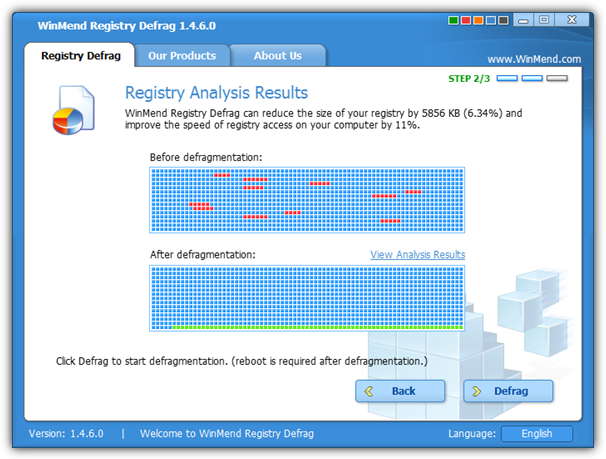
Like we mentioned in our fastest file copying tool article, WinMend’s tools do have nice interfaces and are well laid out with 5 different colors for the GUI available. The program has a Registry Information button so you can get a few details about your registry and hives, and after the analysis, a results page similar to the Auslogics tool gives a before and after display. You also get a nice HTML report after the defrag has completed. WinMend said it could reduce the 90Mb registry size by 6% and improve access speed by 11%.
Download WinMend Registry Defrag
7. NTREGOPT
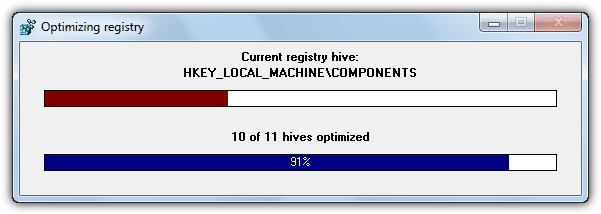
NTREGOPT is certainly a tool which techies and geeks like to use, but definitely isn’t for the inexperienced. Being from 2005 it does have a few issues with the newer operating systems and needs UAC completely disabled although other errors on Vista and 7 are still quite common. It also doesn’t analyze the registry first and goes straight into the optimization process which isn’t ideal if you just want to analyze and have a look at any possible gains. NTREGOPT said it compacted the registry by 8%.
Download NTREGOPT (A portable version is available)
Editor’s note: Another tool which we tried a while back and took another look at again was Quicksys RegDefrag. Although claiming to scan 10 hives, it seemed to completely ignore the largest hive called SYSTEM completely, so is only going to defrag half of your registry at best.





I can admit that NTREGOPT was my guilty pleasure when used on my Windows XP installation.
Looking forward to experimenting with the others to this day and age, now.
Quicksys RegDefrag, RegCompact.NET, WinASO RegDefrag are also freeware registry defrag utils.
Hi there,
this is the first time i am reading your blog, and i wanna tell you its awesome.. keep those posts coming in.. thanks heaps!
Totally agree, my first time here too, great blog! Bookmarked it!
Great program, thanks !
Thanks definitely going to try this now
Thanks man
greatings from Egypt
Thanks a lot for posting this! I’ve been looking for ways to boost my system’s overall perfomance, but the registry is not something I generally like to mess around with.