10 Free File Lister Tools for Directory List & Print [2023]
Whether you need to do so for yourself or for someone else, there is sometimes a need to create a listing of the contents of a particular directory, set of directories, or a whole drive. With the size of hard drives today reaching multiple Terabytes, keeping track of all the stored files would be quite useful. It’s quite easy to find out what files are taking up the most drive space but it’s also handy to know what files are stored where.
There are very simple ways of getting a list of files in a folder without external software. One option is using the Windows command “Dir [folder] > File.txt” from the Command Prompt. However, messing around with console commands is not to everyone’s liking and Dir is also quite limited. Here’s a selection of 10 free tools to save or print out content lists of the files inside your folders including to plain text file, an Excel spreadsheet, or an HTML document. All tools were tested in Windows 10 and 7.
1. FileListCreator
What makes FileListCreator a potentially very useful program is the number of available options in specific areas. It has several different file formats you can save to, including text file, HTML page, comma separated value file (CSV), Excel spreadsheet, and even image files (PNG, JPG, or BMP). FileListCreator has a portable version, is multi-platform, and free to use (donations are welcomed by the author).
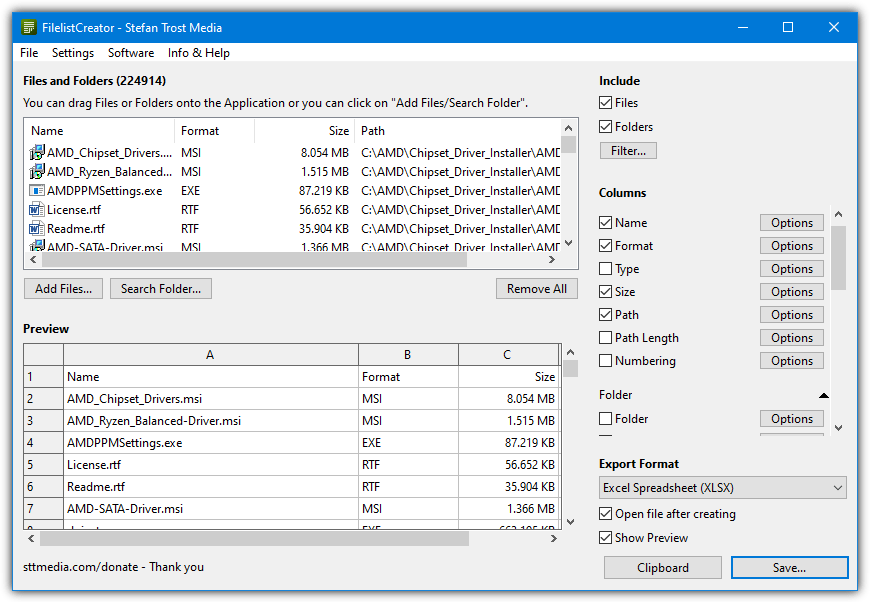
You can add multiple files and folders from different directories or drives by simply using the buttons or dropping them onto the window. The lower pane in the interface is a live preview of the output format which you can copy to the clipboard or save. There’s a huge amount of columns you can add to the list including specific columns for images, audio files, video files, text files, documents, attributes, and checksums. Limited output format options such as fonts and colors are found in the Settings.
2. Snap2HTML
Snap2HTML is a portable tool that is able to generate a single HTML file that lists all folders and files from a predefined root folder. It’s the one tool in this list we actually use ourselves to make content lists of external drives. What makes Snap2HTML so useful is it creates the most functional and visually appealing HTML file from any tool we’ve seen. It’s very easy to navigate through the list of files and folders in your browser.
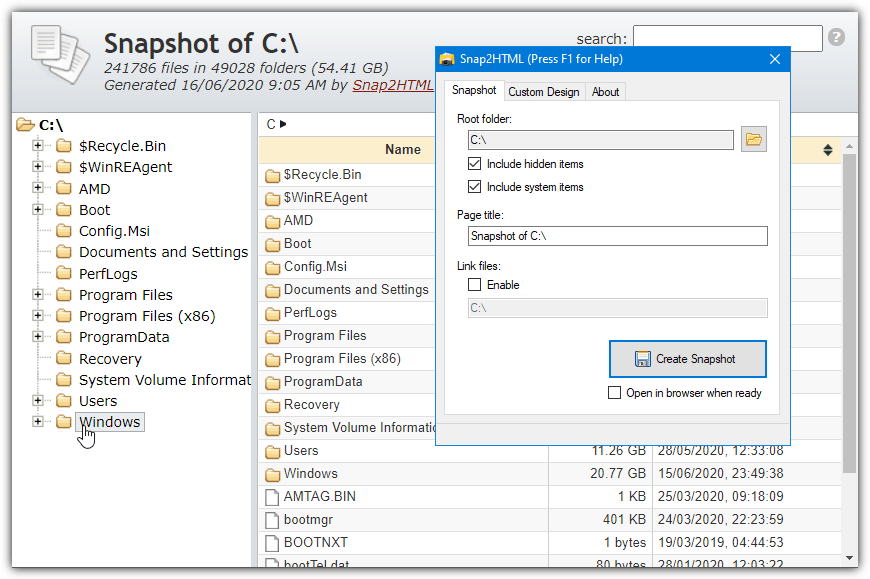
The configuration options are few with tick boxes to include hidden or system files. The Link files option turns file entries into clickable links so you can execute a file directly from the HTML page. Drives or folders are searched recursively. The HTML page looks and behaves a lot like Windows Explorer complete with an expandable tree view down the left and a search option. You can edit the template.html file yourself if you know some CSS. Snap2HTML has command line options for use with Command Prompt and batch files.
3. DirLister v2
DirLister is a tool that we have talked about before. The original from back in 2005 is available on the developer’s website which doesn’t have a .NET 4.6 requirement. The newer version 2 currently in beta is portable and more feature rich than the old version. One improvement is the ability to add multiple drives or folders to the list at once. Use the “Select folder” button or simply drop a folder onto the window.
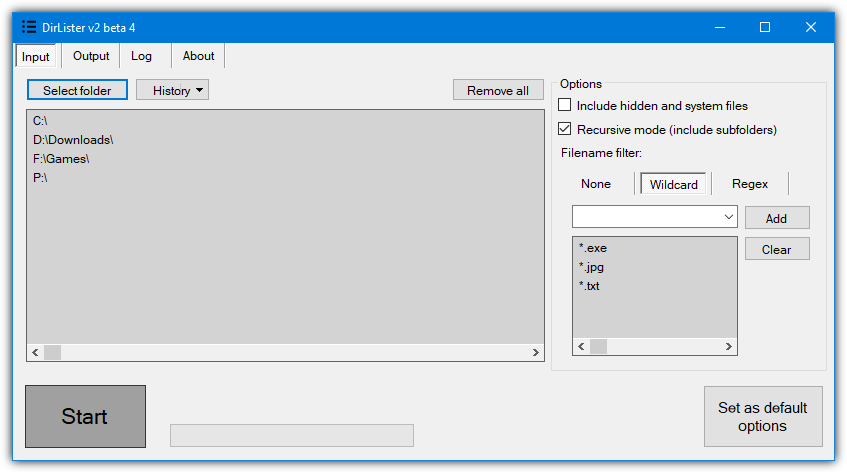
In addition to HTML and plain text files, you have the option to save as a CSV file, an XML file, a JSON file, or a markdown file. Multiple output formats can be selected at once. There’s also a filter where you can add normal wildcards (like *.jpg) or Regex if you know how to use it. Optional Explorer integration makes it easy to create a file list from the right click context menu. The HTML page DirLister v2 creates is good and probably only second to Snap2HTML.
4. Arclab Dir2HTML
Dir2HTML is a tool that used to be freeware but Arclab took the program full shareware back in 2013/2014. However, we found the last freeware version from 2011 and look at that here as it still works fine in Windows 10. While it might not have as many features as the latest paid version, the old free version of Dir2HTML has a number of useful options to aid in the creation and customization of the HTML index file.
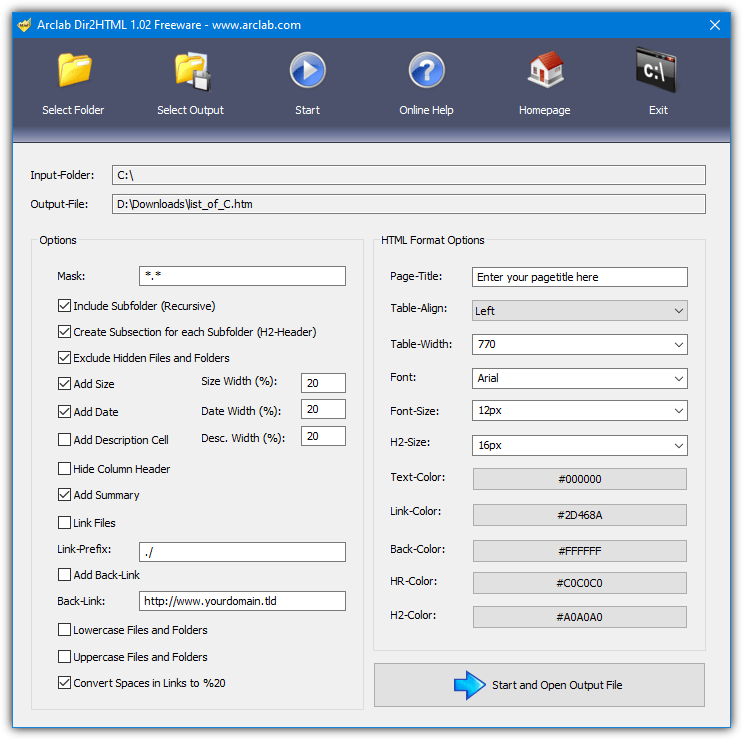
It supports recursive folder indexing, a simple file mask, creating a sub-section for each subfolder, excluding hidden files and folders, including size and date, and many other options. The right side of the window allows you to tailor the output HTML file visually and you can add a customized title, alter the font sizes, colors, and resize different areas of the output. Many of the options can be left alone if the standard layout is acceptable.
5. Karen’s Directory Printer
Directory Printer has been a popular tool for several years for printing and saving file and folder lists. This is because there’s a lot of options you can configure to get the output to your liking. Files have 15 pieces of information that can be displayed including names, dates, sizes, attributes, and checksums. Also included is a file mask filter that already has five format presets built-in for images, music, documents, etc.
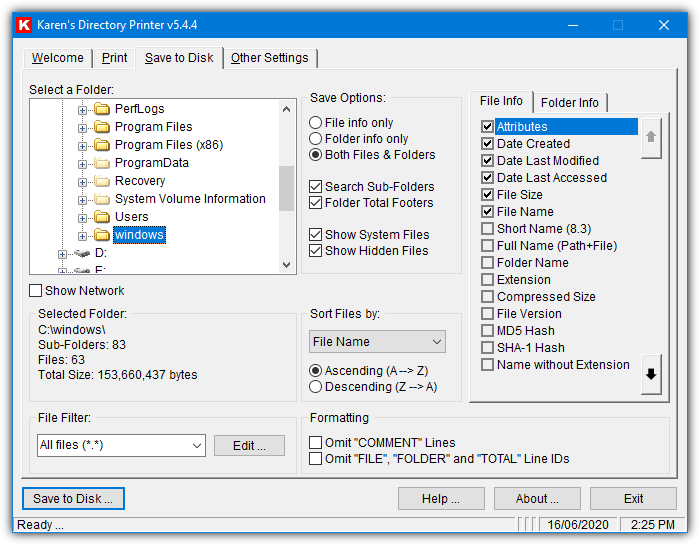
There are various save options for hidden and system files, sorting, and what to include/exclude. The separate Print and “Save to Disk” tabs have a few different options to allow you to set different output formatting. There’s a right click context menu function in the Settings tab. Sadly, the only truly useful output file format is a text file. You can extract the setup installer with 7-Zip to create a portable program.





Thank You very much. This must of taken some time. I am grateful for your generosity.
Do any of these give the option of showing Owner? Matters if run on a multi use (RDC) Server. I’d pay for this feature added.
Hi,
try ASAP Utilities for Excel. it is free for home users. and its splendid : you can get clickable (linked) filenames with full path, and any information about each file.(Information > 14 create a list of filenemes… chose details).
as for files in mobile , I found only mobilefilesearch at https://www.nirsoft.net/utils/mobile_device_file_search.html, capable to read fileliste from my Andoid (Samsung)
Any of these tools or any other which auto scans new files or folders created and updates list as soon as hardrive is plugged-in?
You can use robocopy with /L
Really useful and complete list, thank you very much.
I download Karen’s DirLister and found it to be very buggy on Windows 10. I Deleted it.
Is there a directory printing program that can handle cloud files like dropbox, icloud, box, etc.?
One more great tool for your list:
folder-sizes-explorer.com/print-files.html
thanks :)
Any ideas of Android version of this kind of thing?
I’ve been looking for years. No. No Android app. There should be! The only solution is to use dir2html on a Windows machine and connect it to the phone or tablet.
as for files in mobile , I found only mobilefilesearch at https://www.nirsoft.net/utils/mobile_device_file_search.html, capable to read fileliste from my Andoid (Samsung)
Is there a program that includes all possible fields? Length for example?
The Dir List and Print (#4 in the list above) prints a lot of fields in the free version, with a more complete list of properties which are available only in the purchased version
Directory List & Print is the best but the free version is limited: No filters.
Karen’s is ok but lacks of preview and looks old.
FileListCreator is better and free as well.
The comments; including your own, say there is supposed to be a utility here called “DriveZ”…
So where is it?
If you look carefully you’ll see some nice black buttons that take you to page 2 where DriveZ is….;)
KRK’s DirLister (2.37) free edition only allows HTML saves.
“Dir2Html is a tool which is free for personal and commercial use”
How? When I use it it changes every second entry to “TEST-VERSION” unless I pay.
How is that free???
Because when the article was written, Dir2HTML was freeware, you can even see the title bar in the screenshot say “freeware”. Arclab have since taken the program full shareware.
I’ve tracked down the last freeware version and we now link to that instead.
Use the older version here — Do NOT update. J
DriveZ is so simple and exactly what I was looking for. You don’t need to edit the output again to, say, delete the extensions, file sizes or information etc..
Only the filenames and it’s directly on the clipboard. Just ready to use in one click. Just have a try if you’re looking for such a simple thing..
(Others are not bad too (JR DirPrinter, Dirlister) but you need to clean information etc.. when compared)
Important: When I downloaded DriveZ using the link here, it asked for password for the zip file and it was looking a bit suspicious (v. 1044). So I searched and downloaded from somewhere else (v. 1.0.19)
The DriveZ download is hosted on our own server. We have to password selected files like DriveZ because they produce false positive alerts in some antivirus software and online services like Virustotal. If we don’t do that, just a few files can cause our entire server to be marked by an antivirus vendor as unsafe or malicious.
If you upload your 1.0.19 file to Virustotal, you’ll see that it is classed as malicious by at least one AV service.
Thank you.
So what’s the password for the downloaded zip files? ( I’d tried blank (enter) but didn’t work.. )
The password is listed on the download page.
Karen’s Directory Printer let’s you save output as a tsv file (tab separated values) which can be read by Excel
I have always like Directory Lister v0.9.1 by krksoft.com. There are portable versions online BTW. It looks like there is a newer paid/shareware version but v0.9.1 as of 2006 works fine on Windows 7 however I have not tried any newer version of windows.
It has all the options I need to configure the output and the output can be previewed, modified, previewed and saved or copied to clipboard in text, html or csv formats. It does everything I require, nothing more or less.
I’m using YourDir, which doesn’t have so many fancy options like the above, but is really easy and saves to either CSV or creates an image file, which I’m using a lot.
There is another way, open elevated cmd and give the command dir > filelist.txt
Open the file filelist.txt with notepad and print it :D
You can use and dir/s > filelist.txt command also :)
And you can open the file in word when you are done :)
Thanks for the refresher… I miss the DOS days…
Will any of these suggestions work with Win 10?
Directory List and Print is the only one for me. THE single clincher is its ability to output to Word. I’ve used it to produce lists, tables of contents, indices of hundreds of separate music, image, video files and folders which would have taken years to produce manually and which can be printed. And once in Word, editing is easy – using find and replace to produce a style uniformity. It makes the rest look amateur.
Thanks for the helpful reviews. @ A King: Nobody is interested in your self-serving propaganda. A PC user has the right to control their own machine, including software made freely available for it,
Snap2HTML is the BEST! It does exactly what I was looking for and I spent quite a bit of time searching! So happy I found it!
Dir2Html is no longer free. :(
I agree with anyone who says that Snap2HTML is the best! the most important thing about it is that it’s FREE so you don’t have to waste your time for finding a working keygen or patch unlike Dir2HTML(spent 1 hour trying to find a working keygen but nothing) and it has a file explorer alike GUI so you won’t get lost easily while navigating huge database
Stealing software is a crime
So informative ¬¬
This was e-learning for me. Learnt something new
I’ve tested all of them and the Snap2HTML was the best for me. Its design is exactly what I was needing.
The DIR2HTML and ArcLab are good options too but for what I needed, the Snap2HTML is the first one.
DirLister works in a test install, but unlike stated in Raymond’s mini-review (thank you) I was unable to get a listing that included folder names without an unwanted recursive listing. Maybe folder names do list with recursion, but I didn’t have time to try that, and it still wouldn’t help me. Also file sizes is one of several future features not implemented after years of version 1.0, but the author said he would have to need these features before implementing them.
I have used SNAP2HTML.
It is indeed a great tool and creates HTML file of the directory in a whisker and handy for the web designers. It has built-in option to search the directory too.
I used it for creating a directory containing nearly 4 TB of Files in thousands of sub-directories. It is simply an awesome tool with clean interface and easy to use.
Special thanks to the Mr. Dan, the developer of SNAP2HTML.
Great app,
thanks to the Mr. Dan, the developer and you too,
and this article. <3
The one I’ve been using for years is Rep-Listing 3.0 (Jean-Pierre Aigron, 2004) ; apart from a few minor bugs and quirks (incorrect file sizes above 2GB, annoying question asked every time the program is opened about « margins set outside the printable area ») it’s complete, fast and efficient. The listings are clear and include the file sizes in bytes written as continuous numbers (i.e. with no spaces, for instance a VOB file will be : 1073709056), which was the feature I was looking for back then. I wanted to have a list of the contents for each one of my hundreds of archived CD/DVDs, with the accurate file sizes, so that I could quickly verify if a file I was about to download was already there somewhere, only by typing its size in Windows XP’s search panel (dearly missed on later iterations), searching inside the directory containing all the listings for a given category of content (then if I wanted to be sure I could take the corresponding disc from the pile and look at the file, or calculate its CRC). Now I no longer archive files on CD/DVDs (neither reliable nor practical) but it’s still useful to keep tracks of things.
Thanks a ton man………….it works like anything…..great work
Thank you so much!
The best one is missing :
mythicsoft.com/agentransack/Page.aspx?page=download
finally… free from DOS’ dir command, excellent tools!
Brilliant!!.. Just what Ive been looking for, Thanks!
Thaks a ton man………….it works like anything…..great work……………
nice tools this is great! thanks Raymond.