
Donation Goal
Donate Now Goal amount for this year: 799 USD, Received: 100 USD (13%)
Please donate to help support this website. The funds will be used to purchase owned license of LiteSpeed Web Server Enterprise (2-CPU). It provides superior performance in terms of raw speed, scalability and anti-DDoS capabilities.

Puppy Linux 5.0 Review – Lightweight, Fun, Fast!

Posted By Paul\HellNoire In Category: Computer

Jul
8
2010

One of the earliest distributions that I switched to from Ubuntu was Puppy Linux, and at that point in time, I was new and inexperienced with Linux. I remember using 4.2.1, which released in May of 2008, and thinking it looked dated and wasn’t very user friendly. At that time, it was also using PET packages (think of executable file types) and only dreaming of using Ubuntu as a base. It’s been about two years since that dated release that I tried Puppy Linux the first time, and I have learned to love the Pup, but it also marks a highly important release due to the fact it is now using Ubuntu 10.04 as a base. I figured this would be a fair time to retry a distro that I have tried several times and have learned to enjoy it’s perks that it offers over it’s eye candy.

Puppy Linux seems to have started as a ‘pet’ project (pardon the pun) of the lead developer in making an extremely lightweight Linux distribution that was also easy to use. The major thing I must note here is that ‘easy to use’ in this sense isn’t like the way that Ubuntu uses it, in that it helps you though it 100% and doesn’t teach you much. Puppy offers you an interesting chance to learn and adapt to something that doesn’t hold your hand all the way. While to some people this is not something you would want to do, especially because it can be very difficult, their forums are much like Ubuntu’s in that they will help you if you want help. I’ve managed myself without having to use their forums, but to a first time user or someone who needs/requires a certain application, the offer of help being there is much better then to be by yourself.

The first thing you’ll no doubt noticed on your first boot of Puppy 5 is the amount of text that will be streaming down your computer. Unlike Ubuntu, Puppy takes the approach of making you well aware of any and all errors that Puppy might run into. So if there is a Kernel Panic (think Blue Screen of Death for Windows), you won’t be waiting eons for a system that never loads. [I call out Ubuntu on this only because it did that to me when I wrote my post two days ago.] After booting into your ram (which I might add, if you have more then 128 mb of Ram, you’ll find it speedy, though be careful with your CPU: the slower it is, the less you can do before it starts slowing down), you have to select your keyboard, language, time zone, then your driver to use for your video card. I’d suggest Probing and seeing what it autosuggests and use that for your first boot, especially seeing as how when you have install, you will have to reapply these settings on the first installed boot anyway. After this, it will drop you to the standard Puppy desktop which you will see below.
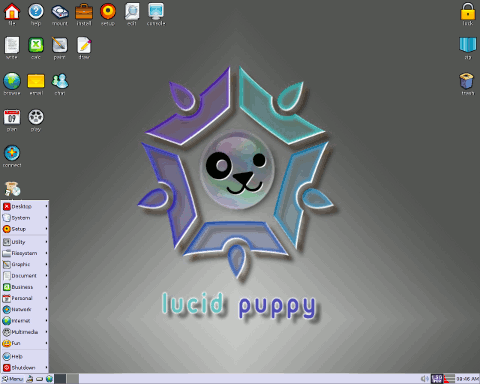
Once on the desktop, either if booting off the liveCD or the installed version, you’ll notice two things different from any other distro I’ve used: it automatically logs you in, and it automatically logs you in as Root. Unlike other Linux distros that force you to use a ‘User/Superuser’ or ‘User/Root’ structure, Puppy can succeed in a Root environment because it’s different from any Windows or Linux OS out there presently for three reasons. The first reason is that every time your computer is booted, it’s like you’ve a fresh install, thanks to all data being saved to two files in your root folder. It does keep all your settings in those two files… but just the fact that it does that, makes it very different from the norm. The second reason is that Puppy was originally intended to be a “client only” environment, which is fairly easy to make secure when surfing. In fact, out of the box, it’s more secure then Windows and equal if not better then Ubuntu. The third reason is if Puppy was used as a server, they have a special ‘DidiWiki’ package that helps you set up the security you need.

One of the only things I hate if anything about Puppy is how it connects to the internet, in that you have to hit the Connect button, then select the type of internet you’re using to connect out, then if you’re able to, you can put in the information you need or select a DHCP server to connect to. After it connects, it offers to save it and after that, it shouldn’t need to be run again until after install. But it has one major advantage now over the older version of Puppy Linux in that when you hit browse, it offers you your choice of Browsers, from Firefox, SeaMonkey, Chromium, Opera, and Puppy Browser. It doesn’t take too long to download, install, and start browsing the internet again though your favourite browser!


Puppy Linux’s Logo

A new interesting feature I found in 5.0 is the ‘Quickpet’ addition to the desktop, and offers one click installation of the most common options wanted and/or needed after install. However, unlike Ubuntu and more like Mint, it has Flash, MP3, NTFS drivers, and even DVD playback preinstalled for you, so you don’t have to hunt anything down out of the box unless you’d like to change a default package!

Overall, if I had to give Puppy Linux 5.0 a numerical value out of ten, I’d certainly give it a well deserved NINE AND A HALF. While it is extremely fast and lightweight on every computer I’ve ever used it on, and the fact that it works with everything I use out of the box, I do have to subtract marks due to dated graphical looks. However, it is extremely easy to do everything that Puppy can offer you, if you aren’t afraid to poke around. I have never once had an issue with Puppy Linux and if you need a Linux distro that is extremely lightweight and fully featured, don’t bother looking at a Ubuntu spinoff – look for a Puppy instead! Woof!

- Puppy Linux Site -


Related posts:
  • Salix 13.02 Review – The Slackware Distro that breaks the mold
  • Watching DVDs in Linux by installing one library
  • Gufw – An Easy To Use Firewall for Linux
  • Increasing or Decreasing the Maximum Volume in Linux
  • DJL – Steam Clone for Linux
    • Tauseef

      Is their a 64bit edition out then i would definately give it a try.

    • Paul\HellNoire

      @Tauseef, they have a spinoff that’s 64bit, called FatDog 64 (I wish I was kidding.)

    • http://megablue.blogspot.com megablue

      Its just like puppy love, great for the inexperience :D

    • jc onte

      cool

      nice review raymond

      … downloading it right now

      cute puppy

    • http://fftempoclub.org Grant

      It took some time for me to find anything more about Fatdog64 other than the ISO you gave, so here is a very small article on it for any one who wants a little more info:
      http://puppylinux.org/news/releases/fatdog64-500-is-released/

    • roy raay

      thanks for the writeup mate!

    • Gordon Jones

      It certainly is the best one they have done so far, I been using Puppy now for longer than I can remember but this last one is beautiful work.

    • Pilgrim

      Thanks for an interesting review.

      I tried an earlier version of Puppy but could not get on with it.

      I do not look at Linux very often although I have the last two LTS versions of Ubuntu installed in VirtualBox.
      I think I will add this to the collection.

      I think that Linux in general has moved on considerably in the last couple of years and in the unlikely event that I ever built another PC I would give serious consideration to trying the latest version of Ubuntu before I bought another copy of Windows.

      In the past the two main problems I had with a dual-boot system were getting a working internet connection, (using an ADSL modem) and sorting out the screen resolution. That was with Ubuntu 6.06.

    • cesimhan

      Hello, thanks for this useful post. I have some old machines and i sure i can try this on them.

    • soon

      this is my another favourite after kubuntu. I used to run it from pendrive.

    • AlienForce1

      Hi Paul ! I would like to try Puppy Linux . Can you please tell me how to install it on a computer with XP allready on it (a dual boot I intend to use) ? Can you guide me a little – my experience with Linux is zero !

      Another option could be to install Puppy on a computer with Win7 Ultimate …

    • Paul\HellNoire

      @Pilgrim, this is very much the truth… Linux has advanced so much in so little time, most people don’t have to use Wine anymore, it’s just an option now for those that have that one or two applications they can’t leave behind. OpenOffice can open DOCX, and save to DOC, GIMP is growing stronger… there’s not much downside anymore!

      @AlienForce1 I’ve used it with both. Simply hit the Install button you see on the desktop, Select Universal Installer (not the one to install applications), then select an internal IDE/SATA hard drive… it should walk you though it step by step. These days, Linux does that, even with a text based installer. It’s nowhere NEAR as hard as people make it out to be to install the operating systems.

    • http://comptb.cects.com mitch

      I use Puppy frequently from a flash drive for troubleshooting purposes. I did install it to a hard drive once, but used the “frugal install” method, which is really the same as that used for a flash drive install. It is also possible to install Puppy in the traditional Linux way although I’ve never tried that. Puppy was developed as a “Live” distribution meant to be run from a LiveCD or from a pen/flash drive. Upgrading is easy because only a few files need to be replaced; the same 6 or so files that are on the LiveCD. Puppy is much easier to use than any of the other “tiny” distros, and it boots quickly and runs extremely fast. It contains an amazing set of features in a very small package. I never had any problems with it.

    • tauseef

      hey paul when it comes to linux distros which is yoir personal favourite.which one you often use and why.

    • Paul\HellNoire

      @tauseef, depends on what I’m using it for. General use is Salix, lightweight use is Puppy, for great support or a server, Debian, and for anything else, usually one of the three.

    • http://www.stlmoto.com/members/-motorcycle_guy.html Motorcycle guy

      Great detailed information, I just saved you on my google reader.

    • http://www.africaourhome.org Dom

      I’m an IT teacher in Ghana, west Africa. I used both Puppy and Ubuntu in my class. My question is how can I install a presentation application on Puppy? I don’t not have Internet connection in my school. Is there a way I can do it, like by using ubuntu’s aptoncd?

    • Paul\HellNoire

      @Dom, yes, but it’s more complex. You’d have to go to their forums and download the .PUP files they provide or download .DEBs off OpenOffice.org’s site and hope they work. Either should work for you.

    • kmonk

      lupu is a great kick in the nuts for anyone who say linux is difficult to use, it’s great!
      the earlier puppy system should not be disregarded as it has lower system requirements and is still a great system for those really, really low end pc’s.
      keep up the great work puppy!

    Copyright © 2005-2012 - Raymond.CC Blog


