
8 Free Tools to Quickly Shutdown or Reboot Your Computer


 7 min. read
  Published on

While computers are faster these days, there’s a couple of areas in Windows where you can get frustrated by the distinct lack of speed. They are during system startup and then also system shutdown. The latter of shutting the computer down can be especially annoying because a piece of software or a driver can cause the computer to take several seconds or minutes to power off, or even hang the computer completely.
It’s then that you might have to reach for the reset or power button which will produce an improper shutdown. If you’re having the shutdown or reboot slowdown issue, the last thing you want to do is sit there and wait for the process to finish before you can troubleshoot or try out a potential fix. A workaround to get your computer to reboot or shutdown a lot faster is to use a utility designed to perform the task almost instantaneously.
Such tools do exist and can be a great time saver if you are affected by this problem. Here we look at some tools that can help to quickly shutdown or reboot your computer.
Warning: Most of these tools perform a faster shutdown by short-cutting procedures that a standard Windows shutdown would go through, such as safely closing applications and services. There is always a risk that you could lose currently open files or data corruption could occur. The tools below are best used to help with troubleshooting. If you intend to use one more often, try to close down all running programs first to reduce the chance of problems.
1. Superfast Shutdown
SuperFast Shutdown is a simple tool that can make your computer shutdown almost instantly. After installation, the program creates 2 shortcuts on the desktop, run the given shortcut (SuperFast Reboot or SuperFast Shutdown) depending on what you want to do.
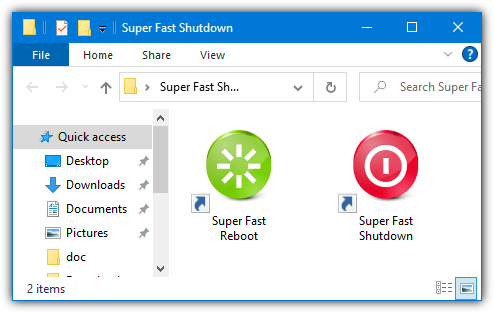
It’s as easy as that, there are no configuration options and also no confirmation boxes or anything. Just make sure any opened programs have saved their data as you won’t get a chance to do anything once executed.
Be aware that even though this software is not malicious, antivirus and security software tends to target Superfast Shutdown quite aggressively. Therefore, you will likely need to add an exclusion for the program in your security software or it will be blocked from running or deleted.
2. Poweroff
Although Poweroff is an old tool, it has some useful functions available and is a portable tool of only around 200KB. The number of available actions is quite impressive, Poweroff can log off, reboot, shutdown, power off, standby, hibernate, lock, wake-on-LAN, and turn the monitor off/on. It can also control those actions on a remote computer as well as running on a schedule.
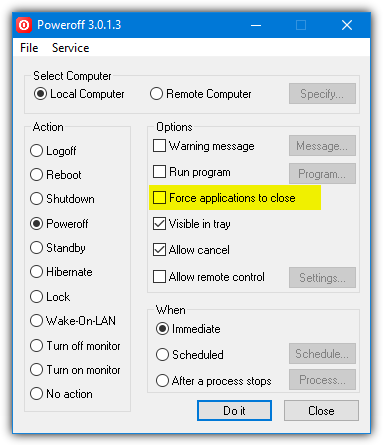
The useful thing for the purposes of this article is Poweroff defaults to shutting down the local computer immediately. You can change that to reboot or log off etc, and optionally force open applications to close. Then press “Do It”. The other functions in Poweroff can be quite useful but you don’t need to touch them if all you want is a simple fast reboot or shutdown.
Note, a newer beta version 3.0.2.0 is available on the same download page if you have any issues with the older 3.0.1.3 version.
3. NPowerTray
As the name suggests, NPowerTray is a tool that essentially sits in the taskbar notification area (system tray) and allows you to perform a number of functions. These include shutdown, reboot, hibernate, sleep, lock, log off, and change user. NPowerTray is portable and open source.
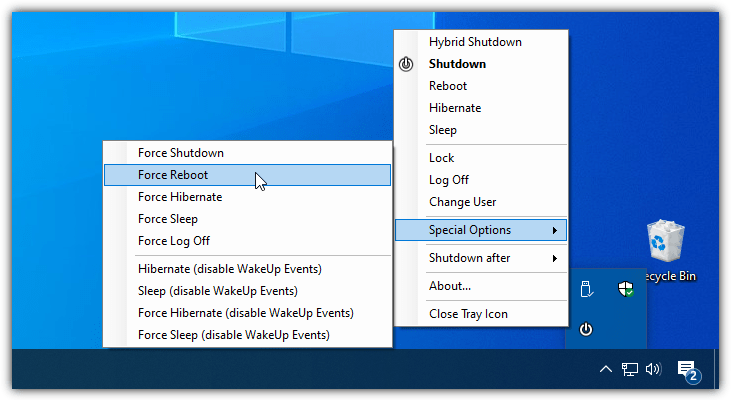
After launching NPowerTray, double click on its tray icon to perform a shutdown. This can be changed to another default, such as reboot, from the About menu. Right click on the tray icon to perform one of the other functions, including a forced shutdown, reboot, hibernate, sleep, or log off from the “Special Options” submenu. There’s also a basic timer if you need one.
4. Fast Reboot/Shutdown
Fast Reboot/Shutdown is two individual utilities from the same developer that use a couple of desktop icons to restart or shutdown the computer. These two tools are portable with their own product pages and are downloaded individually.
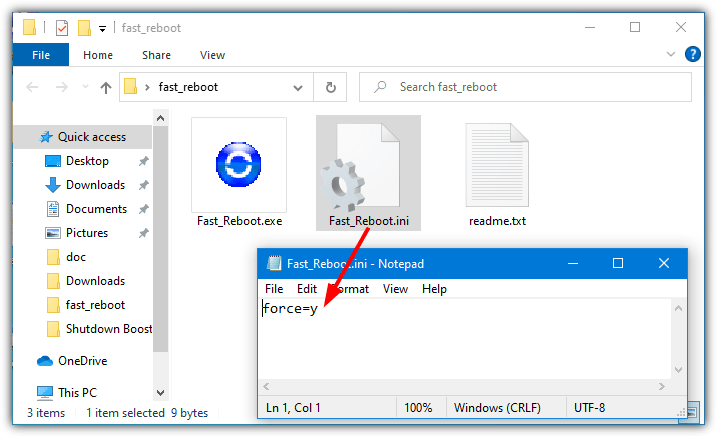
Double click the desktop icon and Fast Reboot/Shutdown will perform a safe reboot or shutdown by default that may still cause a delay or hang. You have to create a text based INI file and place it in the same folder as the tool with the line “force=y” to force a faster shutdown.
Download Fast Reboot | Fast Shutdown
Note, the developer wants you to share the product page on social media before the download link is made available. Just clicking on one of the share links and closing the social media browser tab should make the download link work without actually sharing anything.
5. Fast Shutdown
This program does have a number of different shutdown and reboot functions, all available from a very simple user interface. Fast Shutdown or Fast Restart are the standard options and are supposed to shut the system down in 3 seconds.
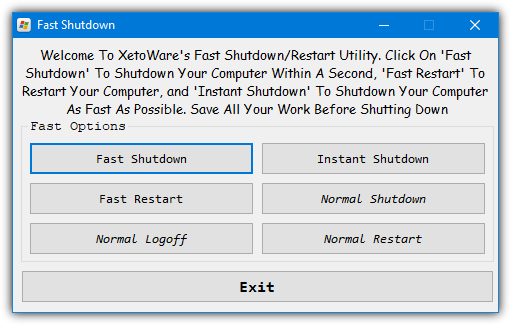
The Instant Shutdown option is designed to be almost instantaneous but during testing, we noticed no major difference in speed between Fast and instant. The three Normal options will obviously perform the safest and potentially slowest shutdown or restart.
6. Shutti Shutdown Booster
Shutti is a little different from other tools because in addition to being able to shut your computer down very quickly, it can also help improve the standard shutdown speed. It does this by changing a few system registry settings that help control the timeout speed of applications and services and hung applications during the shutdown process.
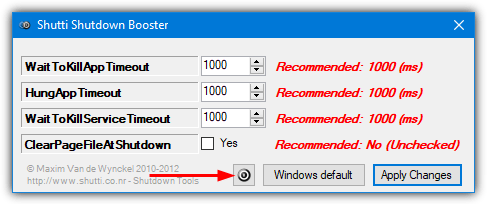
The Fast shutdown button is a small button in the middle at the bottom and it will pop up a Yes/No dialog warning window and then quickly power off the PC. The program is portable and requires .NET Framework v3 for Windows 10 and 11 systems.
Download Shutti Shutdown Booster
7. Shutdown Booster
The last third party tool is Shutdown Booster. Here there is no restart option and just a single 16KB executable to force a shutdown. Simply double click the icon and it will shut down the system incredibly quickly. Make sure you don’t double click on it by accident or before saving unsaved work.
8. Windows Built-In Shutdown Command
Despite the third party options above, you don’t technically need an external program to force a system reboot or shutdown. A built-in console command called Shutdown exists on virtually every Windows system. Here are a few commands you can type into a Command Prompt or PowerShell console.
Shutdown /r /f /t 0
This first command performs a system restart while forcing all opened programs to close without warning. As the default option would have a countdown timer of 30 seconds before executing, we have to also set the timer to zero seconds (/t 0).
Shutdown /p /f
The above command will force an immediate shutdown of the computer without any warnings. All opened programs will also be forcefully closed so make sure not to leave any unsaved work.
As these are standard system commands, it’s very easy to create a desktop shortcut that does a very similar job to Super Fast Shutdown and Fast Reboot/Shutdown.
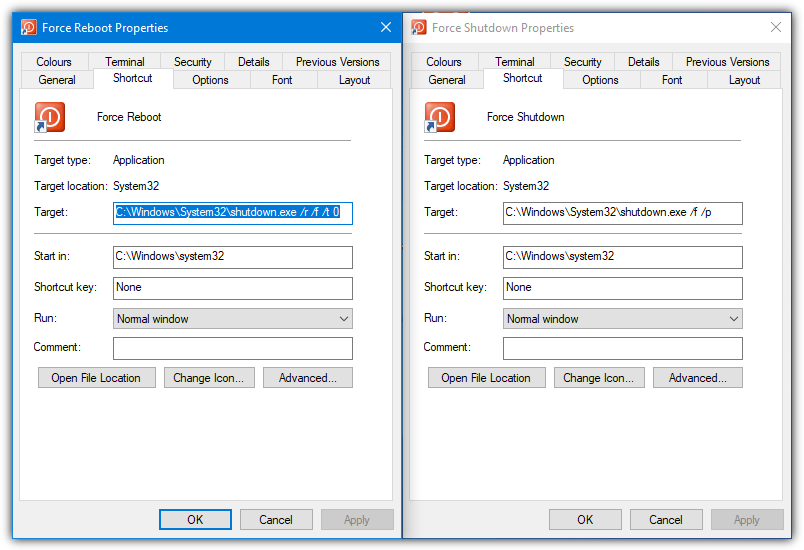
To make things easier, we have created a couple of shortcuts for shutting down or restarting your computer with the Shutdown command. Just extract the Zip archive containing the shortcuts to your desktop.



Improve this guide

User forum
0 messages