
Recent Daemon Tools Issues and Some Free Alternatives


 5 min. read
  Published on

A lot of PC users get very annoyed when a piece of software access’s the internet without their knowledge and does things like phoning home without consent. And rightly so too, with so many privacy issues to watch out for these days, the last thing you want is software you perhaps trusted do it as well. That’s why there was quite a controversy in 2012 when the well known virtual drive software Daemon Tools decided to include a service called Mountspace starting in version 4.40.1.
This essentially collects usages statistics on all ISO’s you mount in the software like image hash, image file name, disk label, number of mount occurrences and sends it to Mountspace.com to be logged. There was also rumor that it was sending IP addresses too, but that was strongly denied. Although it has been clarified now, there was a distinct lack of any information about this at the time in either the Daemon Tools or Mountspace privacy policies which in many people’s eyes was unacceptable.
Unsurprisingly, this has turned many users away from Daemon Tools even if they have now made this option more transparent. Add to that, the extras that keep getting added and bloating the software out when perhaps all you want is to mount an ISO and nothing more, and you can see why it isn’t the hugely popular utility it once was.
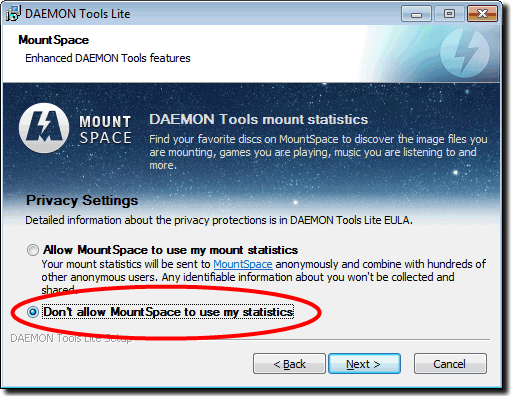
If you still want to use Daemon Tools or already have it installed and wish to keep it, there are a couple of things you can do to stop Mountspace from collecting or sending any information. Use a version of Daemon Tools Lite prior to 4.40.1 because anything before that doesn’t include the Mountspace service and therefore isn’t a concern. If you want to install Daemon Tools, during the install process make sure to click the option Don’t allow Mountspace to use my statistics:
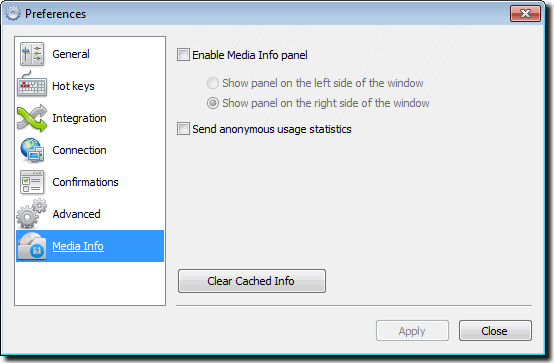
When you have installed the program, go to preferences and the Media Info option window. Untick Enable Media Info Panel to stop the program reading your current ISO hash to request statistics from the Mountspace server about it. Make sure the Send anonymous statistics box is unticked if you already have Daemon Tools installed and didn’t know about Mountspace. Clear Cached Info will delete any information that has already been stored about your ISO’s.
Of course, if you are a more knowledgeable person, you may choose block the connection in your Firewall or HOSTS file, but this way is easier for everyone to understand.
As with just about all software, if you don’t feel like you want to use Daemon Tools anymore, there’s always viable alternatives available and virtual drive software is no different. Here are is a small selection of popular freeware ones:
Alcohol 52% Free Edition
This emulation software allows users to play CD’s and DVD’s without the need for the physical disc. Alcohol 52% Supports more than 25 languages and can handle up to 6 virtual CD/DVD-ROM drives at once. The reading speed of a virtual CD-ROM is 200X and it supports normal CD/DVD and CD RAW sub-channel reading methods. The RAW reading method enables it to emulate all CD’s.
CD formats supported: CD-DA, CD+G, CD-ROM, CD-XA, Video CD, Photo CD, Mixed Mode, Multi-session CD
DVD formats supported: DVD-ROM, DVD-Video, DVD-Audio
Support for all current (ATAPI SCSI) drives: CD-R, CD-RW, DVD-RAM, DVD-R, DVD-RW, DVD+RW
Full support for IEEE-1394 (Firewire) and USB protocols.
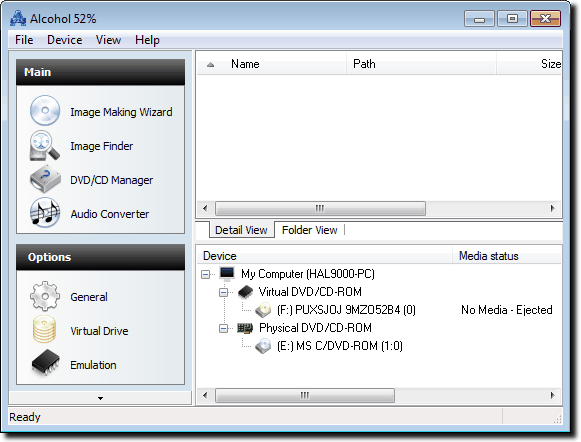
Compatible with Windows 2000, Windows XP, Windows Vista, Windows 7
NOTE: During install make sure to disable the adware options by selecting Advanced Installation, and the untick box on the next screen.
Download Alcohol 52% Free Edition
WinCDEmu
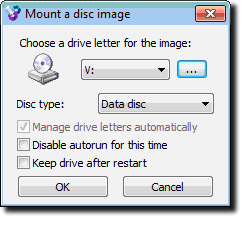
WinCDEmu is an open-source CD/DVD/BD emulator – a tool that allows you to mount optical disc mages by simply clicking on them in Windows Explorer. If you have downloaded an ISO image and want to use it without burning it to a blank disc, WinCDEmu is the easiest way to do it.
Features:
One-click mounting of ISO, CUE, NRG, MDS/MDF, CCD, IMG images.
Supports unlimited amount of virtual drives.
Runs on 32-bit and 64-bit Windows versions from XP to Windows 7.
Allows creating ISO images through a context menu in Explorer.
Small installer size – less than 1MB
A portable version is available.
Translated to more than 20 languages.
Does not occupy drive letters when not used.
Supports data, DVD-video and BD-video images.
WinCDEmu is free for any kind of use – it is licensed under LGPL
Virtual CloneDrive
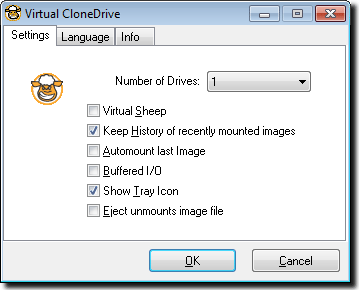
Virtual CloneDrive works and behaves just like a physical CD/DVD drive, however it exists only virtually. Image files can be mounted onto a virtual drive from your hard-disk or from a network drive and used in the same manner as inserting them into a normal CD/DVD drive.
Features:
Supports all common image formats such as ISO, BIN, CCD
Supports up to 8 virtual drives at the same time
Easy to use – just double-click an image file to mount as a drive
Virtual CloneDrive is freeware and a viable Daemon Tools alternative, you may use it at no cost.
Compatible with Windows 98, Windows ME, Windows 2000, Windows XP, Windows Vista or Windows 7 (32 or 64 bit)



Improve this guide

User forum
0 messages