
How To Recover and Export Data from Offline Registry Files


 6 min. read
  Published on

If your Windows system runs into problems, with adequate backups available, recovering files and folders is quite easy. One area which is usually more difficult to recover data or information from is a Windows Registry which isn’t on the running system. You might have backup copies of the registry files, like SOFTWARE or NTUSER.DAT, but actually reading the offline registry itself and exporting data from it is not so straightforward.
What even some experienced users don’t realize is that the Windows Registry Editor has a built in option to load registry hives from an external source. Specific keys and values can then be exported to a .REG file and imported onto another system. The hive files can be from a backup of registry files or the registry from an unbootable or offline system. All you have to do is go to File > Load Hive and browse for the external registry file.
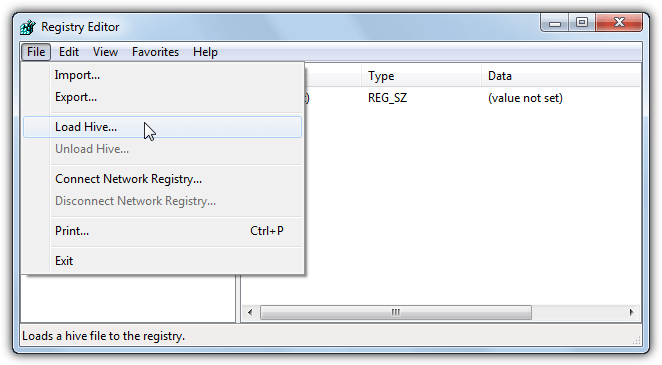
Loading external registry hives does have a restriction, which is they can only be loaded within HKEY_LOCAL_MACHINE or HKEY_USERS in your local registry. Highlight one of those first or the Load Hive option will be greyed out. You will also have to give the loaded hive a custom name and it will sit inside HKLM or HKU as a key. The external hive will stay permanently attached in Regedit until the entry is selected and you go to File > Unload Hive.
While it’s easy to locate and export specific keys from an external registry hive there is one major problem. Regedit will export the key as it’s displayed with the exact path to the key. Instead of a standard path such as HKEY_CURRENT_USER\Software\MySoftware, an exported key would show something like HKEY_LOCAL_MACHINE\_Raymondcc_NTUSERDAT_\Software\MySoftware. Importing a .REG file with that data inside would import keys and values into the registry in completely the wrong location.
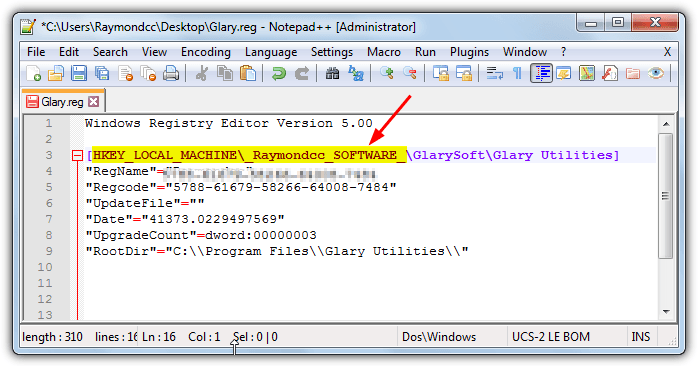
Before being able to import your registry file on a system, this issue has to be fixed and the paths have to be corrected. Failure to do so means the registry data inside is useless. Here we show you two ways to do it.
1. RegistryViewer
We’ve tested many registry editors and tools to see if they can correct the path issue while exporting a key, but only one we found can, RegistryViewer. The program is not a traditional registry editor and doesn’t interact with the local registry at all, but it’s specifically designed for viewing offline registries and exporting keys. RegistryViewer is portable although a small problem is the program comes archived in the RAR format, so you will required an archiver that can handle .RAR files.
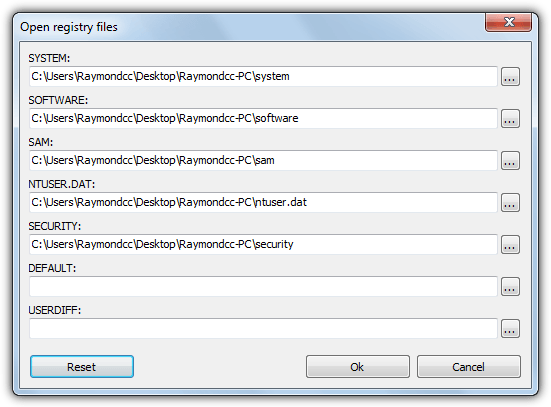
There’s a couple of ways to add registry hive files to the program, either drop a SOFTWARE, SAM, SECURITY, SYSTEM or NTUSER.DAT onto the window or go to File > Open registry files. In that window each file can be individually located. There is room to add DEFAULT and USERDIFF but they are unlikely to be required. All registry files apart from one would normally be found in Windows\System32\Config, NTUSER.DAT is found in the Users\{username} folder.
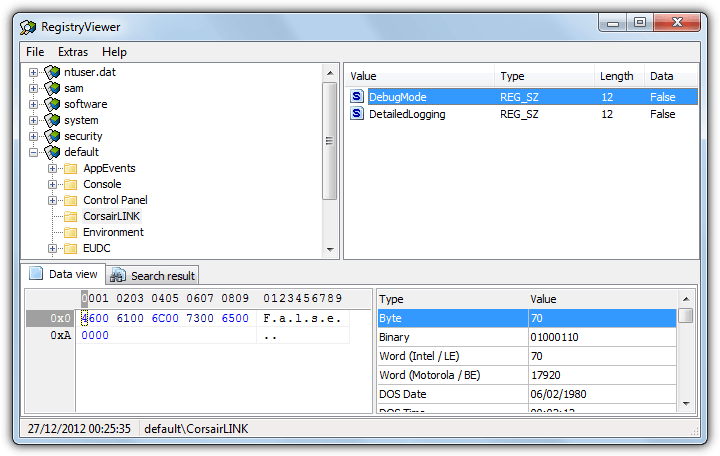
When the registry hive files show up in the program they do actually show as their loaded file names, such as NTUSER.DAT. The important part happens when you browse for a key, right click on it and select Export (Ctrl+E). Open the saved .REG file in a text editor and you’ll notice the key paths are correct and not pointing to the wrong path like they would be in Regedit.
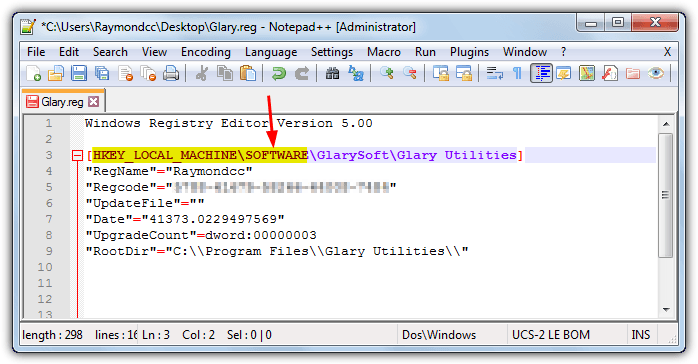
This can be a huge time saver if you have a number of keys to export from an offline registry. A useful search option allows you to search for text by either key name, value name or value data. Click the search result in the lower pane to jump straight to the key. RegistryViewer does have an issue trying to export large amounts of data, we found about 15MB worth is about the limit before you get an “Out of memory” error. The issue is not likely to be fixed as the program dates from 2010.
2. Fix The Registry Entries With a Text Editor
Registry Viewer is a nice and easy method to automatically export the correct registry paths for a direct import into another registry. The other more obvious way is to replace the wrong key paths with the right paths in a text editor. What you need is a text editor with a find and replace function, Windows Notepad cannot do it but there are many around that can, including Notepad++ or Notepad2 Mod.
The only thing you really need to remember is when supplying the custom name to the imported hive, make sure you give it a unique name that is highly unlikely to conflict with any other key or value that might be stored in the registry.
1. Open Regedit and import an offline registry hive by clicking on HKEY_LOCAL_MACHINE and going to File > Load Hive.
2. Locate and load the registry hive file, then give it a unique name. For this example we are loading an offline SOFTWARE registry hive and calling it _Raymondcc_SOFTWARE_ When the replace is done no other keys or values in the registry are likely to have this name so nothing else will be affected.
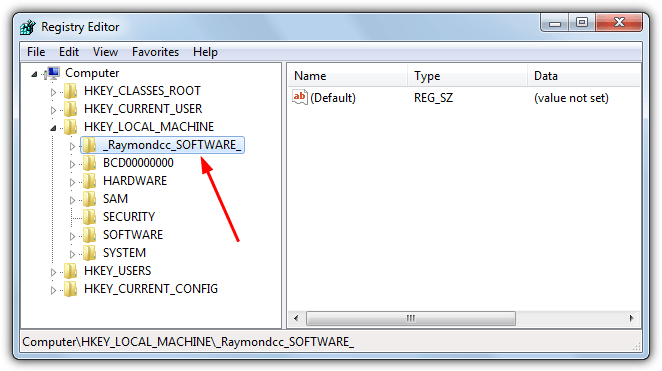
3. Find the registry key you want to save and right click > Export, giving the file a name. Load the .REG in a text editor (don’t double click it to open), for this example we’ll use the popular Notepad++.
4. On one of the lines highlight both HKEY_LOCAL_MACHINE and the custom name from step 2, in our case _Raymondcc_SOFTWARE_, then click on Search > Replace (Ctrl+H). Doing it this way around automatically populates the Find What box with the string to replace.
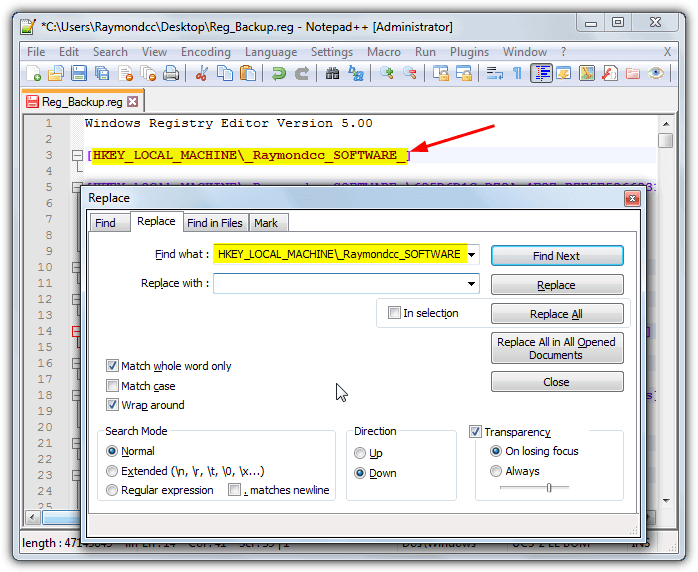
5. What you put in the Replace with box depends on which registry hive file you loaded into the Registry Editor. If you originally loaded the hive on the left below, enter the text on the right into the Replace with box:
DEFAULT – HKEY_USERS\.DEFAULT
NTUSER.DAT – HKEY_CURRENT_USER
SAM – HKEY_LOCAL_MACHINE\SAM
SECURITY – HKEY_LOCAL_MACHINE\SECURITY
SOFTWARE – HKEY_LOCAL_MACHINE\SOFTWARE
SYSTEM – HKEY_LOCAL_MACHINE\SYSTEM
6. Click Replace All and the entries should be replaced with the correct registry path, save the file out again. The .REG file can now be double clicked on any computer and the keys will be imported into the registry with the correct paths.



Improve this guide

User forum
0 messages