6 Tools to Copy Damaged & Scratched DVD/CD [Best in 2023]
Discs are one of the best media that can be used for backup purposes because they are relatively cheap today. A CD-R can store up to 700MB of data while a DVD-R contains 6 times more space than a CD-R. Moreover, writing your files to discs as backup does have another advantage where the data are read only. This means that if you insert the disc onto any computer, no one including powerful virus such as Almanahe that infects executable files is able to modify or delete the files that are written to the disc.
The only problem with CD and DVD disc is it don’t last forever and also it’s sensitive. If the disc has your finger print or small scratches because of bad handling, chances are old disc players can’t read the disc properly. As for most modern disc players, it has error correction and can usually read through fingerprints as scratched surface. That is why some players seems to get stuck on some discs while it plays perfectly on another.
However, if your disc player is unable to read your disc and you need to get back your data or photo from there, here are a few tools that you can use to try to get back your data before taking chances in some weird unorthodox methods such as using toothpaste, banana skin, candle wax or even flushing it in toilet bowl that may just damage the disc entirely!
Before you get to the list of programs that can help you recover data from scratched CD, I would like to explain to you how does all these program work. When a disc is badly scratched, that part or sector will become unreadable. If you copy the CD contents directly through the Windows 7 copy and paste function, you will definitely get an error saying “Invalid MS-DOS function“, a very generic error message that doesn’t even tells you that there is a problem with the disc.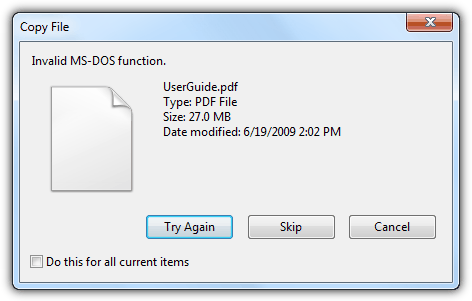
With the programs listed below, you can copy and keep the file till the last bit that it was able to copy without error. That means that it is able to copy whatever it can without giving you error message and stopping there.
1. Roadkil’s Unstoppable Copier
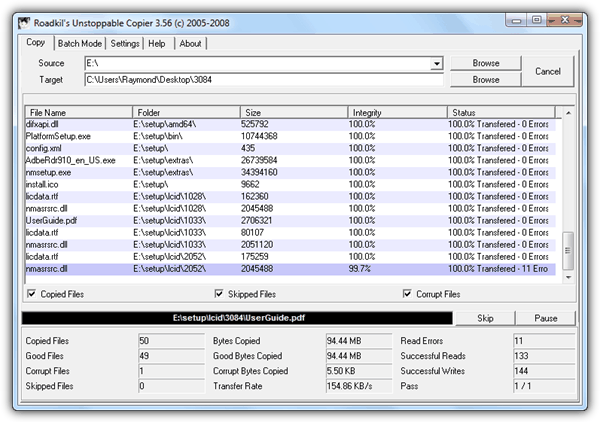
Roadkil’s Unstoppable Copier simply copies without stopping even if the file is corrupted. All you need to do is select the source which is usually the drive letter that belongs to the disc, the target where you want to save the files to and click the Copy button. There are some advanced functions such as the Batch Mode where you can copy multiple locations if you do not want to copy from the root of the disc. The settings tab allows you to switch the language of the user interface, skipping damaged files, keeping file attributes and etc. It is recommended to keep the slider at the default location which is the Best Data Recovery instead of fastest which beats the purpose of this utility.
Download Roadkil’s Unstoppable Copier
2. CD Recovery Toolbox
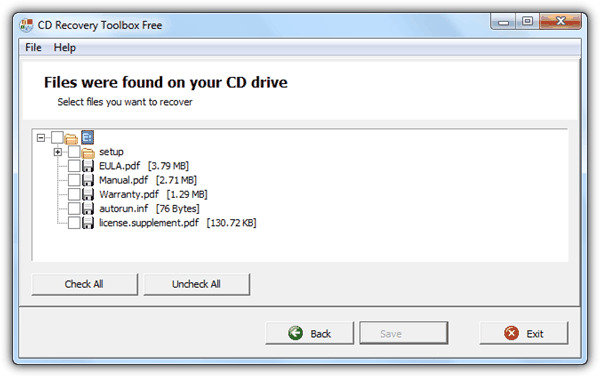
CD Recovery Toolbox is probably our favorite tool because it is free, very easy to use through the wizard style interface and seems to copy faster than the rest. To copy unreadable files from your CD, run the program, select the CD/DVD drive which is automatically listed, followed by the target directory where you want to store the files, and finally it gives you the option to select the individual files or folders to recover by ticking the checkboxes.
3. IsoPuzzle
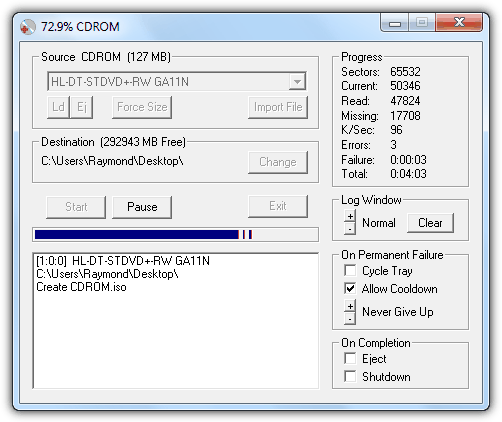
IsoPuzzle is slightly different from the rest because it tries to backup the whole disc by creating an ISO image but with an additional capability of copying files that Windows cannot copy. It is a really simple and no brainer disc recovery software. Just enter the disc, select the destination of where the recovered files should be saved to and click the Start button. You will be prompted to save the ISO file before it starts copying. IsoPuzzle is portable, requires an additional WNASPI32.DLL file to be placed in the IsoPuzzle’s directory and it doesn’t support audio CD.
4. CDCheck
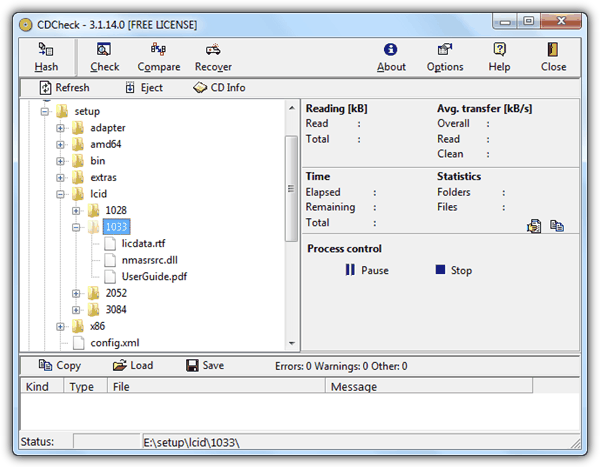
CDCheck is actually a shareware but is free for personal use. You can get your free license by requesting it from this registration page. CDCheck is also very easy to use where the program presents the file in a window explorer like interface and all you need to do is select the file or folder that you want to copy and then click the Recover button. A recover setup window will open allowing you to set the output directory and also advanced options such as the number of retries, timeout and skipping existing output file with matching file size. You can also use CDCheck to check if the files are valid and not corrupted by clicking the Check button.
5. IsoBuster
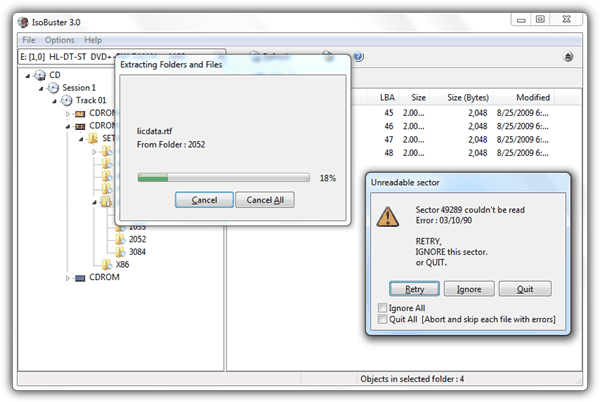
IsoBuster is an advanced tool that can be used to recover deleted files but it is also capable of forcefully copying files that cannot be read. A corrupted file may at least contain a partial of the original file which can be reconstructed with other recovery programs and it is definitely better than not having the file at all. IsoBuster is a shareware but you can opt for the use only the free functions. To recovery your file from an unreadable CD, right click on the folder that you want to recover and select Extract.
6. Dead Disk Doctor
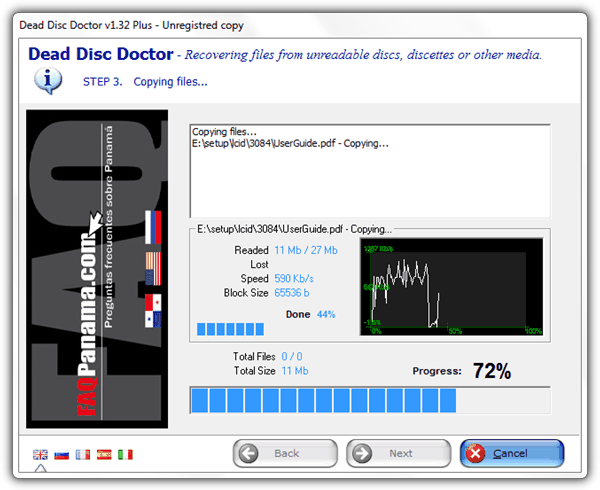
Dead Disk Doctor was featured on another article but we’ve decided to retest and merge it into this article since it tries to do what is discussed on this article. Dead Disk Doctor is also a shareware that has a limitation of allowing you to recover only 1 file from the disc. If you have multiple files to recover, you’d have to go through the hassle of doing it one by one. When we tested Dead Disk Doctor on one of our CD that is badly scratched, it suddenly quit and prompt a “Disc not ready!” error. Although it didn’t work for us, but it is possible that it could work in some other different cases since every computer configuration is different.
If you’ve tried all 6 free data recovery tool for scratched, damaged or defective CD but still doesn’t work, you can search for “scratch cd” in YouTube and take the risk by trying those weird methods to fix a scratched disc. Make sure you only try the method that has the most comment and also success rate. Don’t ever take your chances if there are only a few comments on the YouTube video with the majority of it saying that it doesn’t work, or else you would end up with a damaged CD that is irreversible.





I am using CD Recovery Toolbox on 3500 CD / DVDs. Some of these early CDs were the cheapest worse quality CD because they were the cheapest backup media available.
Lucky, these files are mostly of “adult” content so nothing exceptionally important data was lost.
So far I have used CD RECOVERY TOOLBOX on about 1500 CD/DVDs with AMAZING SUCCESS!!
Amazing Success of Recvoery of files given that some (1000 or so) CDs are at over 20+ years old.
If I had really IMPORTANT files to recover I would use DiskInternals CD/DVD Recovery.
If I have files that are Moderately important Toadkills Unstoppable Recovery (THATS FREE) would be my choice. Since most of my CD/DVDs are videos I can lots of times still see 98% of a video and its viewable when I use VLC Player.
Your mileage may vary, but its hard to beat by trying CD/DVD Recovery Toolbox
Hugo Atlanta GA
Hmmm. Dead Disk Doctor is password protected.
I have a friends cd with a starbust crack right in the middle of the (60mb) data area. Nothing reads it so far and I was hoping this might.
Sorry to resurrect this old thread.
The password is on the download page.
thank you so much it really worked!
Thank you for your list of recovery software. It remains true that prevention is always better than cure and on that basis I would like to mention another free program that I’ve been using the past decade or so. ICE-ECC (I just pronounce it “ice ee-see-see”) creates error correction files from any body of data on your computer (or elsewhere). I usually burn about 4.3 gigabytes of data on a DVD and fill up the rest of the disk with the error correction file. Obviously you have to put in a little time to create these EC files but once you get the hang of it it’s basically just a few clicks and then allowing your PC to do the number crunching in the background. On average I have lost maybe 1% or so of data on most disks when damage does occur, in the event that it does happen I run through a basic set of sequences and ICE-ECC can then restore all of the data. After this process I just reburn this particular data set. The downside of this whole process is that you sacrifice a small amount of writing space on your disk but I can assure you that the advantages far outweigh the little effort put into it. This program can literally extend your disk’s useful lifetime by decades (depending of course how well you maintain them). I put up a simple tutorial on Youtube explaining the use of ICE-ECC, just google the name. I hope this helps a lot of people out there ! :)
Is there something like these programs for Linux Mint?
ddrescue inputfilename outputfilename
Thank you very much. I really love CD Recovery Toolbox software. It makes me very amazing. However, I still recommend that you do a good job of backing up your data at the same time, otherwise, it will be too bad if you can’t fix it. Previously, I downloaded a wonderfox DVD ripper to backup DVD data. I hope to give you some advice
The CD Recovery Toolbox software worked perfectly and we were able to recover all the data on the disc without losing anything. This is absolutely an AWESOME program. Well done!
CD Recovery Toolbox work very good, thx
CD recovery toolbox worked!! Thank you!!!
I recommend CDCheck, because it works perfectly. I managed to get all my files back and in good condition as well. You only have to register once to get a a free license code for personal use but that’s it. I tried several other programs but they didn’t do the work as good as this one.
I tried Roadkil’s Unstoppable copier last night cause of one tech guy’s suggestion the DVD disc had minor scratches so when I tried it, it showed the process would take 70hrs till finish. So I left it alone after just 12hrs upon checking it got stuck in just the first file the DVD-R drive was so hot I just had to stop it when I popped tge disc oit it was also very hot good thing it did not burn out the drive’s lens. So I saw your blog and will try some of these. Just sharing my experience with the number one on your list.
It is ONLY everything all about quality of CD/DVD mechanic. Our teacher had one REALLY scratched CD and he give it to me to copy music on it. We have good computer DVD mechanic – copied music was in great condition and it was played fluently.
Super Clean solution. ThumbsUp!!!
despite installing these programs i couldn’t able to copy the corrupted files from the cd. when i’m inserting the cd it’s not visible in my cd drive when i’m trying to open it. but other cds are running properly in my cd drive of the computer. please help me.
Thank you. CDToolbox and IsoPuzzle both worked nicely. :))
Tried all of these programs and others. ALL failed. Took disc to local video shop and they popped in their disc polishing machine and buffed it lightly. Tested it there at the shop and viola, disc was like NEW.
So next time this happens I’ll give it a shot with one of these programs and if that doesn’t work it’s down to the video shop.
Wonder how much those machines cost? Might be able to pick one up cheaply now that so many video stores are closing down.
PS.
I’ve often read that CD/DVD’s have a life expectancy range of 5 to 20 years depending on quality and storage conditions. I have hundreds of discs, some dating back to the 90’s. Most are music CD’s but many are PC games which are in original boxes. Some of my PC data disks are very cheap brands, even CD-RW’s, yet they still work fine. So some of these are now around 30 years old. Maybe I’ve just been lucky with them. It’s a pity the manufacturers can’t or won’t come up with a cheap media that could compare to the life expectancy of vinyl records. I have some records that date back to the early sixties. If your interested in the topic just google “straightdope” and search for their article “cd life expectancy”.
What you’ve failed to mention is that every play of vinyl degrades it and that it’ naturally warps, even without heat or pressure. So you may have records from the 60’s, but unless they’ve never been played and stored in perfect condition, they’re hardly the vinyl that came off the presses in the 60’s. On the other hand, you can play a CD/DVD 1,000 times and the last time would sound as good as the first within that “5 to 20 years.” More importantly, there is no way to backup vinyl with 100% integrity whereas CD/DVDs can make identical copies.
If you want lasting copies, back them up to flash memory or an SSD. As long as those devices are not used for any other purpose, i.e. for playback, there is no wear to them so they should last indefinitely — certainly longer than most of our lifetimes.
There are home CD buffing devices that cost as little as $10, with motorized ones costing about $30. The secret is in the buffing solution and not the machines. The solvent softens the plastic and fine grit in the solution polishes away the scratch. A cheap home solution is to use toothpaste but I don’t recommend it for valuable data.
thank you, thank you, thank you, thank you and thank you :D half of my movies were on corrupted discs, this programs solved all issues :D
Haga u r a life saver ;) thnx Ray
Thnanks…Nice Post…i tried almost all CD data recovery softwares on the net but my Cd data not recovered but with ISOPuzzle i get that one …Super…Software ….Thanks…
I’ve used both roadkil’s and CD recovery toolbox . . both have restored the files but they are not playable with any player not even with VLC. . . what to do now. . . please help…. please get me through this please. . . i don’t have any backup to that data other than this corrupted disc! which shows all the files but only few are playable. . .
U Saved My Life ….Thanku
Thank-you Raymond.. I search the sofware since 1 year ago. and I just get it..
thanks !!!
Roadkil’s Unstoppable Copier worked like cream…..
My New Vaio TZ Recovery disk got damaged and I used CD Recovery Toolbox and it repaired the disk THANKYOU THANKYOU THANKYOU Raymond awesome post
thank you for the info, cd copier are useful
i just know isobuster only. didn’t know there’s a lot other programs. :p
nice info ray.
really appreciate every tips and tricks that you teaching us.
thanks ray,
This good think to know. Even I don’t need it now but any time it can be needed. I like them.
Thank a lot Raymond.
Nice post Raymond! I am a heavy downloader and heavy burner also…. Sometimes i can’t open CD/DVD that i burn 1 or 2 years ago. I will try these software when i free. Hope they can help me. Thanks!
Ironically Raymond, I could have done with this post a few days ago :) as I had this very problem. Needing to recover a few corrupted video files off some DVDs for a friend, some of which wouldn’t play back in any media plaeyer tried, not even VLC. I tried CD Recovery Toolbox after a google search and it worked a treat. The recovered files had the very occasional audio/video glitch here and there, but nothing that spoiled the play back and they all played fine in all the various media players I tried them in. The one thing to note for those trying is that if it hits a particularly badly corrupted sector it can take a very long time to try and recover the corrupted section. On one of the DVDs I ran it on it took over 40 minutes to recover one particular 700MB .avi file, which it did do with very minor glitches when played back, so don’t give up on it too soon.
I am just sorry I didn’t find this excellent site earlier!