Restore Task Manager, Regedit and Folder Options Disabled by Virus

Posted By Raymond In Category: Computer

Jun
28
2007
Donate

Let’s face it. All of us have been infected by virus before. Even if you have anti-virus installed, you can still be infected by a new or custom virus that is not recognized by your anti-virus. Sometimes after removing the virus completely from our system, you’ll face new problems such as you can no longer bring up Windows Task Manager from CTRL+ALT+DEL. You get the error message saying “Task Manager has been disabled by your administrator”.
Task Manager has been disabled by your administrator

You think that it’s easy to fix this problem by going to Registry Editor but you can’t! You get the error message “Registry editing has been disabled by your administrator“.
Registry editing has been disabled by your administrator

Folder Options and even Show Hidden Files & Folder is disabled! How frustrating! Don’t worry, here’s how to restore your Windows Task Manager, Registry Editor, Folder Options and Show hidden files & folders.


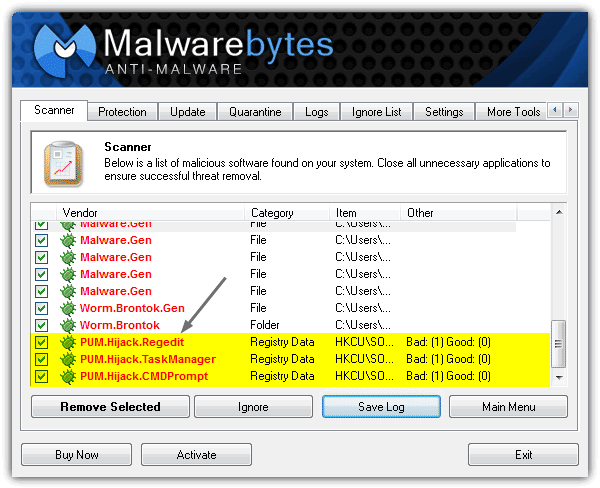
This problem is most commonly caused by a virus called “Brontok“. Brontok virus will make some changes to the system restrictions in order to hide itself from easy detection and also from easy cleaning.

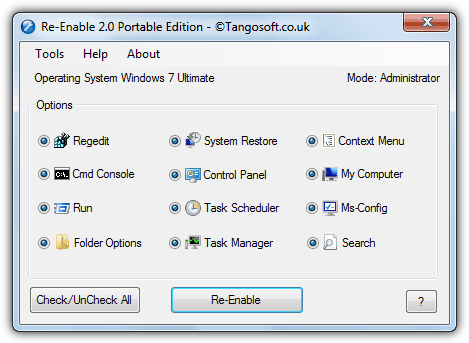
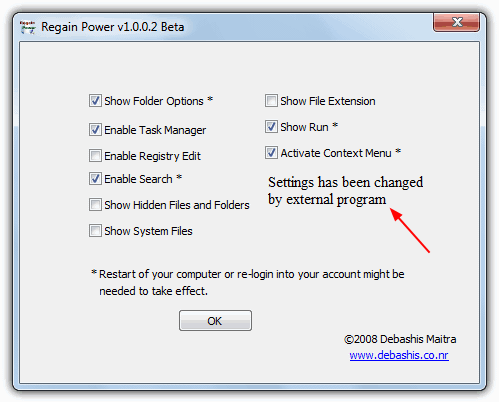
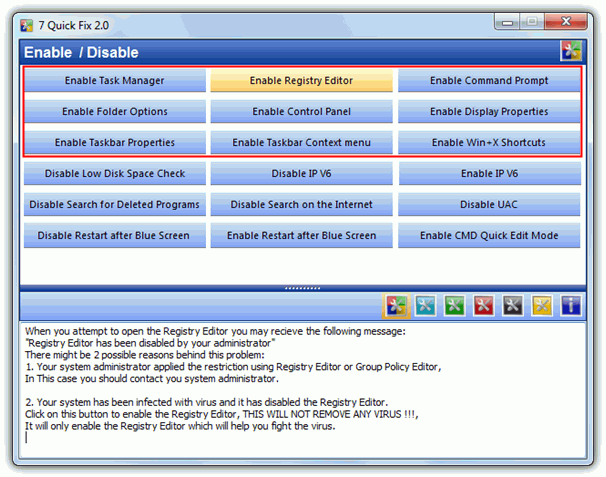
Here’s a free tool called Remove Restrictions Tool (RRT) which is able to re-enables all what the virus had previously disabled, and gives you back the control over your own computer.
Restore windows restrictions

Remove Restrictions Tool is able to re-enable:
- Registry Tools (regedit)
- Ctrl+Alt+Del
- Folder Options
- Show Hidden Files

Small and easy to use. Make sure you boot in to Safe Mode to use Remove Restrictions Tool (RRT). Just click on the buttons and it’ll do it’s job.

[ Download Remove Restrictions Tool (RRT) ]


Related posts:
  • FREE Microsoft Private Folder – Password Protected Folder
  • Read/Send Yahoo! e-mail using disabled Yahoo! POP3 service
  • How to clean Brontok Virus
  • FREE Anti-Virus Protection: AOL Active Virus Shield for EVERYONE!
  • FREE Multi Virus Cleaner That Detects Over 5,500 Common Viruses
    • Pingback: The Malaysian Blogosphere » Blog Archive » Raymond.CC: Restore Task Manager, Regedit and Folder Options Disabled by Virus

    • http://ble.com ble

      very nice. thanks!

    • http://rfayoumi.wordpress.com Rami Fayoumi

      Thanks Raymond! :) I guess this can be done from the group policy editor, no?

    • Replika

      Is it able to do this manually, no need any softs?

    • http://www.raymond.cc/ Raymond

      Actually it can be done without software by editing the registry. However, I’ve seen brontok disabled registry editor and also prevents you from importing registry entries. So a software is necessary.

    • http://www.raymond.cc nytrydr

      cool ray 4 life

    • Nandan Kumar

      U kno i think its the cooolest soft i’ve ever seen..coz everytime i got this ‘Brontok’ my folder option were hidden and i used to format my computer. But Its a miracle now!!!!

      Thanks a lot to Raymond…

      Hope in future u continue like this…

    • Beeby

      U kno i think its the cooolest soft i’ve ever seen..coz everytime i got this ‘Brontok’ my folder option were hidden and i used to format my computer. But Its a miracle now!!!!

      Thanks a lot to Raymond…

      Hope in future u continue like this…

      [ I say the same ]
      Thanks again

    • sudeep

      raymond u r great….recently my computer is infected with virus named as
      brontok a and b ,w32.jeefo.but if u post this software before 1 month ,then i will not format my computer.i format my whole computer 1 month ago.my problem is same …….but in the future i dont format my computer b’coz u have given me a great software…thanks alot raymond for this useful
      software.u r great raymond the engineer…………………………………………….

    • Sudo

      Hey Raymond i can’t download Remove Restrictions Tool (RRT) …i think prob the link…

    • http://www.raymond.cc/ Raymond

      The website was down just now.
      Please try the link again.

    • http://www.raymond.cc Ivan

      Nice Tool Raymond, Tnx ;)

    • Pingback: Stop Virus from Running Automatically When you Execute Files » Raymond.CC Blog

    • webcadre

      how about if you can`t also boot from safe mode?

      i had a problem that when i execute a files it totally disable all the functions key even the start menu which is located in the left down side is gone, when i restart windows it shows your wallpaper and thats it…. even in safe mode does`nt working, hope that you can find a solution for me…

      iam always checking your blog its really cool and knowledgeble for every users,

      keep it up man!!

    • http://www.raymond.cc/ Raymond

      webcadre, your case is really bad. I can’t think of an easy fix solution. What you can do is repair your Windows by inserting your Windows CD when booting up.

    • blackknight

      hi raymond
      could you please do an article on how to stop or remove windows from activation whenever you add a new hardware it is not only pain in the a** but causes more problems than solutions. now this is for all the legit user not your pirated copies XP home and XP pro both are terrible esp the more recent versions bought month or two back it will give a lot of people less headaches
      many thanks

    • http://www.awie.info/icezmanz awie

      many softs can do the same thing and they do that automatically for all invalid registry which caused by viruses. but this one…..its really really make me surprise… ” 7 kb ” and it work great.
      I have tested it by my self to remove the restriction which caused by W32Pitin. Info : this virus will hide all folders under all main directory. you must type the path in your address bar manually to open your existing folder.

    • sans

      Is it neccecsary to be logged in as admin to use this s/w as it didnt work when i logged in as as user even though i booted the pc in sofe mode!!!!!!!

    • http://www.raymond.cc/ Raymond

      You’ll need enough privileges to edit registry. So if you’re logged in as restricted user, this program will not work for you.

    • webcadre

      hi ray,

      i just read your response today, sorry for the delay too busy at work,
      anyways, as you mention above its critical, my question is how will you repair it?

      when i insert the xp cd i found what you`re saying the ” press R to repair” is that it? but my problem is i can`t do nothing in command prompt.
      how can i fix it???

    • Muhammad Khatibi

      it is simply rocking man……. keep it up ;)

    • joe randy tabungao

      thank you so much.. well done!

    • http://nil turab

      no

    • asif

      […] Folder Options and even Show Hidden Files & Folder is disabled! How frustrating! Don’t worry, here’s how to restore your Windows Task Manager, Registry Editor, Folder Options and Show hidden files & folders

    • shez

      This is a very amazing and cool tool for everyone. It is not how easy to make a tool or how easy it is to use, it is the UTILITY that it brings alongwith it and i think it is great.
      WAY TO GO………..RAY

    • andzCs

      Got the same problem. I couldn’t able to see the folder options + disbabled registry + disabled ctrl + alt + del. This got me in trouble. It was lsass.exe that gives the problem. It is located in the system directory or try to search the lsass to locate its location. You will see two(2) results, try to right click on it and view its information. You will see an information IT University. Thats the problem, its a worm2007.

    • Alvin Chin

      HALLELUJAH!!!
      Thanks Raymond,
      I almost format my hard disk and is suggested by my IT and Most Expert!
      The Entire Company got this virus by just a pen drive!
      The file name is “Im-worm.Win32.sohanad.t and SSVICHOISST.exe!
      Terrible virus that goes to all your different directory and kills your task manager! Just won’t operate anymore! And is without your knowing and authorities, not detected by most Anti-virus software!
      Thanks once again for restoring my task manager with your sw!

    • Kim John

      Thanks a lot man, I am working on the ship and we have this porblem months ago. I have get rid of the virus after running an ati viral removal tool but the folder option cannot be restored even you make it in Group policy setting. Man your Great…. Keep it up…

    • Name don’t matter

      U can even use Hi-jack this application to remove the reg entries and kill the virus process. Now ur registry is free. Enable the hidden and system files view, and delete two files in the system32 folder, the ssviichosst.exe and new folder.exe. Now suddenly ur system seems a lot faster

    • L0git3k

      Damn this is a god damn trap the file he is offering is a malicious file. It is a virus named Mal/Packer identified by Sophos SV. Hey fool your not helping other people you are just making it worste. Guys BE CAREFUL WHAT YOU DOWNLOAD IN THE INTERNET ITS A JUNGLE OUT HERE.

    • http://www.raymond.cc/ Raymond

      L0git3k, you’re being paranoid. I wouldn’t want to tarnish my reputation by placing a “god damn trap” on my website.

      Maybe you’re too newbie to know that antivirus does gives out false positives? If you’re too scared to use it, then don’t use it.

      I’ve scanned it with 30 types of antivirus using virustotal and only 3 reported the file as suspicious and 2 as packer. Do you even know what a packer is?

      Before you come bashing me, make sure you know what you’re talking about instead of saying “there’s a god damn trap”.

      Duh…

    • niroz

      i couldnot open regedit and folder option doesn’t appear in tool menu please help me

    • jerico

      how come when i use the program, it enables the regedit, ctrl alt delete, and folder options, but when i restart, i would need to have to run the program again? does this mean that the program just enables temporarily? how do i get rid of the virus itself? thanks.

    • http://www.raymond.cc/ Raymond

      Jerico, use an antivirus to scan your computer. I think the virus disable regedit, ctrl alt delete and folder options whenever you restart.

    • jervz

      Thankz Raymond!!!! Ur da Best!!!!!!

    • Jaime

      Thank You SO MUCH FOR THIS,

      I had precious photos stored in a hidden folder, but I had to delete everything because I couldnt access them, the problem stated above. **Cries** i lost my photos…

      At least i can get access to hidden folders again, and theres copies of it somewhere… i hope …

      All my prom photos … all the ones from the states… ones of me and boyfriend… Thats a lot of photos!

      Well at least in future they are going to be safe because i know about this now… I have changed everyone elses user to restricted now… no-one installs anything on here now but me , why do people install programs they dont understand or know what they are?? (My Brother!) How thick, all my anti-virus got wiped off as well!

    • saeed

      thank you very much i have just downloaded it i will ceck it just wanna se u thanks.

    • Roxanne

      Hi, thank you for this tool.

      Looks like it woirks for everybody, but I encountered this problem when using your tool :-

      1) When I started using the tool on Safe Mode, yes, I am able to open Task Mgr and msconfig. And the 2 stayed open. Tried opening and closing them, still okay.
      2) Then re-booted to Normal Mode, looks ok too, can open both and they stayed open for awhile. Then both Task Mgr and msconfig closed, tried to open them, they just blinked and don’t open anymore.
      3) Then re-booted to Safe Mode again, saw : Folder Options, Registry Tools and Task Mgr lighted up. Did a Remove, then tried to open the Task Mgr and msconfig again, but nope : they just blinked and don’t open.
      4) Then again re-booted to Safe Mode, got the message : You haven’t selected any restrictions to remove. Then the panel opened and again I got : Folder Options, registry Tools and Task Mgr lighted up. Did a Remove again, and the 3 items above dimmed-off.
      5) Then again re-booted to Safe Mode, and the 3 items above lighted-up again. Again, did a Revoe, items dimmed-off, tried to open Task Mgr and msconfig, both just blinked and closed. Can’t open.

      Can you kindly advise please ? Thanks in advance.

    • Roxanne

      Tried a few more times by re-booting to Safe Mode, and then doing a Remove after that, but everytime I re-booted, the 3 items I mentioned above came back, ie lighted-up again.

      Then when re-booted to Normal Mode, initially the Task Mgr and the msconfig could come up, but they won’t stay up for long. After a few minuted, they would close and I will not be able to open them again.

      Why is your tool not able to help me please ? Any ideas from others here ?

    • http://www.raymond.cc/ Raymond

      Roxanne, very likely your computer is infected by spyware. Everytime when you fixed the problem, the spyware will disable it again.

      So make sure you’re clean of spyware before using this tool.

    • sir.Xerces

      Hey man…
      I dunno who you are (I found your site through Google) but you are a lifesaver!!! I had the Brontok virus, and I could’t access my porn because it was hidden! Thanks a bunch!
      Best wishes for the future,
      sir X

    • Scorpion

      thx raymond it’s cool tool

    • Roxanne

      Raymond, thank you. But isn’t your tool supposed to kill the spyware ? Why must I clean my PC first with something else before using your RRT tool ?

      And isn’t your RRT supposed to kill this Brontok virus that I am having ?

      Thank you.

    • http://www.raymond.cc/ Raymond

      RRT isn’t suppose to kill Brontok virus. It is ONLY to restore the changes made by virus. If you don’t clean the virus first, the virus will disable your system options everytime you restart.

      By the way, RRT is not my tool. To clean Brontok virus, please check out this article.
      http://www.raymond.cc/blog/archives/2006/12/08/how-to-clean-brontok-virus/
      http://www.raymond.cc/blog/archives/2007/07/01/stop-virus-from-running-automatically-when-you-execute-files/

    • Roxanne

      Oh so sorry, okay, I understand now. Is there a free tool that I can use to destroy this virus please ? You’re great, man,……..

    • Jaime

      It came back again and i couldnt log onto the computer at all even after doing all the anti-virus in safemode, looks like a problem with the anti-vrus, or its smart enough to keep making discreet copies.

      Had to have it completly wiped and fresh installed, i lost all my documents but everyone elses was still intact.

    • mohammad

      thank u very much I was thinking of formatting … its rocking ..

    • Badong

      ur d best man!!!!!!more power and may the “Unknown Creator”
      gives you a long lasting life here on earth….

      budz…

    • rajakumar

      thank u very much for providing this tool, well done.
      :)

    • Pingback: Task manager

    • RRT addict

      (“,)

    • kave safar

      hi …..how are you ……tanx for this program ……..

    • hafis

      thanks raymond ,
      could the software can remove the entire virus ,if no pls mention a software for it.

    • Prakash Hegde

      Dear Raymond

      Thank you very much. After trying many options, I succeed with your RRT in enabling show hidden files and folders option. It was disabled after trying to clean my wife’s pen drive afflicted by “Disc Knight”. But RRT didn’t work in safe mode, I had to boot in WinXP normal mode. And did it work in a ziffy!!!!!!!
      Formatting my hard disk would have taken me a few days of reloading many licenced software with their paraphernalia of serial nos and keys and what not that come with Indian software.

      Thank you again,

      Prakash

    • http://www.sergiwa.com Issam Sergiwa

      Dear Raymond,

      First of all, let me thank you for offering RRTl on your blog, it’s my honor to see one of my tools published in on a sophisticated blog like yours.

      Second, let me thank every one here for using RRT and for the nice words they said about it.

      Third, I want to emphasize that RRT is not a malware removal tool, it’s -as you tried many times to say- a tool to remove the restrictions a malware makes to your computer, you will always need to remove the malware first (using an AV software) and then use RRT to remove the restrictions as most AV softwares remove don’t deal with the malware leftovers!

      The ones who need a malware removal software may try my other fine software; CaSIR. It’s the software that RRT takes you to it’s download page when it finishes it’s job.

      Thank you
      Issam Sergiwa
      The creator of RRT (Remove Restrictions Tool)
      http://www.sergiwa.com

    • http://pdd-nos.nl fredvries

      I agree with most of the posters. RRT removes the restrictions set by other malware. It can drive you quite mad not knowing what is wrong with your system. Even most AVs can’t repair all these restrictions for you.

      But I’m a bit biased because I helped to design the program. And I can tell you: wait and see… It’s getting better and better.

      And once you removed these restrictions, we created a AV that does its job of killing certain malware quite good. At least, we think so :)

    • http://ittutor.wordpress.com Hamman Samuel

      Thanks that’s a very useful tool. I’ll use it next time I encounter this problem.

    • http://www.raymond.cc/blog/archives/2007/06/28/restore-task-manager-regedit-and-folder-options-disabled-by-virus/ habiba

      hera yahan se jakar aik file download karo, us se task manager or folder options walay saray probs solve hojayen gay, jo virus nay disable kiyay hain,

    • hariharasudan

      thank you 4 guiding me raymond

    • PK

      Raymond,

      Your tool rocks… It cleans the virus and unblocks my admin tools.
      However, I reboot and the virus reappears. Is there a tool that will
      completely clean. I used CompactbyteAV to clean… any recommendations ?

    • http://none norman

      hellow.ive infected with the newfolder.exe IT university.it delete the run,folder option…how do i fixed it..i try to fixed it into the regedit but the run was deleted by this virus…help me

    • jaycee

      in safemode i try 2 intall the software but OMG

      RTT.exe encountered a problem and needs to be close???????

      hey what should i do

    • Roopesh

      Rocks!!!!!!!!

      Thanks Ray

    • http://desimusicstoregmail.com Ravi

      the perfect tool for new trojans which multiplies through USB drives, the Autorun Virus which make a autorun file which executes a trojan .exe and spreading all over the world..

      if u have autorun option into ur HDDs then use this toll to remove unwanted .exe (IO.exe, autorun.ini)

      if ur antvirus didnt detect these viruses/trojans please open ur Drives by right clicking on drive and choosing Open or Explore..

    • fawwaznuha

      hello..
      i’ve dwload RRTv2.0 in order to restore folder option
      but rrt that i dwload was nots same as on ur page n i had removed box for folder option.. i wan RRT 1.0.3 similar on ur page ..look easy to use

    • jann

      THANK YOU RAYMOND!!! my folder options is back again…..

    • http://www.zahidmx.com Zahid Ghafoor

      I love You

    • Indika

      Thanks and Keep up the good work :-)

    • james abraham

      Thank God! and thank you for your RRT. i was having trouble with the hidden file folder option. with your tool ic ould coolly remove the restriction. thanks a million for you help.

      god bless.
      james abraham

    • Tariq

      i downlaoded it and gonna try it

      thanx alot

    • leoperez of gensan

      wow.. cool dude.. tnx for this.. i need to format all over again because of this virus but thank u so much for this small but useful software.. thnx

    • Ravi

      Hi,

      This is really a time saving tool, but I would like to ask you, will this tool only resset the settings changed by brontok or will the virus also be removed by the tool. If no, then pls tell me which is the best software/antivirus to remove the virus from the system.

      Regards,
      Ravi

    • sumit

      hi ray my address bar of internet explorer always shows eyejuice.net.it is disabled .i cabt change my default site.there is a folder always created name newfolder.exe in every drive.kindly tell me remedy for this.

    • Faisal

      Thank you so much.

    • Sul

      Raymond i’ve got a problem, my usb is infected with generic !atr and i’m unable to remove it.. pls tell me how.also tell if there are any manual steps. also there is a virus (only in my usb which executes) that replicates the folder name into an .exe file. like if i have a folder named sul when i open there is a file named sul.exe .. help

    • Alex L. Fernandez

      I am just curious about you web sites appearance.. Iwas just wondering if what grapical tool have you used..to make the glossy effect of the website…thanks… I wish you could tell it to me

    • Bangalore Caterers

      Nice Blog, Keep it Up..!!

    • yes

      thanks alot

      regards

    • bapuji sabat

      i am nat getting my folder option due to effect of virus.how can i retrive it and what is the software to instal and also what is site from which i shall download.

    • Mehdi

      thanks a lot
      Nice Blog, Keep it Up..!!

    • m

      hi i used that link of yours. unfortunately, i still can’t open my registry and task manager.. i also have the registry mechanis program.. it won’t open as well…

      when i try to open my task manager, it just blinks.. any idea?

      thanks.

      m

    • Pingback: Restore Folder Options, Task Manager and Regedit at CypherHackz.Net

    • Jeff

      I’m having the same problem with jerico, please help…

      when i use the program, it enables the regedit, ctrl alt delete, and folder options, but when i restart, i would need to have to run the program again. it does enabled it temporarily but when i restart, the same problem goes on…

      i tried scanning with avg, it can’t detect the virus and still the problem occurs…

      Jeff

    • Jeff

      Mr. Raymond:

      I’m having the same problem with jerico, please help…

      when i use the program, it enables the regedit, ctrl alt delete, and folder options, but when i restart, i would need to have to run the program again. it does enabled it temporarily but when i restart, the same problem goes on…

      i tried scanning with avg, it can’t detect the virus and still the problem occurs…

      Jeff

    • http://www.raymond.cc/ Raymond

      Jeff, it has been explained above why is this happening. Read comment 44 and 55.

    • ammar

      thanks,rtt software is really helpful

    • ratshsata

      i think is good remove tool

    • nirmal shah

      hi,send me script for enable registry,folder options.task manager

    • sengketa

      having the same prob here, no task manager and everything,
      i downloaded the rrt.exe,
      i try to run it on xp safe mode,
      but then it won’t work on win 32 system,
      that what it show,
      so is there anyway i can execute this program or is there replacement for the solution or other option.
      thanx

    • alex

      ei…raymond there is a new virus on the loose I think this was a brontok virus that had mutate it is powerful…you can’t delete it..and it would cause the system to crash…it is recycle

    • rajnish

      sir i have faced some problomes my folder option hide in tools in mycomputer sir i requested to you pls tell solution

    • MAni

      Hi
      I have a Problem and that is i got this virus from the usb and bcz of this My folder options menu from where one can enable the hidden files are in some symbols and is not in english
      Plz help me with this.
      Thx and Regards

    • http://www.raymond.cc/blog/archives/2007/06/28/restore-task-manager-regedit-and-folder-options-disabled-by-virus/ farhan

      man thanx sooooooo much 4 dis stuff its cool

    • vivek

      hi,
      i tried using the RRT software, but it doesnt detect any restrictions on my computer. nevertheless, regedit, taskmgr, msconfig, still refuse to open

    • d3v073d_50uL

      Yeah…this tool’s great..
      i use it to reenable the task manager, command prompt etc on pc’s that has been infected with viruses…

      Alex :…Brontok is not new….it’s been on the net for like 2 years….i was infected with that virus (along with some of my friend)…it stop my AV from running and restart my pc…i resorted to reinstall my windows (and do a clean formating *sigh*

      but last year…we were again was infected with this virus…but this time, AVG and BitDefender v9 seems to counter that virus…and our pc is safe :D

    • http://www.michealsoft.blogspot.com phyzhoe

      This tools really help..but beware!! please download this tools directly from sergiwa.com the cretor of this software Issam Sergiwqa said that “According to my investigating, I found some fake copies of my programs on the internet available for download. Those copies are either corrupted or old or even merged with Trojans and Spyware by some bad guys who want to take advantage of the fame of my programs to pass their bad purposes!”..so for anyone who face same problem like me(malware detect in rrt) please download directly from sergiwa.com.thanX

    • naresh

      folder option disabled due to virus pls give the solution to enable the option.

      thanks
      naresh

    • Pingback: Restore Task Manager, Regedit and Folder Options Disabled by Virus » Raymond.CC Blog « FuLLy-FaLtOo.com

    • Pingback: Top Soft News » Restore Task Manager, Regedit and Folder Options Disabled by Virus

    • alex

      tolong OM kasih tau gmn cara download nya penting bngt nih progam ini buat sy,sy tunggu om balas nya d email sy.kirim sy om program nya.thank bngt OM

    • ye wint aung

      Folder option of tool menu bar was destroyed by virus .So , help me to protect this virus.

    • Tariq

      Thanx alot …

    • sahugani

      dude. ur such a great help. tnx.

    • ALI

      MY FOLDER OPTION HAS LOST

    • ALI

      MY FOLDER OPTION MENU HAS LOST

    • anand

      Hey, i have problem “task manager disabled” . but rrt doesnt show me the task manager recovery option but it shows for folder recovery options. what can i do now?

    • http://www.raymond.cc khan

      i am very happy becouse i am not able to re install windows xp this is very simple solution

    • Pingback: Help me get rid of viruses etc - WCCFtech.com

    • Gowtham

      hello Mr.Raymond,
      my pc is suffering from the svchost i.e hotkey virus and my task manager,folder options,hidden options i.e show,do not show files etc were not working.i tried ur solution with the remove restriction tool.when i did it all restrictions are removed and task manager is shown in the toolbar.but when i’m trying to open it thru con+alt+del or from the task bar its just opening and disappearing again,just like it blinks once.so please send me the solution 4 dis problem.waiting 4 ur reply.

    • Ibrahim Moheb

      thank you at all

    • ba3ero

      MY SEARCH OPTIONS IS MISSING.I CANNOT SEARCH MY FILE.HELP ME!!!!!!!!!!

    • kishor

      Nice Tool Raymond, Tnx

    • Amit

      Thanks Raymond my problem got solved of folder option disabled with ur solution…..

    • GAB.Ph

      THIS IS GREAT.

      THIS IS A VERY POWERFUL,USEFUL, BUT VERY SMALL SIZE PROGRAM…

      I have nothing to say.. they have said everything….

      thanks… and keep up the good work…

      keep on helping people like us… GIFTED BOY!!!

    • mohit

      Thnaxs for this program , relly nice apps

    • http://www.raymond.cc/blog/archives/2007/06/28/restore-task-manager-regedit-and-folder-options-disabled-by-virus/ Shivk

      tq

    • Augustine (Nat Shine)

      Thanks for this tool. It is really useful.

    • Darshan.D.Bhavsar

      it is very nice
      & very bad of virus
      good bay virus
      thank x

    • jrlyn

      hi there.. Pls help me, my folder option disappear from my control panel, i don’t know why.. i tried your program but i can’t download it.. help plss.. thanks

    • Raed

      Can NOD32 get rid of this virus ???

    • Pingback: FREE Portable iSergiwa Malware Scanner » Raymond.CC Blog

    • amey

      this tool works for sure…juz want to tell that this problem can also be caused by a virus called “New Folder.exe”…raymond plz give any good newfolder remover

    • Suh Thang

      Thanks for RRT. It’s a great tool not only for me, but also for other folks who have problems.

    • stella

      how can i make the pop ups from the rrt disappear. it says system restriction detected but i’ve removed all the restrictions. please help its abit bothersome.

    • saman

      its working

    • harpal singh

      using this software folder options has enabled but not functioning. what is the problem?

    • CSSX

      hi

    • http://www.freewebs.com/rozh81/ Rozh
    • http://- danny007

      hello everyones

      i get problems about the folder option, this folder option doesn’t show me in the tools..

      end then I try to download this RRT. success end then
      how to show the folder option, from this

    • Odranoel

      Sir Raymond..

      how to use RRT?? :(

    • Marcus

      thanx

    • Beau

      That RRT software works. That error message disapears and the task manager or registry editor shows up.But hen I start my task manager or registry editor my computer restarts all the time. How to fix ths problem?

    • parveez

      Thanx A lot

    • Uranus19

      I dunno if my laptop problems is the same. What happens is, when I open task manager, it opens for about 3 second then close down, leaving a small icon on the taskbar. I cant seem to open regedit nor msconfig either. Running my laptop in safe mode still produce the same problem. When I try to go online to search for online antivirus scanner, it will close up the window too. I cant search for antivirus programmes also, and I cant even install new antivirus programmes which i download beforehand. My AVG cant detect it, despite having latest updates. Weird thing is, when I want to open the AVG virus vault, it close that up too. I’m at a lost at how to clear the virus without reformating my laptop. Any ideas on how to solve this will be very much welcomed!

    • http://help TYP

      I don’t know anything about computers so could somebody walk me step by step through how to use this RRT software.

      I had/have a virus, I think it’s called system32 dll trojan KillAV virus and it’s removed my control panel completely.

      Whenever I try to do a system restore or do any function that would be done by the control panel I get this message: “This operation has been cancelled due to restrictions in affect on this computer. Please contact your system administrator”

      I am the only one that uses this computer and I know nothing about a system adminstrator.

      I also think it’s affect my ability to listen to online streaming radio stations. Someone told me to check my proxy settings but I can’t access my proxy settings. There configure button isn’t highlight and can’t be clicked on.

      When I click on “listen now” The radio station’s player will come up and say “connecting to media” and then once it’s done I hit “play” and acts like it’s going to play but then it immediately stops.

      So is there anyone out there who can help or would this RRT software help with this problem?

    • Jack

      Thanks a bunch!

    • http://rocks RAJESH.G

      it real rocks thanks lot

    • Pingback: Task Manager - Austech

    • Banu

      Hi Ray,

      i tried running Brontok washer and the other recommemded softwares, including AVG, but it just doesnt seem to work. My task manager and regedit still doesnt work . best of all now am unable to start my Windows Xp from safe mode. it just wont…always starts in normal mode. please lemme know wat should be done.plssssss

    • Pingback: Double Click C Drive at My Computer And Not Opening Fix » Raymond.CC Blog

    • Ali Murad

      Thanks alot, the (RRT) tool was great and it recovered my folder option, regedit and task manager.

    • suhas

      i m not able to see hidden files even after doing ‘show
      hidden files’ from ‘view’ of folder option so tell me how to get rid of these problem

    • suhas

      how to check whether virus is present in our pc or not
      also whether norton is compulsory for net users

    • Y B Raju

      Thank you Raymond for providing us the software which saves the time. Thank\’s a looooooooooooot

    • Pushpinder

      thank u very much dear

    • rakesh

      cool dear…. uooooahhh. thanks for help.

    • robin dsilva

      nice tool i really liked it

    • sky

      is this one good, and will not harm my pc….?

    • sanju

      its not working for my computer
      what i will do????????????????
      help me
      it irritates me

    • krizzallid

      can you teach how to show hiden file using regedit or cmd

    • Kevin

      For those who suspect

      For a little more advanced users: Try to get a live cd of an os like linux. I use ubuntu. Boot from CD (NO NEED of installation) and get an antivirus compatible with it. Avast and F-Prot have a compatible package for it. Mount the windows partition and scan.

    • Kevin

      I missed a part…..

      This is for those who suspect they have a virus but can’t remove it by booting to xp in either way….

    • nauatilus

      thanks buddy….u saved my system frm a format..!!

    • dev

      thanks ,

    • merky

      bro tnx for the downloadable software,,,, my pc works for d regedit and task manager……keep up the good works raymond……

    • Eulabes

      Can you help me restore my PC again?
      I used RRT in normal mode and i forgot it was supposed to be used in safe mode…

      The bad thing is when i restarted my PC..
      It stops to the profile list and when i click my profile name its shows me a message like this:

      “Loading your personal settings..” After 2~3 seconds..
      “Logging off”
      Can you help me?
      I’m gonna get killed by me dad for this..

      Another problem..
      My PC is Windows Xp..
      But when it boots, It’s HP.
      How to I turn my PC to safe mode?
      It’s not the same with BIOS..

      Can you help me?

      Thanks in advance Raymond.

      Eulabes.
      Philippines

    • Eulabes

      I forgot something Raymond..
      If you found something to fix my problem..
      Please feel free to email me at:

      eulachster@yahoo.com

      Thanks..

    • Yoga

      matur nuwun sanget alias terimakasih alias sie-sie alias thanks alot for this great tool
      but there are few problems show up
      may be the virus is too much longger live in my notebook.
      by the way this software is really help me
      and make my notebook very much alive (i like to say this word) rather then before ;-)

    • anil

      my computer had a virus attack a few weeks bak..now it has been scanned and removed of all the virus. but all the folders are hidden.i can view all the files but the folder options do not allow me to change the attribute.to unhide how to i unhide the folder…all the folders seems to be hidden..but i can use all the files in them..

    • swarat

      i donno wat happened but i lost access to my windows task manger………i went thru yahoo answers and….
      i downloaded the rrt,i got a dialog box rrt………
      the i tick marked some options like hidden files,task manager and 2 other optins and hit the remove button in the rrt……but nothin happened………
      can u please help me out with this….

    • swarat

      hey there a problem with my task manager……i downloaded the rrt….but i donno how to use it……….
      can u help me out….

    • Nitin

      hey bro..i’m experiencing an entirely new kinda problem, i cant enter my SAFE MODE!
      when i press F8 during windows initialization, it doesnt goes to ADVANCED WINDOWS OPTIONS screen but shows a screen with booting options to choose from namely the hard disk and the CD drive.
      please if somebody have had this kind of problem in the past, reply me with a mail and also in this thread.
      thnx
      Mavin AKA Nitin

    • amr, from the arab world

      i think this tool is a good one..but if u scared to download it then …u can follow these steps..

      Enter Start>> Run>> gpedit.msc

      This will get you into group policy

      Then: User config>>>> administrative templates>>>>> system Then: User config>>>> administrative templates >>>>> system
      Then: Ctrl +Alt+Del options Then: Ctrl + Alt + Del options

      Right click on each of the 4 choices and choose: properties Right click on each of the 4 choices and choose: properties

      In properties: choose: disable… In properties: choose: disable …

      Then go back and you will find: prevent access to registry editing tools Then go back and you will find: prevent access to registry editing tools
      Right-click>>>properties>>>>disable Right-click>>> properties>>>> disable

      Your computer is healed Your computer is healed

    • anand

      hey Raymond
      i need it man that RRtT for bludy Brontok
      thanks 4 it
      is it really works na?

    • gerry

      help regarding this tools..when i always open this rrt.exe a message prompt \”rrt.exe encountered a problem and need to close sorry for the inconvenience\”even on safe mode pls help me..iam also infected with this so called brontok v

    • robert

      thanks raymond I\’ve try this sofware to enable back my task manager and this sofware is good. But try to find out for buyig your sofware at sabah market and did not find it?

    • chtan82

      TQ for your solution, iam finding it quite long.

    • Jeff

      What if the virus deleted your task manager? Is there a setup.exe for the task on the Windows Xp disk.? I already ran a checkdisk from recovery console shouldn\\\\\\\’t that have fixed my problem?

    • ketankumar patel

      hi i am ketan

      I could not open folder option. I can see folder option but seeing time is bit and then closed folder option.

    • Postwoman

      Hey! Thanks a ton for the RRT first of all.. My folder options had been disabled and i\\\\\\\\\\\\\\\’ve revived that with RRT.. but now the folder option\\\\\\\\\\\\\\\’s, view tab is appearing in a new language and not in english (think the language is korean).. does anybody know why this is happening?

    • Xahuwan

      hey ray…my computer shuts down wen i open my taskmanager….got any ideas on why this is happening and how i can fix it?its really annoying hope u get bak to me asap

    • paymon

      thanx, Ray

    • Barrington

      This did not work, and is not free.

    • http://Great!! BaSSaM

      5 stars to your program, I guess I will try it the program tomorrow on my friend laptop (after it was cleaned from brontok using kaspersky and scan spyware, regedit and the folder options remained corrupted). I hope things will go smoothly.

      Thanks again.

    • http://Great!! BaSSaM

      Jeff for the task manager I think you can get it from any windows (check your friends pc or anyone, look for taskmgr.exe

    • http://www.lakeside.com.np Subash

      Thanks a lot, it did help me mate. hope it will be useful to others as well.

    • kyawzin

      hello
      thank a lot for your porviting RRT
      i want pro version
      but i can’t buy it
      because i am from poor country,Myanmar in south east Asia
      we have no online banking system
      if u want to donate RRT to me
      please send pro version to my mail account
      thank

    • Seshadri

      This isnt free , and it redirects you to a large and confusing product listing…

    • http://www.sanshark.com sanshark

      Nice thing
      alert(‘nice thing’)

    • http://www.sergiwa.com Issam Sergiwa

      @Seshadri

      RRT is FREE, you don’t have to pay if you only need it to remove the system restrictions and restore your administrator privileges back. However, you will have to pay if you need to enjoy it’s advanced features like RRT Vault, RRT DeepScan, RRT AutoRemove, RRT RM Malware Defender!

      Thank you

    • nickk

      when i downloaded the rrt.zip file a message came up saying
      the compressed (zipped) folder is invalid or corrupted
      what do i do?

    • Dani

      Hi Team,

      Thank u very much for ur easy way…….

    • smaoel

      what is the kazme_kheyz ?

    • amol

      is this for real?

    • Qaiser Javed

      Copy the following code,paste in any notepad and save as “regtools.vbs” file. Just double click it and you will get yor regedit enabled.(Be careful to copy the code exactly as presented here including everything.

      Code goes here…….
      ___________________________________________________________________________________
      ‘Enable/Disable Registry Editing tools
      ‘© Doug Knox – rev 12/06/99
      Option Explicit
      ‘Declare variables
      Dim WSHShell, n, MyBox, p, t, mustboot, errnum, vers
      Dim enab, disab, jobfunc, itemtype
      Set WSHShell = WScript.CreateObject(“WScript.Shell”)
      p = “HKCU\Software\Microsoft\Windows\CurrentVersion\Policies\System\”
      p = p & “DisableRegistryTools”
      itemtype = “REG_DWORD”
      mustboot = “Log off and back on, or restart your pc to” & vbCR & “effect the changes”
      enab = “ENABLED”
      disab = “DISABLED”
      jobfunc = “Registry Editing Tools are now ”
      ‘This section tries to read the registry key value. If not present an
      ‘error is generated. Normal error return should be 0 if value is
      ‘present
      t = “Confirmation”
      Err.Clear
      On Error Resume Next
      n = WSHShell.RegRead (p)
      On Error Goto 0
      errnum = Err.Number
      if errnum 0 then
      ‘Create the registry key value for DisableRegistryTools with value 0
      WSHShell.RegWrite p, 0, itemtype
      End If
      ‘If the key is present, or was created, it is toggled
      ‘Confirmations can be disabled by commenting out
      ‘the two MyBox lines below
      If n = 0 Then
      n = 1
      WSHShell.RegWrite p, n, itemtype
      Mybox = MsgBox(jobfunc & disab & vbCR & mustboot, 4096, t)
      ElseIf n = 1 then
      n = 0
      WSHShell.RegWrite p, n, itemtype
      Mybox = MsgBox(jobfunc & enab & vbCR & mustboot, 4096, t)
      End If
      ______________________________________

    • Rashid

      Mycomputer>tools>Folder option> view under this menu all options are in unknown language Is this a virus on that system my Office documents are also loss data while it open

    • ASHISH

      hi raymond;

      well my systems task manager is unable to open…i ve downloaded one of ur software….is there any additional software…..which has to support this……nd one more thing is that….when i use ur software will it restore..the notebook??(i.e will all my files will be lost)
      plz help…hope to see ur response soon
      thank u :)

    • http://khinmadi.blogspot.com mtd

      hello Raymond,

      I think my computer is affected by virus. folder option is lost in Tools menu bar. I see your reply to use \”Remove Restrictions Tool\” in Safe Mode. how can I do this procedure to run in safe mode. I don\’t know how to run in safe mode. Could you help me. please tell me step by step . My pc is window xp. I\’ll expect your reply.

      Thanks,

      mtd

    • emjhayne

      waaaaaaaah’ d xa effective sa pc ko’ ahahaha anyway i nid to try again’

    • emjhayne

      well my systems task manager is unable to open..nwala run sa pc ko’ i dont know wat to do’ so i think i nid sa 4mat my pc’… ahahaha’ maybe tom..

    • rakib

      thanks a lot.
      I didnt know about this tool. So I had to format the C drive and reinstall windows everytime to get rid of this problem. Now I get a very simple tool.
      Thanks again

    • http://dreamlover.blogspot.com mtd

      hello Raymond,
      I have run rrt tool in safe mode. taskmanager fix, registry editor fix tool are also used. Although folder option is reappear in tools menu bar, task manager and registry editor cannot run. why? i run AVG version 8. Is virus still in my pc? what antivirus software can i use? please advice me.

      mtd

    • Abdul bari

      hello sir how r u my name is abdul bari i\’m from INDIA
      sir most of my time i\’m working with my pc i\’m also using internet fesility but every time my pc affected with virus every time my pc become slower and one of the partition has not working it will not formatting in any format such fat32 or ntfs plz tell me the solution for this problem and also tell me the software when i installed on pc when any virus attacks my pc on restart of my pc it will deleted autometically plz send my the link to work my pc very well

      thank u sir
      god will show mercy on you

    • jun2x

      i downloaded RRT , but I got an error saying that “the activation key is invalid…

    • jhun

      hey man, what is the activation code for RRT? tnx man!

    • mohad

      enshalla eno ysht’3l m3e
      w thaaaaaaaaaaaaaaaaaaaaaaaaaaaaaaaaaaaaaaaaanks

    • ramaa

      My task manager and registry edior are disabled and when ever i try to open it , i get a msg saying it is restricted by adminstrator and the system shuts down.

      what would be the best way to emove these ploicies and stop the virus from shutting doen my system.I have even tried this in safe mode with n/w

    • Abdullah

      very nice program
      i use it always

    • ahmed

      thank you man

    • Venicci

      I have had the virus displayed above, first thing i did was pulling the internet cable out of the computer.
      Didn’t know what to do, so I just formatted the windows partition and put a new windows on it.
      This workt for a while, but now I have what looks like a lesser version of this virus.
      It hassen’t changed anything yet, except the fact that somehow i’m nolonger the user that can change things in the boot sequence. Strange enough, but stranger still is that the administrator acount in save mode doesnt have that ability either…

      don’t know what to do….

    • nestor

      can you send me the steps in solving for my disabled task manager?

    • Yonas Tesfaye

      I have got a type of virus called user porn and adminstrator porn and I couldn’t remove. please help

    • http://Ihavenowebsite.com/this/is/not/a/real/url/so/dont/try/to/click/on/it.html YJ

      I found a trojan virus behaving like a Brontoc, I got when I using my pendrive at a internet coffe. I used symantec free version to scan the thing and it have detected it in windows 32 folders ironnicly it took the apparence of a symantec product called \\\”symloader.exe\\\”, yet I don\\\’t have symantec, the one i used is just a trial version so I deleted it using safe mode. Once I did this I used Ray\\\’s link to downlaod the RRT tool and restored the rigistry, I deleted all files in the rigistry related to symloader, and check the ports for any suspecious open ports, check if the programme is in the start up on the rigistry and delete it too.

      Tips for the ones that can not use safe mode:

      If some of u uses xp home edition, and can not use safe mode, try to shut down the pc but in same time open as much application as possible, this will cause the system to crush a bit and stop the log off process. Many of the start up programmes will also stop running and you might be able to use RRT tool and then delete the affected file without using safe mode.

      Alternatively, download symantec free virus (or other virus software) scan and then once it had detected the affected file just buy the software and let it do the job for u.

    • Roy

      This tool is great. My PC was hijacked for months until I found this site. This is what I did:

      1. Downloaded AVG 7.5 (trial version)

      2. Downloaded and saved Resctriction Removal Tool (RTT)

      3. Ran full system scan with AVG 7.5

      4. Restarted my system in Safe Mode

      5. Disconnected all external drives (jump drives, cameras and the like)

      6. Ran RTT

      7. Restarted my system in normal mode

      And presto, I am in full control of my system now

      Thanks Raymond, you are awesome

    • Bijomon Varghese

      Actually ur system is affected with new folder.exe

      Try this one:-

      http://www.us-experts.com/site/Details.asp?TopicID=35

      goto this link
      and download the smart virus remover its free.
      and install it.

      then check ur system tray it will show a new icon…. click on it…else

      goto

      start > all programs > Smart Virus Remover

      click on all the four buttons on the left side of the interface.

      it will activate ur task manager, folder options etc….

      but remember u have to use a good antivirus in order to remove the virus.

    • Billy Lloyd

      i have downloaded my copy and i am going to try but i guess over 200 testimonies to the soft cannot be a lie

      i will also return with my testimony

    • http://www.jamespcummins.com Jim

      THIS IS A MUCH MORE NASTY VIRUS THAN PREVIOUSLY THOUGHT

      Symloader.exe Virus symptoms:

      – Task Manager Disabled, throws error that you do not have administrator access, even if you do.
      – Regedit (registry access) Disabled
      – Msconfig will not open, task is killed by virus
      – Disables McAfee Antivirus and some others
      – Spreads and infects any flash drives that are inserted into the computer
      – Spreads from infected flash drives to any computers that they are plugged in to.
      – Deletes SDFix from any removable media
      – Kills the tasks of any Spybot Search and Destroy, Alternate Registry editors, process explorers, antivirus programs which you try to install.

      PLEASE DO NOT PLUG IN ANY FLASH DRIVES DURING THIS PROCESS, IF YOU MUST COPY FILES TO THE COMPUTER PLEASE USE A CDROM!!!!! ANY FLASH DRIVE YOU PLUG IN WILL BE INFECTED!!!!

      What you need:
      1. Knoppix
      2. RRP

      To Fix Physical Symptoms on Computer:
      1. Log into computer and create the following batch file in a text editor, then run it:

      cd C:\WINDOWS\system32
      attrib -h -s -r SYMLOADER.EXE
      del SYMLOADER.EXE
      md symloader.exe

      This batch file changes the attributes temporarily on symloader.exe, deletes the file, then replaces it with a folder named symloader.exe to fool the virus. If you don’t create a file with the same name then the virus will simply recreate itself (since during all this, the virus is running).

      2. Now restart the computer. When you log back in, the folder that we just created in the batch file will pop up. Keep it open.

      3. Go to start run, type msconfig and hit enter. Go to the Startup tab and find and uncheck the box next to symloader.exe.

      4. You should now restart again and this time the c:\windows\system32\symloader.exe folder should not pop up when you log in.

      5. You now need to install RRT(http://fileplaza.blogspot.com/2008/06/rrt-re-enable-task-manager-regedit-and.html) which will allow you to renable regedit and the task manager. BE CAREFUL AND USE A CD, NOT A FLASH DRIVE.

      6. The last step is one that I’ve not actually done myself because we forgot and ended up reformatting the PC. You need to find out where the virus is still hiding. Chances are that it is in your C:\RECYCLER or C:\$RECYCLE.BIN folders. To see these you need to go to Tools > Folder Options > View > Uncheck ‘Hide Operating System Files’, Select Show Hidden Files, and Uncheck Hide known File extensions.

      6a. Now go to C:\RECYCLER and C:\$RECYCLE.BIN and check to find out where the virus is hiding. Inside C:\RECYCLER you should have a folder called something like: S-1-5-21-1659456603-14503623922-1603740848-213811

      The only way to know if this is your real recycle bin is to put a file in your recycling bin on your desktop!

      Once you put a file in your Recycling bin it should show up in C:\RECYCLER\S-1-5-21-…..

      What you want to be looking for is any folder inside C:\RECYCLER that isn’t your real recycling bin!!! That is where the virus is likely hiding!!! Try deleting any folders inside C:\RECYCLER that are not your real recycling bin. If you cannot do it in windows (if it gives you an access denied error) then try booting to Knoppix and doing it there. (It should work in Knoppix although you likely need to set the file permissions to “Write” (Make sure to click “Apply to Subdirectories”).

      MAKE SURE TO REPEAT THIS STEP FOR ALL HARD DRIVES, EVEN IF THEY ARE NOT YOUR WINDOWS OS DRIVE!!!! (So check D:\Recycler, E:\Recycler etc.) AGAIN, I HAVE NOT DONE THIS STEP BUT I SUSPECT IT IS NECESSARY OR THE VIRUS WILL CONTACT A BOT SERVER.

      To Fix Flash Drives and Remove Flash Drive:
      1. Boot to Knoppix
      2. Delete any .cmd files or .inf files on the flash drive.
      3. Delete the RECYCLE file

    • http://www.jamespcummins.com Jim

      I should clarify. We removed the physical aspects of the virus (restrictions, lockdown, etc) but some days later Central IT blocked the machine for “Contacting a known Central Botnet Server”

      Thus, by removing symloader.exe and the physical restrictions you have not removed all the problems!!!!

    • PSYCHIC

      this is really an amazing product…

      thanx a lot buddy….

      hope to get such good softwares in the future….

    • http://eros.mam9.com/ eros

      thx and i hobe

    • Roy

      Hi Raymond,

      The program is no longer working. The link is fine but the program itself is not. Why. My PC was hijacked and I want to get it back. Any clue why the program is no longer working? e-mail me at roysanford@hotmail.com. thanks

    • http://www.teomandogan.com Estetik

      thank u very much I was thinking of formatting … its rocking ..

    • Miushi

      Thanx a lot for the rrt

    • Mohammad Rajavulla

      I have a virus in my system that creates folders with named ********.***

      We cannot open this folder either or can delete them. These folders are hiding the actual data. Did any one face this problem? If so any fix for this please??????????

    • mar

      hi just wanna let u try what ive done in my comp when it was attack by virus..and same things happened…so what ive done opening msconfig…

      click start
      then click search
      click all files & folder
      then put msconfig.exe for the file u’ll search
      browse for the windows folder so it’ll be a quick search
      after if it display the msconfig as result open it then
      click on tools
      click registry editor and click launch
      it will pop up the registry editor
      and do what u wanna do with the registry….

    • emad – syria

      thnk you to this help im
      the computer cant go to save mode
      and dont give this

    • http://army-sultan-commander.blogspot.com/ Arimao

      That was a savior in a jiffy. Thanks.

    • http://rr arnel

      what if those registry keys are in virus vault? ?
      they’re not able to restore anymore! ! can u give some steps
      how yo fix it . . . aSaP . . email it to me please . .
      as soon as possible!!

    • Mohd Aabid

      hey……….i have got somethin very nice.

      go to run….type gpedit.msc

      go to USER CONFIG>ADMINISTRATIVE TEMPLATES>SYSTEM>CTRL-ALT-DEL OPTIONS

      Double click on Remove Task Manager….
      click on DISABLED
      click apply…ok….
      and then u have the TASK MANAGER.

    • Rohan

      Eh, just start command prompt and type:

      REG add HKCU\Software\Microsoft\Windows\CurrentVersion\Policies\System /v DisableTaskMgr /t REG_DWORD /d 0 /f

      Simple

    • Rohan

      erm yeah, my bad.

      Start > Run > REG add HKCU\Software\Microsoft\Windows\CurrentVersion\Policies\System /v DisableTaskMgr /t REG_DWORD /d 0 /f

    • Prince

      this software is amazing. Thanks raymond.

    • yilob

      I installed the program RRT and get a run-time error 429, even after I ran ccleaner ???

    • Aji Thomas

      i couldnot open regedit and folder option doesn’t appear in tool menu. plz give me a solution for this problem

    • ariezajae

      try noob killer then look for the option restart

    • teddy

      hey, i just want to ask u a batch script for enabling taskmanager and foder option because they are disabled by a haker i hope u will help me thanks!!!!

    • http://www.sereyboth.tk SereYboth

      i `D LIKE THIS SOFT WARE AND THIS WEBSITE SO MUCH!

    • hak

      hi! you !new my computer had the prolem about Folder Option menu bar. i can’t to Enable Do show hidden files and folders, when i chooes , show hidden files and folders
      and apply ok , still i don’t Enable show hidden files and folder, i hope you reply to me,
      thak you!

    • PJ

      hi,

      my pc is experiencing the same effects of brontok, but one problem i encountered is that i cannot install any software particularly virus scanner or any removing tools. i;ve downloaded RRT as instructed an installed it on safe mode. the program launched but when i click \”add\” the process is halted and i cannot continue to clean up my system or ativate the task manager and regedit functions. i\’ve also tried the tips mentioned above however if it involves installing a software the virus just blocks the installation…

      anybody knows how to address this problem??? thanks a lot..need ur help…

    • Johar Wahab Khan

      Thanks to Raymond,what an Idea

    • Asif

      Looks like a great tool, gonna try this now. :p

    • Tarunta

      It was too easy……………. no software was neccesery for enable Task Manger,Regedit and Folder option.
      Here is a easy mathod to enable them __________

      Click start
      then click search
      click all files & folder
      then put msconfig.exe for the file u’ll search
      browse for the windows folder so it’ll be a quick search
      after if it display the msconfig as result open it then
      click on tools
      click registry editor and click launch
      it will pop up the registry editor
      and do what u wanna do with the registry……. [:)]

      For other enquery contact me : tarunta.samanta4@gmail.com

    • http://www.kelate.com.my budin

      no need any software, just use regedit, if regedit has been disable use cmd batch file, if cmd also desable use javascript or vbscript.

    • http://RemoveRestrictionsTool rahul

      very gud very gud
      dis is bettar than other Remove Restrictions..

    • http://gudday jero

      gud day sir, im just asking about how to repair the NTLDR? in rebooting windows always appear then NTLDR is missing? how to repair that?. thanks

    • http://shehatawafy shehata

      good program

    • Pravin

      hi….

      mine folder option hide and unhide is not working

      even i click show all folder…

      its not working can u help me about this

    • Hasan Aatas

      hi…..please…
      when i open my registry….it’s open but not my registry…it’s look like notepad with some word’s that i can’t read at all

      please…..

    • Peter

      I gonna try this at my work, there they have a computer that dont show hidden files any more. Thanks Raymond

    • Shukur

      Please read with patience

      trial1:
      1) Formatted only c drive during installation
      2) Installed windows xp sp2
      3) installed mother board CD
      a) all drivers
      b) and then only Kav
      4) Scanned whole system-no threats detected
      5) wanted to make a copy of windows cd so again started installing other software from mother b cd.
      a) installed Acrobat reader
      b) installed INSTALLATION SHIELD
      c) warning from kav- but continued the installation
      6) task manager, regedit and kav disabled

      trial2:
      1) Formatted only d, e, f drives thru computer mgmt and formatted c drive during installation.
      2) Installed windows xp sp2
      3) installed mother board CD
      a) all drivers
      b) and then Kav
      c) installed Acrobat reader
      d) installed INSTALLATION SHIELD
      e) warning from kav- but continued the installation
      4) task manager, regedit and kav disabled

      trial3:
      1) Formatted all the drives during installation.
      2) Installed windows xp sp2
      3) installed mother board CD
      a) all drivers
      b) and then Kav
      c) started scan- no threats found
      d) installed Acrobat reader
      e) installed INSTALLATION SHIELD
      e) warning from kav- accepted the warning and immediately checked for task manager but it was disabled. and in the warning dialogue box there was an option for terminating the program so selected that and installation was terminated. and then checked for task manager. it was enabled.
      5) started scan- no threats found.
      6) Restarted tehe M/c
      7) task manager, regedit and kav disabled

      note: programs in the mother board cd installed as per the order given in the mother board cd.

      comments
      1) when the disk is formatted there will not be anything not even virus. so if the virus is still there then why its is getting activated only while installing INSTALLATION SHIELD.
      2) if it is activating due to the installation of programs then why it didnt happen while installing kav and acrobat reader.
      3) if the worm is present in the system it wont allow installation of any antivirus coz i faced it. when task manager and kav was disabled i tried to reinstall kav but it failed coz again the virus disabled the kav as soon as it got installed. now if we assume worm is there then how it allowed kav to install
      4) is there any problem with hardware like motherboard or ram.

    • Orlie

      I can’t download the RRT..I think the site is down…I badly needed it….pls help…thanks..

    • josh

      cool thanks

    • steveML

      Great!! but can`t download it•••

    • Stefan

      Hello,

      I have the same problem with Brontok….after fromatinf all drives, I have installed only Windows and everything was good again but after 5 minutes all was disabled again, how is possible ?? This virus is nasty !!

    • fabian

      thank ray, finally i found this tool.

    • http://www.kardeslerrentacar.com araba kiralama

      nice article thanks for sharing, wish you continued success

    • greendragons

      Well no need of tools….everyone can do it manually….
      I healed many people system from such problems very often…..
      In case your everything is disabled like folder option,regedit, cmd, taskmanager….blablabla…..
      just try open in safe mode….if still don’t work no panic…
      create new user and go to regedit and it’s hkey_user….
      key u’ll find keys with something s-5-….21…15363-…..
      some kind of this sequence…these number are SID system identifier…..
      Now goto that SID which is infected…and hey now you have full control on registry correct it and u’ll see all is working…:)

    • Sani

      hey raymond, thanks a lot. that software work to my PC. :) . the problem just fixed less thn 1 minute.

    • boybitz

      hello raymond,

      if i run the cmd on the start menu my computer will shutdown…what happen???

      thanks

    • beluaq

      thanks a lot, dude!!
      it works

    • http://techiesandnewbies.blogspot.com Marnelle

      Just disable first the “automatically restart when system failure” before configuring, maybe that’s the one thing why It will shutdown.

      goto

      1. Right click My Computer
      2. Properties
      3 Advance tab
      4. Start-up and Recovery –click the Setting button
      5. Uncheck Automatically restart
      6. ok …done

      try to open sa cmd if it will still shutdown,.

      goodluck

    • rudra

      thnx yaa! for this valuable and meaningful article!!

    • GFW

      Thanks a lot! It really helped me solve my problem! :)

    • dibyendu

      hello sir , i want to how can create a autorun virous which can very harmful to my computer..

    • abh

      hello the regedit is dosn’t shown it gives desebl by administrator but am admin please help me

    • slain_gambit

      you can manually remove brontok by following instructions:

      Start ur computer in safe mode with command prompt and type the followinf command to enable registry editor:-

      reg delete HKCU\software\microsoft\windows\currentversion\policies\system /v “DisableRegistryTools”
      and run HKLM\software\microsoft\windows\currentversion\policies\system /v “DisableRegistryTools”

      after this ur registry editor is enable
      type explorer
      go to run and type regedit
      then follow the following path :-
      HKLM\Software\Microsoft\Windows\Currentversion\Run

      on the right side delete the entries which contain ‘Brontok’ and ‘Tok-’ words.

      after that restart ur system
      open registry editor and follow the path to enable folder option in tools menu

      HKCU\Software\Microsoft\Windows\Currentversion\Policies\Explorer\ ‘NoFolderOption’
      delete this entry and restart ur computer

      and search *.exe files in all drives (search in hidden files also)
      remove all files which are display likes as folder icon.

      ur computer is completely free from virus brontok

    • http://internetlk.weebly.com Chamara Maduranga

      CTRL + R
      gpedit.msc
      User Configuration
      Administrative Templates
      System

    • Rasheed

      its very gud very gud Thanks a lot Raymods
      dis is bettar than other Remove Restrictions..

    • levi

      hello… my problem is ….
      task manager is disabled
      regedit is disabled
      system restore is disabled
      i cannot boot on safe mode
      how can i fix it manually, is there anybody has a solution for this

    • elliot

      Hi if i download this will it stay forever like if i make task manager enable again will it be there forever then ?

    • elliot

      Omg thankyou so much this file worked!!!!!!!!!!!!!!!!!!!!!!!!!!!!!!!!!!!!!!!

    • freak

      i am not able to download this software, help.
      Thank’s

    • Robert Blunn

      I know MANY people have already said this….. but THANK YOU SO MUCH!

      Why can’t all software geniuses put their talent to constructive and beneficial purposes???

      Another thing… I am a complete layman in computing jargon… that is to say I know very little about how computers work, there are so many sites that offer help and advice, but this is the first one I could understand- Again thank you for realizing that not all of us are savvy with how our computers actually work :)

      To anyone having the same problem- this software took seconds to d.l and repaired the dmg to my system in a couple of mins :)

      Many many many many thanks!

    • nosyar

      RRT is good i admit it. but the latest version of this virus (i think it’s regsvr.exe virus a.k.a newfolder.exe virus) cannot be fix by RRT. after i remove the restriction it keeps on coming back. i still cannot enter regedit/msconfig etc. anyone who still have another solution for this kindly email me silent_rhythm08@yahoo.com

    • Kathy

      I just downloaded Super AntiSpyware, ran a scan, it found it instantly and got rid of it. Task Manager back in working order. Too easy!

    • yol

      this tool is good for removing restrictions, but when a virus is present that causes restriction, this tool(RRT) is useless. I’ve been using it for almost 2 years.

    • http://www.yahoo.com Adnan

      oh can i restore the FOLDER OPTION quickly , instud of fresh and new installation of windows,,,,,,,,,,,,,,
      thnx

    • ganesh adhikari

      i would like to request you my task manager is hide i am very try to restore but i m unable to solve my problem. kindly please help me

      ganesh

    • http://joshi Bhushan joshi

      Hi I am
      Bhushan joshi
      I have a answer regedit eanble
      but the regedit sovled is not garranty regedit start
      the answer is
      service pack 2 is formated And Reinstall service pack 3
      because the PC is Formated And clean there fore
      the task manager enabled and also regedit

    • http://Joshi Bhushan

      hi am bhushan joshi
      please use this softwer
      Remove Restrictions Tool (RRT)

    • rahul

      solution=This problem is caused when a virus overwrites your root directory .rename your task manager then you will surely be able to use your task manager again .
      regards
      rahul dass
      if you have any other problems post me at rdass36462@gmail.com

    • Sarthak

      Thnks dude..!!
      it work for me .. :)

    • http://6bestregistrycleaner.com/ nho99

      I did encounter this problem and the best way to solve this is to download a registry cleaner.

    • Marlon

      is this not free? i can’t download it. tsk :[

    • zteee

      download

    • Rajendran

      I tried R.R.T , but i failed.Still can’t access Registry and
      Task Manager

    • varun

      thank a lot it worked….

    • mansoor

      thnxx a lot dude
      love u
      it worked…

    • rahul

      Hi,
      I used default windows option to hide my folders.
      right click->properties and then enable the hidden option.
      I am not able to view these hidden folders using show all hidden files option.
      Even though if i select “show all hidden files” from tools menu, after i press OK
      “donot show option is getting selected automatically.
      Plz help me.
      Regards,
      rahul

    • Alinor Salic A. Ali

      i cant understand this pls, i dl it and install it then there are so many pop-ups..showing at right lower side… and its color is red like a red key..whats that? anyone help me hpw to use this?

    • Roy

      Thanks mate :) had a nasty case of khatra.exe and after cleaning out the infection, this tool by sergiwa returned all the lost function. Cheers!!!…

    • http://tipstut.blogspot.com cadic

      Another tool useful to fix this problem . It is FixAuto V1.7

    • http://welcomechat.wapego.com dj_punit

      Download EnableRegEdit.vbs

      only in one click i have solved my problem…now both working task manager and registry ….
      1KB OF SOFTWARE AND IN 1SEC PROBLEM SOLVED …. thanks GOD BLESS U ALL

    • zahra sadeghi

      I am not able to view these hidden folders using show all hidden files option.
      Even though if i select “show all hidden files” from tools menu, after i press OK
      “donot show option is getting selected automatically.
      Plz help me.
      tnx

    Copyright © 2005-2012 - Raymond.CC Blog