3 Browser Extensions to Save What You Type into Online Forms and Text Boxes
There are few things more frustrating when after typing something into your browser such as an email, forum comment or blog post etc, that it accidentally gets deleted and you lose what you typed. This can happen for various reasons but closing the browser or page unexpectedly whether you did it or the computer or browser crashed can often result in lost text if you was typing at the time.
Popular email services such as Gmail or Hotmail often come with an auto save function which can stop you losing everything you’ve typed in by periodically saving the draft. Once you have finished and sent the email, the draft will be removed which makes this feature a real time saver if you can type quickly. WordPress has a similar function that auto saves when you’re writing a blog post in the TinyMCE editor. Also if you accidentally click the back button or try to close the tab it will popup a warning which also appears for a number of other forms where you type something in.
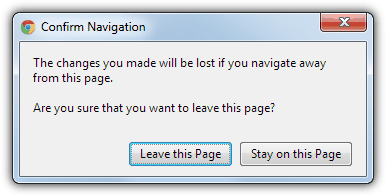
There have been times though in the past when this function hasn’t worked properly in WordPress and large chunks of posts were lost and had to be rewritten. If you restrict your typing online and never write much into online forms, editors or emails etc, it won’t be a major issue and you could always copy the text using Ctrl+C to stop you losing it. But if you spend a lot of time online writing into your web browser, a tool to save what you type while you’re typing it could be a real saver of time and headaches.
Here are 3 form or text area saving browser extensions for the two most popular web browsers that support plug-ins, Mozilla Firefox and Google Chrome.1. Textarea Cache
Textarea Cache is a Firefox extension that automatically saves the text area or WYSIWYG editor text from webpages. Everything you type in is saved and then if that is lost by a crash or closing the browser tab, everything can be recovered by selecting what you want from the cache window. What’s quite useful is the ability to view the text cached from all the boxes or areas and then pasting it into different fields.
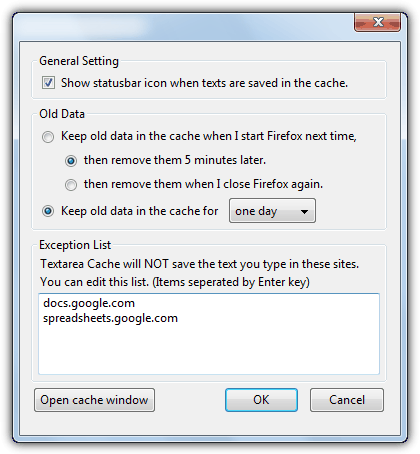
Once the extension has been installed into Firefox, there is a settings window that you might need for configuring a few options. Access this from Firefox -> Add-ons -> Extensions -> Textarea Cache Options. The old data can be removed after 5 minutes, after Firefox is closed, or select a value from the drop down of one, three, five or seven days before data is purged. The Exceptions List will tell Textarea Cache not to keep any data from those websites, a couple of sites are entered already.
The tool will remain invisible until you type something into a relevant area, box or form and some text is recorded. Then right click in the typing area and a context menu entry will appear called “Open Textarea Cache window”. That will open the cache window where you can see everything that has been saved from the text area, different forms from different webpages can be selected from the drop down if you’ve recently typed into other pages.
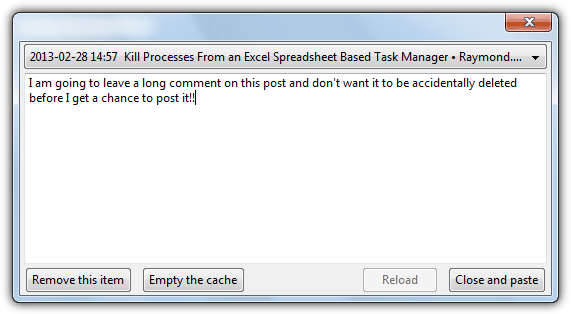
If for example you type into a blog or forum post and Firefox crashes, Textarea Cache will preserve rich text elements such as hyperlinks, bold text and images right up to when the crash occurred. Simply select it from the drop down and click “Close and paste”. If you no longer need the text, you can remove just that one item or empty the whole cache before waiting for the expiry time to kick in. If you want to increase cache size or expiry beyond seven days, there are some hidden settings in the Firefox about:config.
Download Textarea Cache for Firefox
2. Simple Form Recovery
This extension is for Google Chrome and about as simple as you can get. Simple Form Recovery will remember what you type into a text field or box and stores what you type locally. This information will stay stored and when you open up the same form or text area again at a later time, the same text will be displayed. The data for the same form is kept until you submit or manually delete it.
Simple Form Recovery has no options, buttons or menus and will simply work in the background while you’re typing in something. If you leave the page accidentally or through a crash etc, then when you go back to the same form, the text is returned to what you typed in before the page was closed.
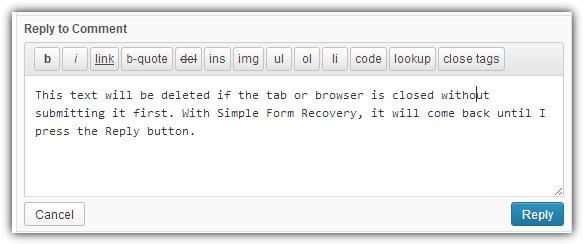
On testing, it appears Simple Form Recovery can only save plain text from the forms and rich text WYSIWYG editing such as hyperlinks, images and bold text etc will not be retained unless you’re actually typing it in as plain text (the text as opposed to visual editor in WordPress for example).
3. Lazarus Form Recovery
Lazarus is a plugin extension for both Firefox and Google Chrome and it’s certainly the most well known and popular tool of this type, although development seems to have stalled with the last update in 2011. Lazarus enables you to recover lost forms with a couple of clicks and securely saves forms as you type, allowing you to recover lost work after browser crashes, accidentally closing the tab or browser, or simply making a few mistakes and wanting to revert back to an earlier text.
Although Lazarus is available for both Chrome and Firefox, the Chrome version seems far more unpredictable with which forms work with it and which don’t, it also doesn’t seem to work with rich text or WYSIWYG editors. The Firefox version is more complete and has far more options and control including searching with more advanced control over the database.
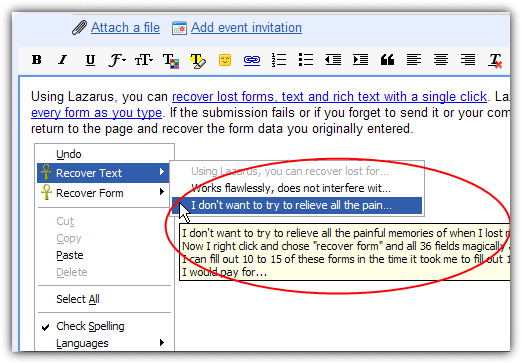
Simply install Lazarus for your respective browser and the recovery options won’t appear until you type something in to a text field or form. For Firefox, you will get a right click menu where you can recover text snippets, and another to recover the complete forms. Hover over a menu entry to display the text to recover or the time when the form was saved. Chrome users will get a small icon in the top right of the text form or area which you click on to get a similar menu of previously saved text.
Both browsers have a few options specific to each one, but the options to encrypt saved forms with a password, save passwords and set the amount of time text is stored in the database is available on both Firefox and Chrome.
Download Lazarus Firefox Plugin | Lazarus Chrome Extension





I’m using Firefox ver 80.0.1 with Textarea Cache ver 4.2.1, and it’s working great. It just save me from having to rewrite a feedback I spent 40 minutes writing.
The feedback form timeout, and closed the formed. It discarded all the text I entered without warning!
I screamed loudly until I remembered I had Textarea Cache. I was able to retrieve the text with no problem.
Thank God for Textarea Cache!
Lazarus still works in SeaMonkey 2.49.3 (last release today) once it has been converted.
addonconverter.fotokraina.com/?url=https%3A%2F%2Faddons.mozilla.org%2Fseamonkey%2Fdownloads%2Ffile%2F128169%2Flazarus_form_recovery-2.3-fx.xpi%3Fsrc%3Dversion-history
Textarea Cache is fading out, too.
addons.mozilla.org/en-US/firefox/addon/textarea-cache/
says: This add-on is not supported anymore. After Firefox 57, it would die.
Please move to Textarea Cache Lite
addons.mozilla.org/zh-TW/firefox/addon/textarea-cache-lite/
And when you go there… SURPRISE! The page is in Chinese. “zh-TW” in the URL means “Chinese, as used in Taiwan”. SO INSTEAD GO TO
addons.mozilla.org/en/firefox/addon/textarea-cache-lite/ “en” is the code for English language.*
The English-language pages for Textarea Cache are clearly not written by native English-speakers.
* There’s also a code “en-GB” for British English and probably others, but I don’t know if that site has pages for them. I recognize these codes because I’m a linguist.
I would note that the “replacement” Textarea Cache Lite isn’t the same program, it’s an attempt to duplicate the original program. As of last time I checked (Feb 2018), it doesn’t work as well or have all the functions of the “classic” version, acc. to both reviewers and the developer. He’s trying, though.
The original still works with FF 52 ESR.
Lazarus is not longer working in firefox, or mine has just quit without notice, even when I re-download the app it still does not work.
Lazarus is dead but Textarea Cache seems to be a
good replacement for it. I think it might be a little
simpler to use. I just started using it. I remember
have problems at times using Lazarus but I”m not
sure how different the options are between the two
of them.
forums.opera.com/discussion/1853164/opera-equivalent-of-lazarus/p1
Lazarus can be used in Opera too
Sometimes i face the problem with this too.. thanks this is good, just installing it now…
thanks to you
Thanks ray
thanks to you
good information. thanks raymond… want to use it. :)
thanks, ray
Thanks for the wonderful information…
Great tip as always, thanks!
thanks raymond you save my time. i face similar problems. thanks for sharing this tip. you save the day
i installed lazarus…i dont have UPS neither at home..nor at office
great tool
thanks ray
Ray
good article
good