
7 Command Line Utilities to Easily Send Email Using SMTP


 7 min. read
  Published on

Not only is email very useful for communication between friends and families and sending messages with attachments such as reports, photos, documents, presentations, video clips and music files, it’s also useful for notification purposes. For example, a website monitoring service such as Pingdom has alerts where you’ll be notified through different methods such as email, SMS, twitter or in-app when your server is down. Third party backup software also normally has at least an email notification feature where you can set it up to automatically email you when the backup process has completed or failed.
If you are writing a batch file and want to send an automated email when the batch has completed running or if you’re faced with a third party software that does not even support email notification, then the simple solution is to use a command line email sending tool for Windows. Here we have 7 ways to look at.
An example command line for sending an email using Gmail is given for every utility mentioned below. You’ll need to change the following information in the command line option:
- [email protected] = Replace it with your full Gmail address
- [email protected] = Replace it with the email address that will receive the message
- YourGmailPassword = Replace it with your Gmail password
- subject = The subject of the email. Make sure it is enclosed with double quotes if there are spaces. For example, “This is a long subject“
- body = The message of the email. Should also enclose with double quotes if there are spaces
1. SwithMail
Out of all the command line email sending tools, we’d consider SwithMail as one of the best in its class, if not the best. Instead of the need to write really long command line options to silently send an email where you might make mistakes and need a few tries to get it right, configuring SwithMail is quite foolproof thanks to the easy to use settings configuration GUI. You even test the email settings to make sure that it is able to successfully send an email.
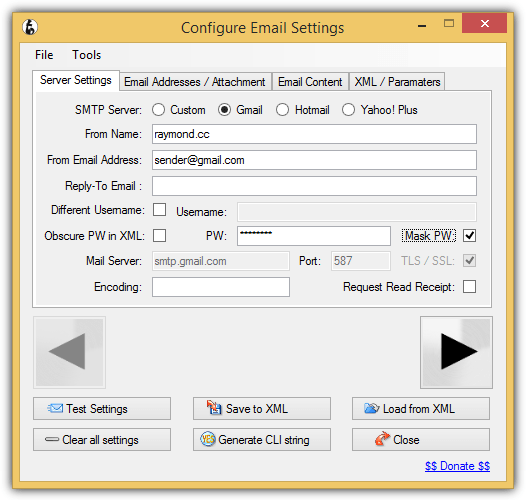
Other than the standard options such as attachments, CC, BCC that you’d normally find when sending an email, SwithMail supports returning error codes, global variables and wildcard attachments which is very useful to automatically send log files with dated filenames. Below is a working example of SwithMail command line options to send an email using Gmail account.
SwithMail.exe /s /from [email protected] /pass YourGmailPassword /server smtp.gmail.com /p 587 /SSL /to [email protected] /sub subject /b message
2. CMail
If you need to use a command line email sending tool that supports proxy, CMail would be your choice as it’s the only one that can support socks and HTTPS based proxy. Other interesting features that can be found in CMail are sending the whole directory content based on wildcard attachment and delivery status notification.
The full working command line to send an email using Gmail is as follows:
CMail.exe -secureport -host:[email protected]:[email protected]:465 -from:[email protected] -to:[email protected] -subject:subject -body:message
3. SendSMTP
Running SendSMTP will bring up an interactive graphical user interface to send emails but at the same time it also supports command line instructions to silently send email with just one line of commands. Although an advanced user would have no problems with the command line arguments, a GUI will greatly help a basic computer user in creating a working config file.
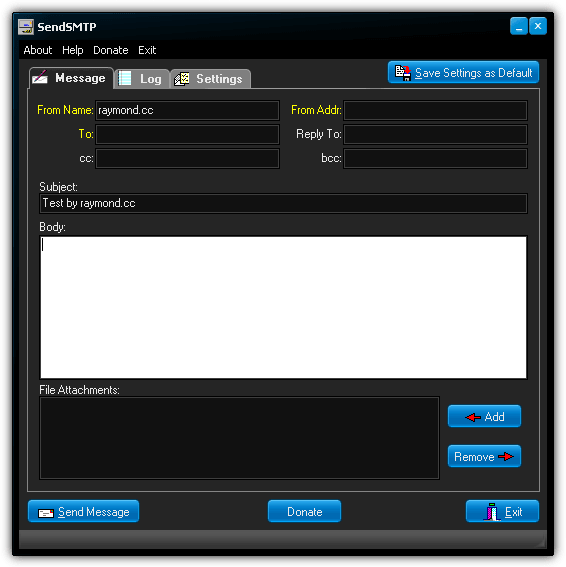
Some notable features found in SendSMTP are the ability to save the password as encrypted using 128-bit Rijndael (AES) rather than saving the password as clear text, enable log file to save the activity of the SendSMTP program, and can return codes to report if the send email is successful (0), failed (1), or cannot find settings (2). The full command line for SendSMTP to send email using Gmail is as follow.
SendSMTP.exe /nos /host smtp.gmail.com /port 587 /auth 2 /userid [email protected] /pass YourGmailPassword /from [email protected] /to [email protected] /subject subject /body message
However, if you’ve saved the settings as default from the GUI which will create a SendSMTP.ini file at the same location as the program, a much shorter command line can be used to send an email.
SendSMTP /s SendSMTP.ini
Do note that there are 2 versions available on the download page. You will need the newer version with the bigger file size to support sending email using Gmail because the old version does not support SASL authentication.
4. mailsend
Comparing with the utilities mentioned above, mailsend is a simpler command line tool to send email using SMTP. It doesn’t have fancy features such as loading config from an external file, password encryption, GUI, error codes and etc. However, an interesting feature found in mailsend that is not available on other command line email sending tool is the ability to show SMTP server information by using the -info option.
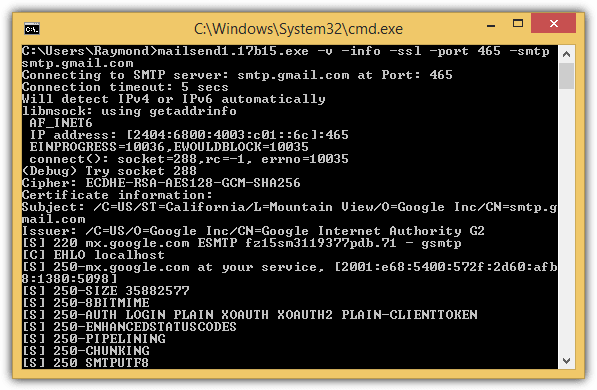
mailsend is available for both Windows and Linux operating system. Below is the example command line for mailsend to send an email using Gmail.
mailsend1.17b15.exe -t [email protected] -f [email protected] -ssl -port 465 -auth -smtp smtp.gmail.com -sub subject -M message -user [email protected] -pass YourGmailPassword
5. Send-It-Quiet
Send-It-Quiet is the smallest command line SMTP mailer utility that weighs only 14KB in size and this is made possible with .NET Framework. This would also mean that you need to have .NET Framework 3.5 installed to run Send-It-Quiet. Send-It-Quiet only comes with very basic parameters that are enough to send an email. Possibly the only extra features found in Send-It-Quiet are the return value of ERRORLEVEL and also the flexibility of manually adding the parameters to registry.
The command line to send an email using Send-It-Quite with a Gmail account is:
senditquiet.exe -s smtp.gmail.com -port 587 -u [email protected] -protocol ssl -p YourGmailPassword -f [email protected] -t [email protected] -subject subject -body message
6. SendEmail
SendEmail is written in Perl but there is no need to install Perl in Windows for this command line mailer utility to work. SendEmail was last updated in 2009, but the last version has TLS support which means it can send email using Gmail SMTP. In terms of features, it is quite similar to Send-It-Quiet which only supports the standard email sending options such as to, from, subject, body, attachment, etc. SendEmail is available for both Windows and Linux operating systems.
Here is an example of the command line options that can send email using Gmail SMTP.
sendEmail.exe -o tls=yes -f [email protected] -t [email protected] -s smtp.gmail.com:587 -xu [email protected] -xp YourGmailPassword -u subject -m message
7. PowerShell
PowerShell is included in Windows operating systems since Windows 7 which means you can actually use a powershell script to send an email through Gmail SMTP without any of the command line tools mentioned above.
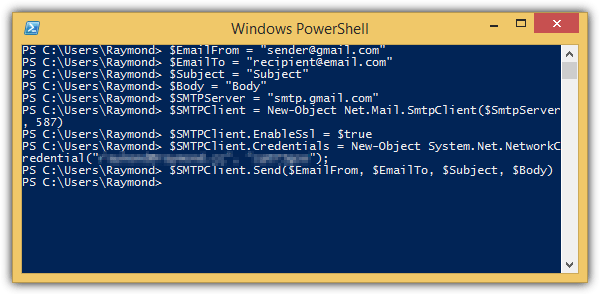
The sample script that can be downloaded at the link below is a very basic one that is meant to only send an email without attachment support. Simply download the ps1 script, open it with Notepad or Windows PowerShell ISE and change the credentials located at line number 8. The command line to run the powershell script is as follows. Make sure you update the path to the .ps1 file.
Powershell.exe -executionpolicy remotesigned -File C:\Users\Raymond\sendemail.ps1
Download PowerShell Script to SendEmail
The popular Blat is not included in the list because it does not support SSL which means it cannot send email using Gmail SMTP. Bmail (last updated in 2004), cmdsendmail which is a part of CommandLine Tools, and XmlSendmail are also example of command line send mail utility that doesn’t support SSL.



Improve this guide

User forum
0 messages