8 Tools to Hide Running Apps from Taskbar [Best for 2023]
Quite often you might come across a piece of software that you don’t necessarily want sitting in the system tray or showing itself on the taskbar when minimized. It can be set to autorun whenever Windows is booted up, but there is no way to hide it from appearing on the taskbar or tray, not every program that sits in your tray needs to have an icon there. There will probably be no useful option in the program settings, so you’re pretty much stuck with it. If you’re someone who likes to keep their desktop clean and free from clutter, it’s a little frustrating.
One of the most common ways to close open application windows but keep the program running is by using something known as “boss key” software which was obviously originally designed to hide what’s open on your desktop if your boss is walking past your computer. This can be used to hide games or any programs that are not allowed in the office by simply pressing a configured hot key. Some anti boss key software has other extra features such as being able to hide a program whenever it’s being launched and also the ability to even hide itself.
Here we list a number of free tools which can help you hide running programs from the system tray and the taskbar. Some will even allow themselves to be hidden from the average user and optionally supply a password to stop tampering.
1. OuttaSight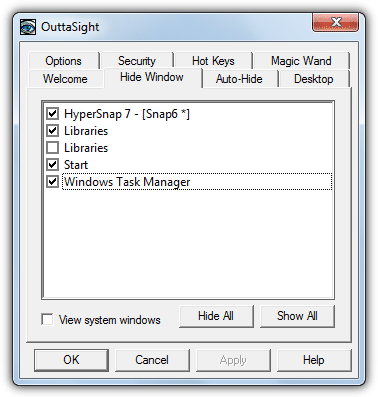
Outtasight is certainly a very old tool, and a few of the secondary functions such as hiding the tray and the Start button don’t work in newer operating systems, but the window hiding functions still work well. Something this tool has that even newer programs don’t is a Magic Wand option you can drag onto a window to hide it. Outtasight also has other useful options like hiding itself completely from the average user, hiding windows based on the executable file name and a password protect lock to stop windows being unhidden or the settings window being accessed.
2. WinRAP
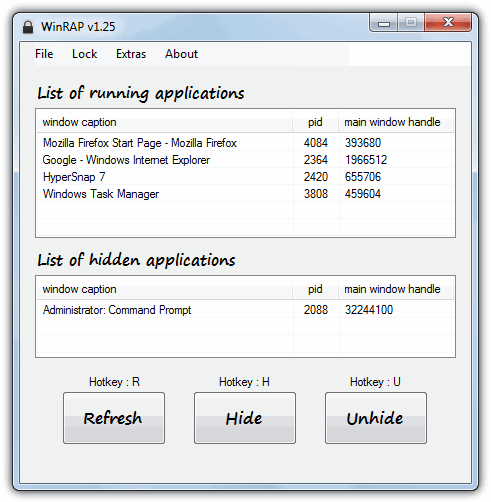
Windows Running Applications Protector (WinRAP) is a program that is able to hide running processes you add to its list, and then only allow them to be unhidden by entering the correct password. In addition to hiding programs, WinRAP can be minimized to the taskbar, system tray or put into stealth mode which will completely hide and password protect it from the average user, with the added option of disabling the Task Manager on the task bar right click to stop the process being killed easily. The Extras menu can quickly hide all or unhide all running applications, or hide the Taskbar and Start button completely. WinRAP is a portable tool that requires the .NET Framework version 2 or above.
3. Taskbar Hide
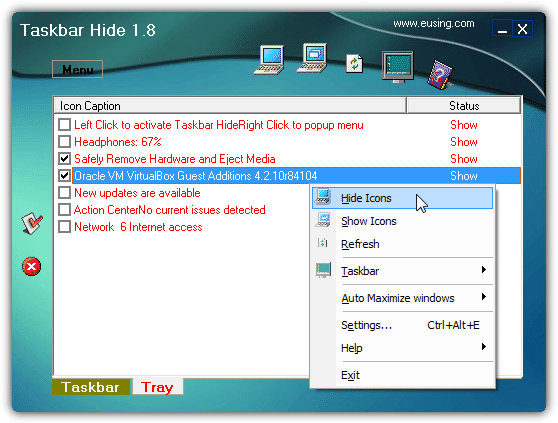
Taskbar Hide is a program that as well as being able to hide the open windows from the desktop, it also has a separate tab where you can hide or show any number of icons in the system tray. There’s also options to hide the clock, tray, taskbar and Start button completely. Windows themselves can be completely hidden from view or minimized to the taskbar using the configurable hotkeys, while the Taskbar Hide tray icon can be locked from unauthorized changes by means of a password. Although the program is free to use, it does popup a donate nag window every time it’s launched which can be annoying.
4. Tray It!
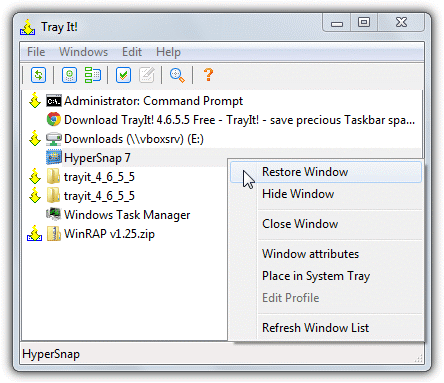
While Tray It! doesn’t have the more useful options for stealthing or hiding traces of program windows such as hotkeys or password protection, it does have the ability to hide or show individual tray icons in the notification area for just about any application that places an icon there. A valuable addition if any running program places an icon in the tray and you don’t want it to show. This is available from the Edit menu -> Shell Icons. Alike windows can be grouped together for bulk hiding and there’s also a profiling option to setup more advanced settings for each window. A handy quick minimize will allow you to right click on the window close, minimize and maximize buttons for instant minimizing. Tray It! is also portable.




Try Dreadlock Instant Privacy
gneesis.com
HOW TO HIDE RUNNING APPS IN TASKMANAGER
Unfortunately , OuttaSight not working with windows 10 . From the other hand winRAP work as expected.
I wrote my own little tool. It’s free to use.
scheler.com/bosskey
Code execution can not proceed because VCRUNTIME140_1.dll not found?
Same for me, it doesn’t work sadly
why don’t u upload it in github dude
I think I fixed the DLL issue. Please try again. Will upload it on github soon.
That works like a charm! Tested at least 10 other applications, none as good and easy as that one, Thanks again!
Hello, I’ve been testing but it doesn’t work for the LoadTeam program that creates an icon in the “tray icon” next to the clock doesn’t hide it. :(
can u please add a mute option too ?? plz
does these applications show up in the task manager?
Can’t seems to find a proper application. I really want a program that hides my program from tray the moment windows has start. And also hide itself so other user can’t find and close it.
Did you find the sofware that you want?
How to get out of stealth mode? I cant seem to find it back
Winrap was able to hide a ruuning program for me, but couldn’t hide it own program icon
Hi, Winrap is very good except that it can’t hide “voice recorder program on win 10”.
I need one which can hide this program.
does outtasight work on windows 10???
it gives mine an error: incompatible version or something
use legacy compatibility in the programs properties
Very helpful! I just download WinRAP and it does work!
Well written and helpful
any idea of how to hide the icon? but still be able to use the program?…
Like hide the icon from the taskbar but use Alt+Tab to use the program at the same time the icon doesnt show on the task bar?
Pretty good stuff you have in your website!
Thx in advance!
Hi Raymond,
If I use OuttaSight to hide a particular process, can I uninstall it (OuttaSight) and when I restart/shutdown the computer will the process I have hidden still be hidden? Thanks!
No, it’s the OuttaSight program that does the hiding, so if it isn’t running/installed, the process will be visible.
Thank you very much….
looking forward to try OuttaSight.
Your description fits perfectly for what is needed.
Cheers!
WOW dude! You saved my day! Very useful analysis for such programs. Thank you!
Tray It worked well for me but I had to set it in Windows XP Compatibility mode
I wish there was our own keybinding for the exit stealth mode. if i press x and then shift, no matter how long the spacing is in between, it will bring up the password prompt. i’d like to bind it to F9 or something like that.
Why cannot I change the password in WinRap? When I click change password . it shows error
Working fine here…
Dear first type pasword then hit at (change pasword).
Password cant be over a certain number of characters. i think the cap is 20 cause my 21 digit pass code wasnt accepting but my 19 digit one was.
How can I recover WinRap back from stealth mode?
Shift+Z gets you out of Stealth mode.
Great list!
Daphne implements this feature too: drk.com.ar/daphne.php
Thanks
OMG dude it works thanks ;)
nice, really nice!
Oh! Thank you
Thanks Raymond.