How to Stop qBittorrent from Killing Internet Connection


Many popular BitTorrent clients work right out of the box. Download, install, load a torrent file and it’ll start downloading, provided any needed ports are forwarded correctly. If you don’t tweak the configurations, most probably it’ll take you longer to complete downloading the torrent because the default configuration might not be very well optimized for your router or internet connection.
A slow to finish download is not really a big problem. A bigger problem you could encounter is when someone else is on the network streaming or online gaming and your computer is downloading a torrent. All of sudden, the internet connection might seem like it’s been cut off as if someone is using NetCut and there are problems browsing the web or your messenger program disconnects, etc. Pinging the router could also give a “Request time out” error message.
To get back the connection, you might need to disconnect and reconnect the internet connection, restart the router, or even reboot the computer. Restarting the router is not a good solution because when the torrent detects a connection and starts downloading, the connection gets killed again. There are ways to configure most torrent clients so that if you’re having similar problems, your internet won’t get disconnected while downloading torrents, one of the most common ways being to use a good cloud torrent service.
This happens mainly because there is a large number of connections that BitTorrent utilizes at once, and it is using more connections than your internet connection or router can handle. The default settings in a BitTorrent client are sometimes set too high and it chokes the connection. The solution is to lower the global connections limit in the BitTorrent Client. Here we show you how in a number of popular torrent clients.
qBittorrent
qBittorrent is one of the most popular torrent clients currently available for Windows. An issue it has out of the box for slower internet connections is a high default maximum global connection value (600).
1. Press the Options button on the toolbar that looks like a cog wheel. Alternatively, open the Tools menu and select Options (Alt+O).
2. Click the Connection icon on the left. qBittorrent has two values to look at. One is the “Global maximum number of connections” that affects all running torrents. The other is the “Maximum number of connections per torrent”.
3. Set the global maximum to about 100 (or lower if you wish) and the per torrent number to something equal to or less than the global number. Click OK.
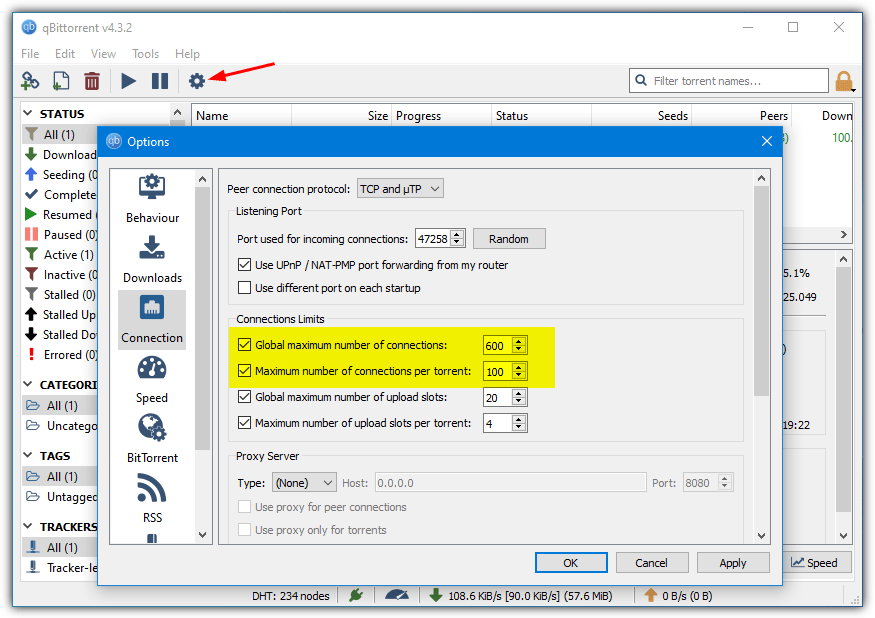
DO NOT uncheck those two boxes because that will set the maximum connection number to unlimited and will make your connection situation worse.
Free Download Manager
This is a popular general download manager for Windows that also includes a torrent client. A good thing here is you can raise and drop the connection limit on the fly through the traffic limit menu. The default maximum connection limit is 200 in High Mode, 50 in Medium Mode, and 15 in Low Mode. It’s easy to drop from High to Medium or Low and see if it helps before touching any other options.
1. To manually change the connection limits in Free Download Manager, click on the Options menu at the top right and select Preferences.
2. Click the Traffic Limits option on the left or scroll down. Change the “Maximum number of connections” numbers for the speed modes to suit your needs. Also, adjust the download/upload speeds to best match your connection speed.
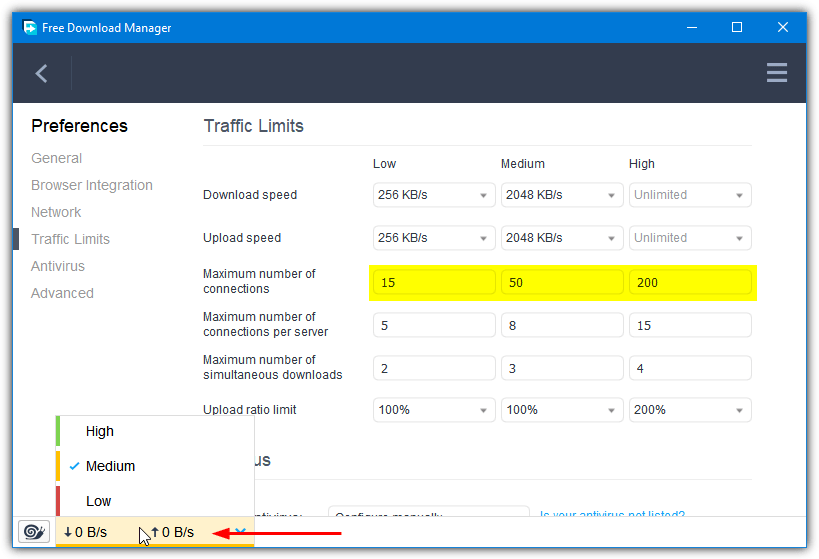
Changing the speed mode is done from the menu at the bottom of the window. It will show as green for full speed, orange for medium, and red or low speed mode.
Download Free Download Manager
PicoTorrent
This is a small, easy to use, resource friendly, and optionally portable torrent client that also includes an option to limit the maximum number of connections.
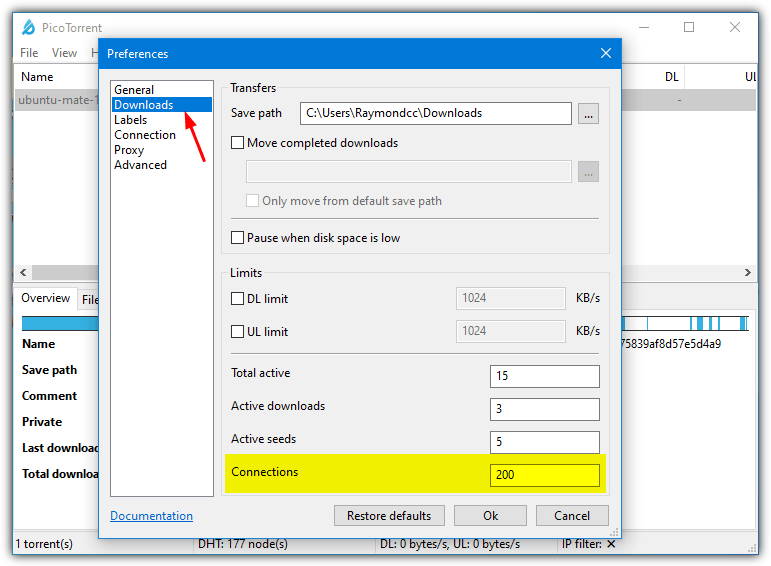
1. Click on the View menu and go to Preferences. Click the Downloads option on the left of the window.
2. The option is simply labeled “Connections” and found right at the bottom. Reduce the default value of 200 down to something more reasonable, such as 50-100. Click OK.
Transmission
There’s quite a lot of options in Transmission but the connection limit settings are quite easy to find.
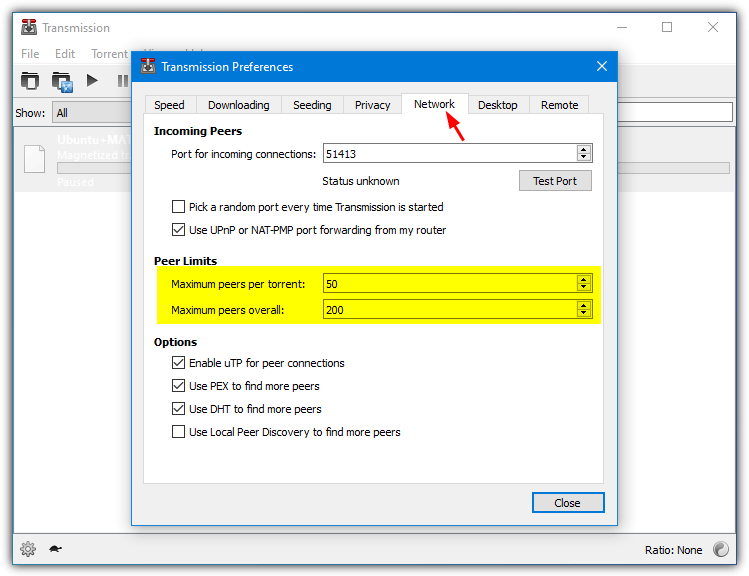
1. Go to the Edit menu and select Preferences, click on the Network tab.
2. There’s two options in the Peer Limits section, “Maximum peers per torrent” and “Maximum peers overall”. Reduce the overall default of 200 to a lower number. You can leave the per torrent setting if it’s still lower than the new overall value.
Deluge
Although Deluge is a popular cross platform torrent client, the Windows version is currently behind the other platforms because of some programming limitations. The connection limit options are the same on all versions though.
1. Click the Preferences button on the toolbar or go to the Edit menu and select Preferences (Ctrl+P). Select the Bandwidth category down the left side.
2. The overall maximum number of connections is the first option at the top and is set to 200 by default. The per torrent setting should not need changing as it’s intelligently set up to always be one connection less than the global value.
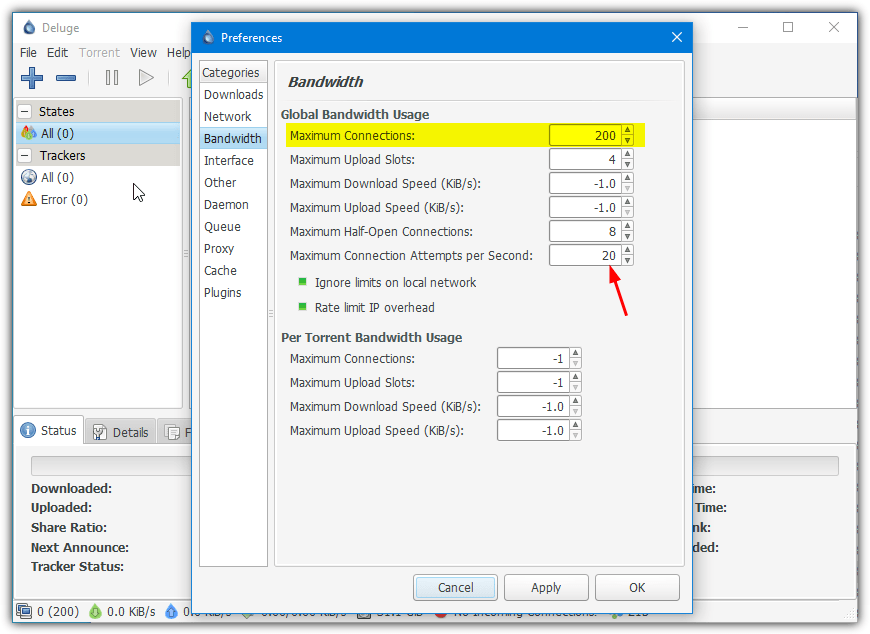
3. You could also optionally reduce the “Maximum connection attempts per second” to a lower value. This will slow down the speed Deluge is trying to connect to other peers and might help stop your connection from being overloaded.




Thanks a lot for the valuable info. Great!!
Love You bro
i was really facing this problem from a long time
I love you, thank you so much
Where have you been all my life!
Magic!
Worked like a dream!!
Thank you changing the number from 500 to 50 totally brought my network back up and running.
I do other way easy and you can use full internet to download automatically when you not use browsing
i will upload the picture of my way if any one need it
Omg thank you sooooo muchhhhhhh I put 5 max and it works hahahahahahahah yassssssss
Worked!!!
You saved my life, thank you!
You save my life, thank you!!!!
THANK YOU!!!!!!!!!!!!
If you have a modern, fast router, all this was sorted out with QOS
That’s why it exists. Don’t see any reason to cripple your p2p clients just to avoid using it, unless your router is old and slow so QOS bogs it down. Do some throughput tests to see if it’s capable, and watch the heat as some routers before the “green” era ran hotter than others.
Awesome. Works on 150 Global connections. Telstra technicolor router. Utorrent. Thank you :)
Thank you!
I’ve been suffering for years, needlessly. God, what an easy solution. You ROCK! How is it I’ve missed it for so long? I’ve been jacking around my DL and UL speeds thinking, surely, THAT was the problem, and looked over the global connections and torrent connection numbers, thinking, “Well, they’re only connections. Surely that doesn’t matter all that much.” I feel like an idiot, but I’m a relieved idiot at the moment! =)
Thanks so much!
I did a lot of research and came up with a simple solution which would solve the problem of 80% of the people.
First will post Solution then my story if anyone is interested :D
SOLUTION:
Try downloading a previous version of Torrent. Example 2.2.1. which solved my problem. Its just around 300kb. google it or use your existing torrent to download the previous version I used Kickass torrent to get this version.
My Problem –
I never had problem with torrenting before until I got a new laptop in my Office, I downloaded the latest torrent thinking I’d have the best-in-class software.
Only while torrenting my laptop’s network adapter shows yellow ! and the internet stops working.
I use wifi on my laptop and it stops working, while other people’s wifi and lan network still workes perfectly.
[Temp Solution]
I right click the wifi icon on the start menu shortcut and troubleshoot – It says DNS did not respond.
I go to my network setting click on my connected wifi and click Diagnose – It will reset adapter and the wifi will start working again.
But if my torrent is still on it will again stop working in 2-3 mins.
Just manage to get a previous stable version of torrent and it will work flawlessly.
You’ve made my day
Greetings from Bosnia
thanks!!!
I had same problem (internet disconnects while torrenting). This problem only started for me when I switched to fiber service from ADSL and changed ISP and my router as well. So initially i couldn’t understand if it was my ISP or my router or the NTU Device which my ISP installed for me.
After lot of elimination tests i found that disconnection was only happening when I was torrenting (and particularly torrenting through transmission client on my Centos machine). When I do torrenting on my uTorrent client on Windows it never dropped and infact it worked noticeably faster than Transmission client.
The fix mentioned in this makes sense and that may resolves lot of such issues for people but I would like to point out here that the problem only started with my new ISP, with new NTU and new router – such disconnection never happened on my old slower ADSL line using the same setup.
so my analysis says that it definitely is happening because it torrents are establishing too many connections for router or modem to handle but not all devices complain about too many connections ..like my old belkin ADSL modem router never complained and always worked. so the main culprits are the devices (Router / Modem or NTU which acts as Modem and in rare cases ISP which may block too many connections)
You my friend are a genius! My hat is off to you!
Thank you – brilliant tip, sorted the problem for me. This issue has bothered me (and my family) for over a year. Kudos.
This solution didn’t help me at all actually! :( As soon as i change the value as you showed, it works for 3-4minutes and then stops working again, till i lower the value again! I started with 100, then 50 and now 20 and again it stopped working after a couple minutes… Should i keep lowering the value? I don’t think that trying out 10 or 5 would help much, i fear my problem is entirely something else… Any ideas?
Thanks anyway.
PS: Interestingly enough, i had to disable my utorrent in order to post this simple message! Arrrgh…
Your solution worked for me just fine! I appreciate you and the wonderful work you do very much indeed! Happy New Year!
this was so helpful, always hates when i couldnt browse and download at the same time, its even helped with my download speed. thanks so much and I hope many more people give up and search and find this to help cause it’s very helpful.
I am so extremely grateful for you sir. You are an inspiration to my soul. Like so many others above me who have commented on their gratitude toward you, I too want to tell you something… You are the breath in my lungs, the sun which so gently shines through my window on a spring morning, if you were a lady, i would make my self known to you and marry your sweet soul. I love you. I thank God, our heavenly father for creating you. You are my life.
I just changed my internet from 100Mbps to 200Mbps and replaced the older Huawei router to Asus RT-AC68U. Now it seems to get disconnected within a short time when running uTorrent. I have to do a Disable and Enable of the network device in Vista to get it up, albeit for a while until it gets disconnected. Any idea if this Asus RT-AC68U is being overloaded?
Many thanks to you for finding a solution for this issue. I have spent countless days online trying to find the fix. You are the man.
THANK YOU!!!!! :D
Thank you soooo much. I can also say that I can believe that the solution was so simple. Whoever you are who just helped me with that – lots of happiness and good health form me :) Thank you again so much – this solution really works for me!
thank you i thought it was my dsl problem this solved my problem thank you from the bottom of my heart
I have problem with my internet for long long time about 2 months and trying to figure out and cant thing of one. I change my Mainboard and ram and power supply and other stuff in my PC.
and still it wont stop Request time out for so many many request time out.
now i change my Bit Torrent to Max 50 like this post said. and its work!!!!!!
Thank you God … im so happy … thank you thank you..
Thanks man. It was just as you said it. Your instructions fixed my problem.
Awesome advice, thanks a lot. Helped me get back to a more stable connection as well. Cheers!
This is very useful information. I have a litte curiosum to add. I see a lot of people that complains that utorrent (or other torrent-client) seems to make their Cable Modem/Router crash/reset all the time. I suddenly had that problem after years of torrent DL’ing. I tried for days to figure out what I might have changed. I checked if my router settings had somehow been reset to factory default making my port forwarding disappear, but everything seemed to be exactly as it should be. …. Then suddenly I remembered, that the separate computer that I use for torrent downloads only had been disconnected a couple of weeks ago, and even though I’ve remembered to forward the Network Port on it’s MAC adress, I suddenly remembered that I have two Network ports on my computer mounted right next to each other and when I reconnected my computer I put my RJ-45 cable in the wrong port, thereby connecting the computer with a MAC adress that hadn’t been forwarded in my router settings. When I put the Ethernet cable back into the other slot everything worked fine again.
I’m only mentioning this as a possible solution to all of you out there that may also use a computer with two network cards mounted, and might have moved the RJ-45 cable to the wrong port. It took me two weeks to figure out that the solution was this simple. This experience may spare some of you several days of headache.
I really like your article. It is very clever and nicely written.
I admit after reading your advise on fixing this utorrent prob I assumed my visit to your page just another waste of time as it couldnt be that easy to fix. I am sorry for doubting you sorry sorry sorry it was exactly as you said, not only did it work i didnt even have to restart utorrent the fix was in so to speak as soon as i hit enter. Thanks, You re awesome
thank you
Hope that it will work :)
Thanks dude 50 worked for me just fine
Can’t believe it was that easy to fix the problem… Now I need to find all my other torrents again and get them back up and running. Thanks a lot! Can’t believe it’s actually working
God Bless you my friend, It is a 2 year problem for me that just got solved!!!!
Thanks! This has completely solved the problem I have had for a long time. You are real Super Hero for us!
awesome dude – works a treat. i adjusted ‘global connections’ to 100 and ‘max connections per torrent’ to = 20. just experiment to find what suits you
Thanks, I’m going to try this soon.
I try to go on the games, or on my laptop, and the internet is completely killed off. Because when my uncle is home (usually 95% of the time) he has on that stupid Torrent crap on downloading Comic Books.
thanks everyone..works for me on my utorrent..i lower down the “Global maximum connections=50” ; max number of connected peers = 20 and i got my internet browsing back to normal.
Thanks so much for this guide. Now I can torrent all day and not just while I am sleeping!
Thanks for this guide! really helped me a lot!
Thanks buddy. I have had this issue for a couple of weeks. I tried this tweak on my utorrent and it has not crashed for the last two hours – which is a miracle :)
i have never thought of this fact “how much can my router take”! the truth is, a siemens SE-361i can take up to 200 connections at a time. downloading at full speed, and still can watch a youtube video! this is amazing! thanks mate
Took me a long time before I started looking for a solution to the router cutting out only while downloading via Utorrent. I thought it was my ISP cutting off torrent downloads automatically and it pissed me off.
Now I find out that its just a Modem Error from to many connections I just switched to 100 connections and am hoping for the best. It seems that the connection has improved now also.
Thanks very much for the info it makes my life much better, basically allows me to use Utorrent reliably again which is awesome. I’m very happy.
Thank you! I have been trying to figure this out for 2 years lol
Thanks! Your post must be popular, it was 2nd or 3rd from the top when I googled bitcomet slows internet. Thanks for your time in posting this.
thanks a lot – it worked straight out on Vista
thanks very very…
You solved the problem for me, THANK YOU very much for information.
UTorrents info/forum was completely useless.
Thanks a million for that idea. It does work, and since I have a relatively weak connection (1 Mbps is the maximum download speed) I don’t experience any drops in speed. Perhaps I’ll even lower the number of connections further, I’ll see.
I read many many instructions on how to tweak bitcomet so that it wont disconnect my internet. All doesn’t work! But when i follow ur instructions, it works like magic! Now i can surf and download at the same time. My DL speed also improve. Can’t tell u how much grateful i am! Thank you so much!
thanks!! :-*
now, i can go AFK while downloading.. :)
Dog! You rock. I’ve never been able to diagnose this and you nailed it. Also, this never happens when I’m downloading, say, Sabayon Linux and there are only 40 peers connected–total. If happens when I’m downloading swarms like SXSW 2009 and there are 600+ peers connected. That kinda reinforces the Max Connections theory. (And for the haters, hasn’t slowed the D/L speed either. I’m still at rock-solid 90% rated speed which is where I want it.)
I couldn’t figure this out either. I’ve never had a problem for the last 2-3 years but now every time I would get close to 500 or 600 kB/s my connection would crap out. I’ve changed my settings in Utorrent to 100 max connections and its working so far. Although my speed is only at 270-300 now.. I’ll keep trying to add more by 20’s Thank you.
thanks a lot! i hope this works. I’ve been looking for a way to resolve this issue for 2 weeks.
OH MY GOOD GOD, you have NO idea how many long hours I’ve sat by my router trying to work out why it kept cutting me off, works like a charm now, no cutting me off the internet, MY DOWNLOADS actually download.
Works for Bitcomet !! thanks!! I lowered ALL those settings to 1 .. the global connections and the TCP connections… now I will push them up bit by bit..
CHEERS
for bittorent works,
thank you
Thank you for your Great Config
thanks a lot
wish you the best
thanks man. That really helped alot.
I’ve been looking for this solution for ages now. thanks for the insight
thanks a lot brother..
Thank you Raymond for another useful tip.