7 Tools to Stop Windows Running the USB Flash Drive Autorun.inf File
With the invention of USB flash drives and hard drives, the Autorun feature has been the target of attack from viruses, Trojans and other malicious software. This is because of the ease at which the Autorun.inf can be replaced and then pointed to start a malicious executable, and begin the infection as soon as the device is inserted into a machine. The ease at which these viruses can then travel from system to system with the aid of the unwitting user poses a major security risk. It would come as no surprise to anyone that Autorun based threats have been one of the most common forms of infection over recent years.
Windows 7 and 8 have Autorun disabled by default for all devices except CD/DVD media although the slightly different Autoplay function can still be used on USB devices. Other versions of Windows received a hotfix patch from Microsoft to behave in a similar way some time ago. Even if your own machine might be invulnerable to the Autorun virus threats, it doesn’t automatically mean other peoples PC’s are as well, especially if they are running a pure Windows 7 operating system. Even if you have disabled autorun options yourself, it is possible for registry software or tweaking programs to change the setting without your knowledge.
It still makes sense that if you frequently use USB sticks or portable hard drives, doing all you can to help prevent any Autorun type threats installing themselves on the devices is important both for your computer and any other machines the devices plug into. Here’s 7 free tools to have a look at.1. Autorun Vaccine
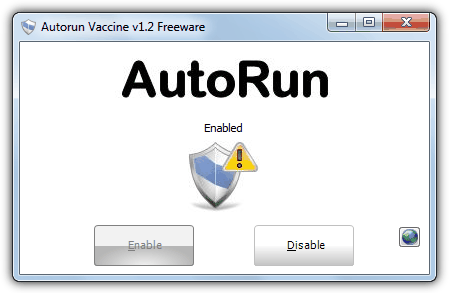
Autorun Vaccine is a very basic and portable utility that will completely disable the autorun function on your computer. It does this by simply checking for the existence of the “@SYS:DoesNotExist” entry in the HKLM\SOFTWARE\Microsoft\Windows NT\CurrentVersion\IniFileMapping\Autorun.inf registry key. This tells Windows to treat Autorun.inf as if it were a configuration file from a pre-Windows 95 application. The next time you insert a flash drive, hard drive, CD/DVD or other removable media into your system, Windows will not execute the information in any Autorun.inf file that may be present.
2. Panda USB Vaccine
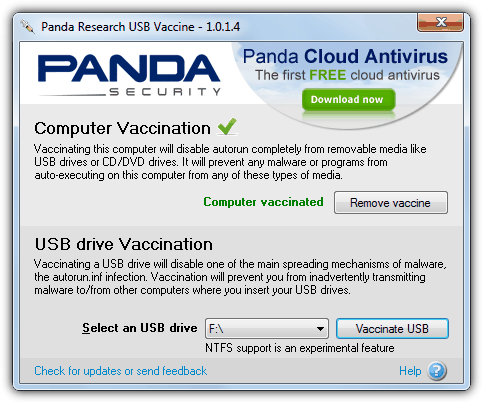
The Panda computer vaccination tool prevents your computer from executing any autorun.inf files by inserting the same “@SYS:DoesNotExist” registry value as the Autorun Vaccine utility above which disables autorun on CD/DVD as well. The USB drive vaccination option creates a dummy autorun.inf file on your external usb drive so that a virus can’t infect it. Do note that support for NTFS formatted devices is experimental in the program and you need to specifically enable it on install.
3. Bitdefender USB Immunizer
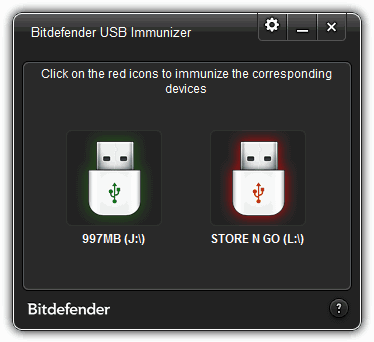
USB Immunizer is a portable tool that’s able to immunize several USB devices with ease. The program creates an empty write protected Autorun.inf folder on the USB device which prevents any malicious software from installing its own file and therefore nothing can be automatically launched upon insertion. Click on a red glowing device to immunize, green ones are already processed. Clicking the cog icon in the window will enable you to turn on auto immunization whenever a USB device is attached. Because of the special permissions given to the autorun.inf, you can’t just delete it and will need to be either very experienced, use Linux to remove or reformat the drive.
Download Bitdefender USB Immunizer
4. No Autorun
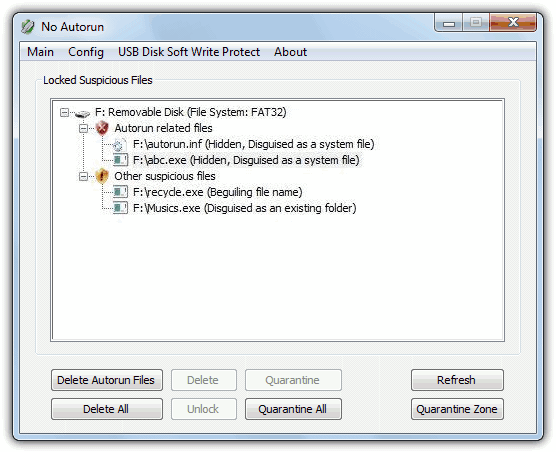
No Autorun is quite a useful utility because in addition to performing a basic autorun disabling function, there are some extras built in for a bit more security. One is a software write protect option which can use the “StorageDevicePolicies” registry key to stop any editing or writing onto the flash drive while inserted. It can also detect a few common malicious files like Recycle.exe or Musics.exe (more can be added) and quarantine them with the ability to unlock and delete either suspicious files or the Autorun.inf. No Autorun can be started with Windows and you can choose to disable all autoruns or keep it enabled just for CD/DVD drives. The program itself is portable and under 100K in size.
5. Ninja Pendisk
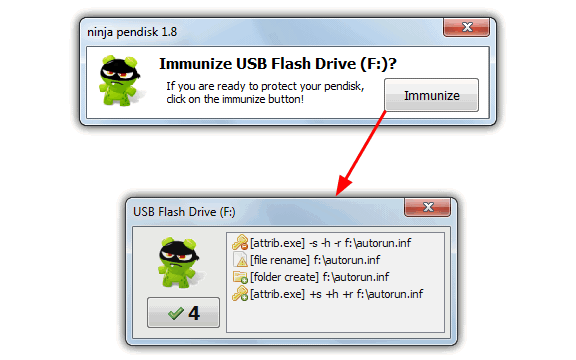
Ninja Pendisk is a tool which doesn’t try to disable Autorun via the system registry, but instead replaces any Autorun.inf file present on an inserted USB flash drive with a folder with the same name. As many malicious Autorun.inf files try to hide and protect themselves on the device, Ninja Pendisk will reset its file attributes, rename it to autorun.inf.old.txt and then create the folder in its place. Being a folder, nothing can add to or edit it and try to launch any malicious files, useful if the drive is to be used on other computers. The program is portable and sits in the tray while running, the tray menu option can be used to vaccinate automatically and also disable the Autoplay option.
6. Autorun Eater
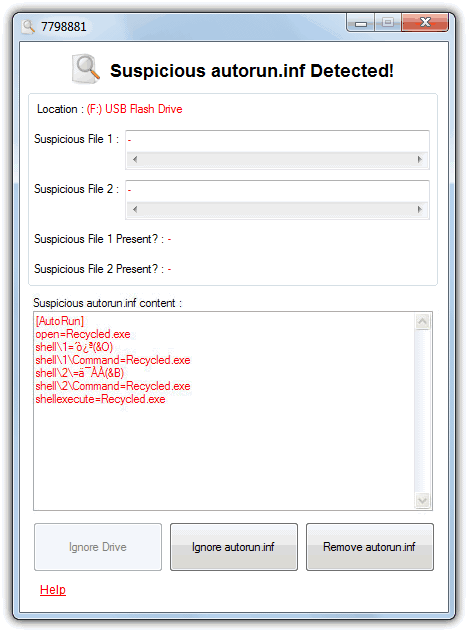
Autorun Eater will sit in your system tray watching for an inserted removable drive and scans to see if it has an autorun.inf. Then upon looking to see what it finds inside the inf file, Autorun Eater will either let it go or popup a window warn you. All the options are in the tray context menu, and there are a few interesting functions included such as fixing broken Task Manager, Regedit and Folder Options registry associations caused by malware and running a post scan with Microsoft Security Essentials command line if you have it installed.
7. Antirun Free
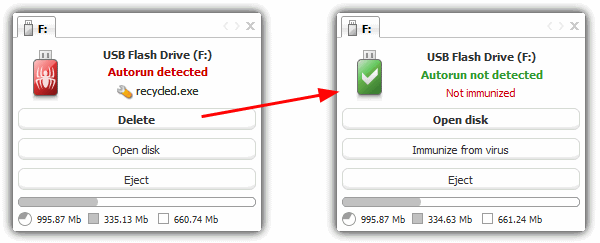
The free to use version of Antirun is quite an easy tool to operate and will simply sit in the system tray and warn you if the inserted device has an autorun.inf file and what it is wanting to launch. Then you can choose to delete the inf file, open the drive if you trust it or eject the device again. There are some space usage stats for the drive in the window and you can also drag and drop files onto the window which will copy the files to the drive. Antirun uses both the “@SYS:DoesNotExist” and “NoDriveTypeAutoRun” registry values to disable ALL autorun.inf files from being processed including those on CD/DVD media.
You might also like:
 Disable AutoRun on CD/DVD Drives in Windows for Better Security
 How to Enable AutoRun on USB in Windows: Step-by-Step
 5 Ways to Create Fake Dummy File on USB Flash Drive to Enable Write Protect and Prevent Modification
 8 Tools to Hide Running Apps from Taskbar [Best for 2023]
 Automatically Scan for Viruses When Plugging in a USB Flash
Thanks very much sir this article also helped me thanks
SmadAv is Good
Thanks for featuring Autorun Eater! AE is proudly Malaysian made. :)
This is great, thanks.
it was beneficial … useful .. thanks for all
thanks raymon this very useful for my PC because my friend always plug and unplug his flashdisk on my PC everyday.
that’s possible to virus in :P
Hey, Raymond!
Thanks a lot for the useful advice! I spent some hours trying to clean my pc, and your solution is so simple and works perfectly. My flash drives are clean now :)
I believe all the downfalls of turning off the autorun are nothing compared to the damage such a virus can do to the regular users like me. I have had a lot of trouble with other viruses in the past but this was my first one on a flash, and it caught me unprepared.
It is an useful knowledge. Thanks a lot, Raymond!!
Nice articles :) Great work!
Raymond….finding this website and this information, ie this tweak and disk heal has saved my rear hindquaters. Thanks so much.
Thanks Raymond
Good Information.
Thanks A lot
Thank you… this will help very much indeed. before i didn’t notice there is difference in autorun & autoplay so i treat it as same functionality. thanks again.
Thanks Ray!!!!
Your tip is very useful…great!!!
Thanks for this great info
nice one thank you
Hey Ray, thanks again for the neat info.
Thank You! Thank You! Thank You Raymond!
Best Blog Ever!!! :-D