Raymond.CC Blog
  • Home
  • Forum
  • Giveaway
  • X-Ray 2.0
  • Contact
  • About
  • I’m Feeling Lucky
Search the site...
You are here: Home » Computer » SuperSpeed Firefox By Putting Profile and SQLite Database in RAMDisk

SuperSpeed Firefox By Putting Profile and SQLite Database in RAMDisk

Updated by Raymond - 1 year ago - Computer
104
  • Like
  • +1
  • Tweet
  • Printer Friendly and PDF

During the month of November in 2009, my web statistics software shows that 47% of this website visitor uses Mozilla Firefox and 37.1% uses Microsoft Internet Explorer. When I compared it with last year November 2008 web statistics, Internet Explorer was still at number 1 with 46.8% and Firefox at 43.5%. Firefox has now taken the lead, obviously its because of the browsing speed and also the huge amount of addons for you to install.

As good as it is, there’s still one problem that was never really solved which is after using it for a few weeks or months, you will notice that Firefox starts to crawl. A very good example is when you boot up your computer and run Firefox, then typing a letter in the URL bar will cause Firefox to hang for a few seconds. Obviously you have a huge list of history and Firefox is trying to search for any matches on the first letter that you typed. The huge list of history is stored on a sqlite database file which is located in your profile’s folder. Now if you have a slow hard drive, Firefox will definitely crawl especially when you have a lot of tabs opened. Most laptops even have 5400RPM hard drive and that’s going to make it even worse.

I’ve tried many ways to make Firefox faster such as optimizing Firefox SQLite database, reducing Firefox process memory usage and making Firefox remember less history. They all worked but only for a while. Fortunately I’ve figured out another method which is able to make Firefox perform much faster.

Like I said before, Firefox uses SQLite database and it’s saved on your hard drive. Overtime the database becomes large and your slow hard drive will have a hard time trying to extract information from the SQLite database. If you remembered yesterday’s article on benchmarking 12 RAMDisk software, we can actually put the Firefox SQLite database into RamDisk so that it reads and writes 10 or 20 times faster than your hard drive. Yes, Firefox still takes up a huge amount of memory (currently 300MB and sometimes can go up to 400MB) but it is still fast.

Here’s an example on how I move my Firefox profile to RAMDisk created by Dataram because it has the best performance if compared to other free RAMDisk software and also support all versions of Windows both 32 and 64 bit.

1. Download the latest version of Dataram RAMDisk and install.

2. Simultaneously press CTRL WIN + R to bring up the Run command.

3. Type %appdata%\Mozilla\Firefox\Profiles and hit Enter. You should see a folder with random characters followed by .default (For example, 89ns5tbp.default) and that is your Firefox’s profile folder.

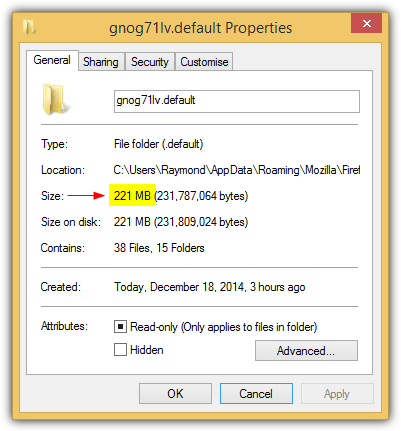
4. Right click on the folder and select Properties. Take note of the Size of the folder.

5. Run RAMDisk Configuration Utility from the Start Menu.

6. Set the Disk Size which is the amount of space that you want to create. Do not set it too high because the number will be deducted from your memory. I personally set it to 300MB as I have 2000MB of RAM and my Firefox’s profile folder is only 133MB in size.

7. Select FAT32 Partition. FAT32 is faster than NTFS in small volumes because the structure is simpler and the system does not have to check permissions since there is no controls regulation.
Dataram RamDisk Configuration

8. Click Start RAMDisk button.

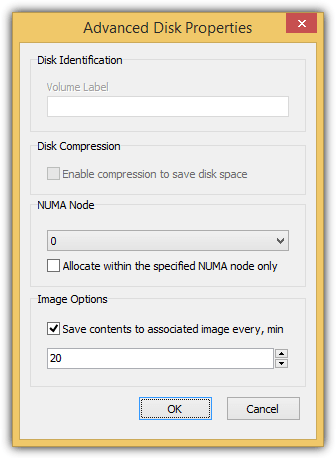
9. Go to Load and Save tab. Check the 3 option, “Load Disk Image at Startup”, “Save Disk Image on Shutdown” and “AutoSave”.
dataram image settings

10. Click the Save Disk Image Now button and select OK. Step 9 and 10 is very important because if you don’t save the image, your Firefox profile will be lost when you reboot your computer.

11. Finally, click File from the menubar, select Save Settings and click OK.

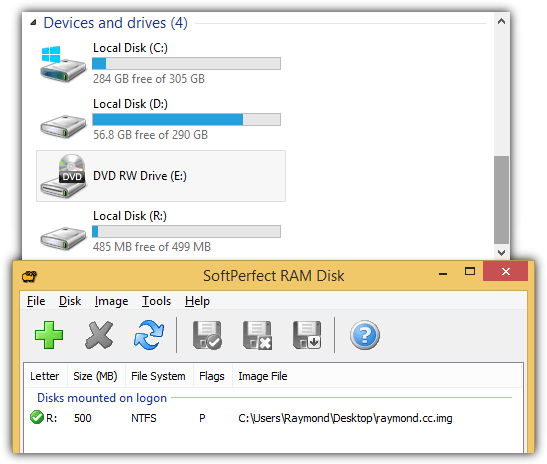
You’ve successfully set up RAMDisk and there should be a new drive letter on My Computer with only 300MB of disk space or the amount that you’ve set. Now you will have to copy your Firefox’s profile folder to the RAMDisk and configure Firefox to load your profile from there.

1. Simultaneously press CTRL WIN + R to bring up the Run command.

2. Type %appdata%\Mozilla\Firefox\profiles.ini and hit Enter.

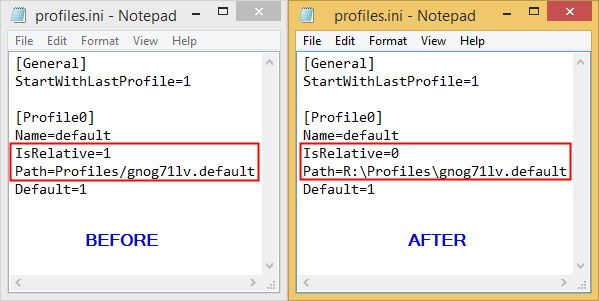
3. A notepad should appear with profiles.ini being loaded. Edit the path like the example below and save. Replace the “Profiles/” at Path with the drive letter that has been created by Dataram RAMDisk.

Change Path=Profiles/xxxxxxxx.default to Path=E:\xxxxxxxx.default

Change Firefox Profile Location

4. Make sure that the value for IsRelative is 0 and NOT 1. An example is IsRelative=0

5. Again simultaneously press CTRL WIN + R to bring up the Run command.

6. Type %appdata%\Mozilla\Firefox\Profiles and hit Enter.

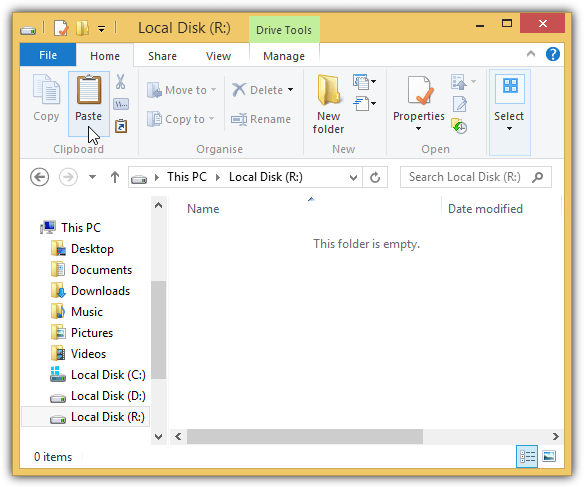
7. Copy the xxxxxxxx.default folder to the new drive letter created by RAMDisk.

You can now run Firefox with everything being the same! Everything is now automated and there is nothing that you need to do. Just enjoy the super fast Firefox!


Didn't find what you want? The links below could help:

Sync Your Bookmarks Across Browsers and SystemsSync Your Bookmarks Across Browsers and SystemsMozilla Maintenance Service maintainanceservice.exe by FirefoxMozilla Maintenance Service maintainanceservice.exe by FirefoxMozilla Firefox 64bit Build Performance Compared to 32bitMozilla Firefox 64bit Build Performance Compared to 32bitGetting Direct Website Links from Google Search ResultsGetting Direct Website Links from Google Search Results

104 comments on “SuperSpeed Firefox By Putting Profile and SQLite Database in RAMDisk”

  1. chocka says:
    2 years ago

    Nicely, but as Temporary Internet Files are also on the ramdisk. These files will be saved in the ramdisk.img as well. So is there a way only to save a ramdisk.img of Firefox without all the TEMP files included???

    Reply
  2. freddymac says:
    2 years ago

    What about Firefox on the Mac running OS 10.6+ Snow Leopard. I like Firefox but am about ready to switch totally to Safari.

    Reply
  3. HumpDoome says:
    2 years ago

    Hello this post is really amazing are you a trained autor ? Maybe i can hire you to post for my company?

    Reply
  4. Hawk says:
    2 years ago

    Work in/with Firefox Portable?

    Reply
  5. Omar says:
    3 years ago

    Thanks a lot man i almost forget about firefox because of that problem it hangs a lot.
    thanks again.

    Reply
  6. Robert says:
    3 years ago

    Worked well.
    using dataram ramdisk with w7 64bit and done so for months, no issue.

    Put the profile without any hitch, but noted the
    Profile has / and the one for path G: is \ which I guess might be easy to miss for a None computer savy.

    Reply
  7. Steven says:
    3 years ago

    @96
    A ramdisk’s function isn’t to remove an application’s reliance on RAM, but remove an application’s reliance on HDD. You shouldn’t be looking for improvements in RAM usage, as there’s little chance there will be any improvement.

    Reply
  8. Steven says:
    3 years ago

    I couldn’t get Dataram’s RAMDisk working properly, just like kitharass (comment 16). As others are experiencing with Dataram’s RAMDisk, despite being free, it may not be the best RAMDisk product to use if reliability is a requirement. I’ve tried others and received BSODs, even for non-free products, so your mileage may vary…

    Reply
  9. mosky7 says:
    3 years ago

    It doesn’t work!!!!
    Firefox started using 950mb ram even if my ramdisk profile was 300mb!!!!

    Reply
  10. John says:
    3 years ago

    Also, I suspect my Carbonite backup possibly had a conflict with RAMDisk, not sure. I just wonder why E: disappeared and yet RAMDisk was still running.

    Reply
  11. John says:
    3 years ago

    oops, FF stopped working a week later with a “firefox is already running but not responding… close … or restart” blah blah blah message. All applications were indeed closed! Figured it can’t find the path and sure enough, the RAMdisk “fake” E: drive was gone. modified the read file back to original “profiles and Firefox launched — but with a “Firefox has updated” screen. ah ha! I suspect FF updates throws a wrench in the works. Ideas? Should I try RamDisk again?

    Reply
  12. Phoe says:
    3 years ago

    I would add to No. 10 Sandeep that if you want your original profile back to exit firefox and then copy your original profile into the folder on your ramdisk. His way is MUCH simpler than than Raymonds. Using FirefoxProfilemanager you do not need to edit profiles.ini and you’re more likely to get it right the first time.

    Reply
  13. John says:
    3 years ago

    Tried this and works superbly! Lagged typing eliminated and the performance usage box in the task tray isn’t “maxed out” green all day!

    Reply
  14. John L. Galt says:
    3 years ago

    Ray,

    Thanks for the tip – both for the software as well as for the copying of the Fx profile.

    Off the top of your head, can you tell me if this can be automated, so that the RAMdisk is started every time the computer is booted? I currently have 4 GB of RAM, easy enough to allocate 650 MB (to contain 6 profiles) so that I can run Fx with ease….

    @everyone having problems – I did this just *once* and it worked correctly – but there are a couple of things to note.

    In the profiles.ini file, if there is a ***FULL PATH*** (e.g. “d:\somedir\mozilla\firefox\profiles\”) listed instead of just “Profiles\” then you’ll need to replace the entire “d:\somedir\mozilla\firefox\profiles\” string with the new drive letter, not just “Profiles\” – otherwise Fx will not be able to find your profile and will start out looking like a brand new install, as several people have noted.

    Also, if you copy the entire “Profiles\” folder (including all of the profiles inside, such as 4r5ty67u.default) then you’ll need to make the path be “X:\Profiles\” instead of just “X:”, where X is the new drive letter.

    Finally, make sure you’ve exited out of Firefox ***before*** you start copying.

    Reply
  15. catlyee says:
    3 years ago

    Use AFOM or Memory Fox(, which just came out) by IDEVFH.

    Well, I know a much easier and better way to reduce Firefox process memory usage.

    Reply
  16. ma7moud Mustafa says:
    3 years ago

    Insufficient physical memory! RAMDisk requires at least 600MB reserved for the operating system

    what can i do ? Ray

    Reply
  17. Terry-Anne says:
    3 years ago

    Awesome tip, Raymond! At first I only changed what you had highlight in red in the profiles.ini file. When I opened Firefox, all my passwords and bookmarks were gone. I went back and changed the profiles.ini settings exactly to what you had (not just what you typed out to change: “Change Path=Profiles/xxxxxxxx.default to Path=E:\xxxxxxxx.default”) and then I had everything back in Firefox.

    Thank you for once again providing such a great tip in your newsletter!

    Reply
  18. Please tell Me says:
    3 years ago

    One more thing: it is possible to use the undetected extra memory on Windows XP? Let’s say I have 4GB and XP detects 3,2 (give or take). The extra 800MB could be used to make a ram disk?

    Reply
  19. Ramesh kumar says:
    3 years ago

    Thanks raymond,
    But i lost my addons, bookmarks all..
    How to regain back all?
    Please reply raymond.

    Reply
  20. Rox4 says:
    3 years ago

    Very bad idea, my firefox pretty much reset back to its original state. all bookmarks, addons, etc. gone….
    Now i only can restore with Acronis trueimage.
    Check things a little better before laying it out !!

    Reply
  21. Daniel says:
    3 years ago

    Anybody thinking about the possibility with integrate AV and FW on this way?

    Reply
  22. Lord82 says:
    3 years ago

    Hi Ray

    Thanks for this article,
    but how does it work on
    (QSoft RAMDisk Enterprise v5.3.1.5)?

    Waiting your help……

    Reply
  23. ryann says:
    3 years ago

    guys… anyone got problem playing mafia wars on facebook? i follow the correction mention above but still got problem (the server at mwfb.zynga.com is taking too long to respond) , i tried using IE and it running fine. ????

    Reply
  24. Alex says:
    3 years ago

    but why disappear, bookmarks?

    Reply
  25. Nick says:
    3 years ago

    1. Before doing this trick..REMEMBER to Always have a backup strategy before make any changes!

    For example don’t make the changes inside the only original file. Then it is more safe to just take a copy from it to use as a source to play with and let the real file stay untouched.

    2. Also remember to let DataRam always save the image file on a place somewhere on your computer before it shutsdown and also to load the image automatic when turn your pc on, or loading it manually from the source. This because of the reason that every data which is saved (like RamDisk) or other data which is inside memory will be gone and released every time the computer shutsdown and the memory losing the power.

    Keep Nirvana rolling!

    Reply
  26. martinsmithson says:
    3 years ago

    Raymond states “…make sure that the IsRelative is set at 0 and you get everything back.”

    THIS DID NOT WORK on my XP SP2 PC.

    However, setting IsRelative=1, DID WORK! This makes PERFECT sense because your instructions require the change from 1 to 0. Therefore, to revert back to the original status, it must be changed from 0 to 1.

    Minor correction, I believe.

    MS

    Reply
  27. jashe says:
    3 years ago

    all my bookmarks and plug ins were gone, so i pointed the profile back to its original folder.

    also reclaimed the space set at Ramdisk.

    maybe this is good for new installs only.

    Reply
  28. CurlySue says:
    3 years ago

    After reading the Dataram RAMDisk v3.5 manual, I discovered an issue that may effect this applications ability to deliver on what it promises…SPEED!

    Specifically, on page 2 of the manual, it states, “Upon successful Start of the RAMDisk, a kernel level driver (RAMDisk.sys) is loaded into the Windows/System32/drivers folder. This driver will be available to Windows each time RAMDisk starts. It is removed when RAMDisk is stopped.”

    After following Raymond’s newly revised instructions, when I searched my system for RAMDisk.sys it was not located in the the Windows/System32/drivers folder (as specified by the manual, as noted above).

    This file exists in one location, and only one, on my Windows XP SP2 computer. Described as RAM Disk Drive, it exists in the C:\WINDOWS\system32\dllcache (directory) and is version 5.1.2600.2180 with Size: 20.2 KB (20,736 bytes), and Size on disk: 16.0 KB (16,384 bytes).

    Any thoughts regarding this “location” issue, Raymond?

    I ask because Dataram offers no support on this product and I cannot find any forum or usergroup regarding this application.

    Thanks,

    CurlySue

    Reply
  29. Raymond says:
    3 years ago

    Cool down, all your settings are still there and it’s not end of the world. All you need to do is point it to the right location, make sure that the IsRelative is set at 0 and you get everything back.

    I specifically mentioned to COPY, and not CUT and PASTE, which means no matter how badly you screwed it up, your original profile at Application Data folder is untouched.

    If still you can’t get it to work, then just revert the profiles.ini changes to point the path to Profiles/

    Reply
  30. lawiz says:
    3 years ago

    awesome share raymond… super!!! ;)

    Reply
  31. Samad says:
    3 years ago

    Great tip, one word of advice though, the bigger your ram disk the longer it takes to save it to the hard disk and thus your shutdown time increases significantly. I have a 512MB ram disk on a laptop with a 7200rpm sata hard disk and it takes about 2 minutes for the computer to shutdown, earlier it took about 15-20 seconds.

    Think about it, if it is worth the trade off on your case go for it!

    Thanks Ray!

    Reply
  32. martinsmithson says:
    3 years ago

    Well… it sure would have been nice to KNOW the SETTING associated with #71, Raymond’s UPDATE before spending the last hour and a half reconstruction my Firefox 3.5.5 bookmarks toolbar, etc.

    Then again, had I read the RAMDisk instruction manual, less than 13 pages, perhaps I would have AVOIDED the CATASTROPHIC results!!!

    The “IsRelative=0″ is HUGE to AVOIDING the problems that I encountered as “poorly” described under #69.

    Thanks for this “specific” CORRECTION, Raymond.

    MS

    Reply
  33. martinsmithson says:
    3 years ago

    And ANOTHER thing…

    GOOD LUCK INTEGRATING DOWNLOAD MANAGERS, LIKE ORBIT, IT CANNOT HAPPEN!!!

    ORBIT CANNOT INTEGRATE SINCE IT NO LONGER RECOGNIZES FIREFOX AFTER THIS RAMDisk MODIFICATION.

    WHAT A JOKE!!!

    I CANNOT BELIEVE I FELL FOR THIS ONE!!!

    MS

    Reply
  34. Raymond says:
    3 years ago

    An update. Make sure that you’ve set IsRelative=0 in your profiles.ini file. If you have that value as 1, then Firefox will start without your bookmarks and etc…

    I’ve updated the article. Please check the steps again. Sorry for any inconvenience.

    Reply
  35. Eric says:
    3 years ago

    Never trust sensitive information to an experiment. Should always leave the original profile folder in place just in case it doesn’t work. It didn’t work for me either, but I don’t care much since I have practically all the slowness-inducing features turned off. So when it didn’t work, I just went and set it back to its original state, and everything is fine.

    Reply
  36. martinsmithson says:
    3 years ago

    I LOST EVERYTHING!!!

    ALL OF MY BOOKMARKS ARE GONE, ALL OF MY QUICK LINKS ARE GONE.

    WHAT A DISASTER!!!

    AND I FOLLOWED EVERY DIRECTION TO THE LETTER TOO.

    THIS IS GONNA TAKE ME 2 TO 3 HOURS TO REWORK.

    WHAT A JOKE!!!

    Reply
  37. Ahmad Nazir says:
    3 years ago

    I can’t open using %appdata%\Mozilla\Firefox\profiles.ini and %appdata%\Mozilla\Firefox\Profiles command. The “Open With…” box comes out.

    I’m using Windows 7. Help!

    Reply
  38. Marc says:
    3 years ago

    Raymond,

    Nice concept but I cannot get it to work like others in this article. I followed all the steps, and when I started Firefox, I received a message that stated that Firefox was already running, and I needed to shut it down or restart.

    I even encountered a incident where Firefox started as a new installation without my Bookmarks. I needed to change the profile ini in Notepad.

    I am using XP. Could you please review the steps that you posted so that we can all get it to work like you described.

    All your help will be appreciated. Thanks.

    Reply
  39. Clay says:
    3 years ago

    i finally got tihs working, but now my computer’s Shutdown time has increased significantly, from like 30 secs before to like at least 2 minutes now. do i need to turn off RAMDisk when i’m done using it and before i shutdown?

    Reply
  40. venkat says:
    3 years ago

    @ kitharass
    “RamDiskXP start faild:
    Unable to start RamDiskXP driver. The Event log may also contain additional information.
    Why i m getting this message ?
    As i have made
    Disk Size 100MB, FAT 32 Partition,
    NT/2000/XP boot sector”

    me too getting hte same error
    ANY SOLUTION PLZZZZZZ…?

    Reply
  41. ryann says:
    3 years ago

    hi ray, thanks alot for speeding up my firefox…but got problem everytime i play mafia wars in facebook it slow down.aside from that everything is okey. please help

    Reply
  42. govind raj says:
    3 years ago

    hi ray,

    great work man !!

    It greatly benefits dial up users like me.

    Thanks

    Keep it up.

    Reply
  43. Ed says:
    3 years ago

    Hi thanks ray for the articles. much appreciated. i have a problem. after successfully done all the steps, my firefox started as if it’s newly installed. all add-on, bookmarks, etc are all gone. i have quite a fair bit of add-on and it’s rather difficult to reinstall one by one. any advice from you? thanks you very much.

    Reply
  44. Don says:
    3 years ago

    @Kai
    @Dan
    I have the same problem with bookmarks.
    Change the IsRelative=0 and add Default=1 after the Path at profiles.ini
    it will look like this——>

    [General]
    StartWithLastProfile=1

    [Profile0]
    Name=default
    IsRelative=0
    Path=k:xmvmev8.default
    Default=1

    Reply
  45. Murphy says:
    3 years ago

    Hi,
    Thank you very much for this article .
    Best regards !

    Reply
  46. Alex says:
    3 years ago

    aftre all these procedures i cannot start the Firefox at all. it that the Firefox already lounched and I’ve got finish the process! Reboot does not help.

    Reply
  47. rajsidhu says:
    3 years ago

    Raymond, pls help me…
    I dont get the last part, can you pls explain the last part in detail?

    4. Copy the xxxxxxxx.default folder to the new drive letter created by RAMDisk.

    Where is the new drive letter created by RAMDisk??
    PLs help!!

    Reply
  48. SB says:
    3 years ago

    Super!Will definitely give it a try.
    thanks once again Ray. Just waiting for X-Ray :)

    Reply
  49. Victor says:
    3 years ago

    hey i get invalid picture while trying to start my ramdisk.Is there any solution for this case??btw im using window 7 x32

    Reply
  50. little tablo says:
    3 years ago

    I register to a form. But I’m not reply to post. And next message displayed. I don’t know why. How to?

    you do not have permission to access this page. This could be due to one of several reasons:

    1. Your user account may not have sufficient privileges to access this page. Are you trying to edit someone else’s post, access administrative features or some other privileged system?
    2. If you are trying to post, the administrator may have disabled your account, or it may be awaiting activation.

    Reply
  51. kafji says:
    3 years ago

    didn’t work for me

    after changing the profile path in profile.ini as you mention above and start my firefox, firefox automatically create new profile files in %appdata%\Mozilla\Firefox\Profiles rather than using profile folder in ramdrive

    Reply
  52. Maruens says:
    3 years ago

    For those that having their bookmarks, addons and etc reset, it means that you either did not copy your firefox profile to the ramdisk or you’ve set the wrong path in profiles.ini

    =>
    If the ‘IsRelative’ item in profiles.ini file is set to the 1, then change it to 0.
    In my case, this is working!

    Reply
  53. Shamus says:
    3 years ago

    Someone try to explain this one!

    I followed all the steps and was able to start Firefox profile from my newly created J drive after pointing the ini file to J:\2kg4r2j1.default.

    I lost my bookmarks, addons and passwords. I was able to restore the passwords with the addon: Password Exporter. I was able to restore the bookmarks by importing bookmarks.html

    I noticed a quicker load time.

    I changed my ini file back and forth between Profiles/2kg4r2j1.default and J:\2kg4r2j1.default. They both loaded and were slightly different from each other because of the loss of addons in the new profile.

    All of a sudden I noticed my profile missing from the new J drive and Firefox was still loading. I thought this was weird.

    I decided to delete Dataram RAMDisk and I also deleted the 300MB img file. The J drive disappeared and I pointed my ini file back to Profiles/2kg4r2j1.default.

    Just for the fun of it I pointed my ini file back to J:\2kg4r2j1.default and to my surprise it loaded. How in the world can this profile load when I deleted the Dataram RAMDisk program and the img file. There is no visible J Drive.

    Can this profile be stored in memory somewhere?

    Reply
  54. dcrowe0050 says:
    3 years ago

    Thanks Raymond I appreciate the quick reply and love the blog.

    Reply
  55. Daniel says:
    3 years ago

    Ok, I’ve had this running all day so far and I noticed that my ram disk space is getting smaller and smaller as the day goes on. I set it up as a 300mb ram disk and my profile was 17mb in size. It has now grown to over 140mb in size. Is this normal? Do I have to increase the ram disk size eventually? I’m just doing normal stuff, surfing the web, nothing special. Running Win 7 Pro 64 bit.

    Reply
  56. Raymond says:
    3 years ago

    Sorry, it’s WIN + R. Made a mistake there…

    @Nicolas: That is why I’ve advice to set it auto save every 5 minutes.

    @dcrowe0050: When you’ve set the ramdisk to FAT32 and started it, the option will be blurred out and you will notice that it goes to Unformatted. Nothing to worry there because the ramdisk is still fat32.

    For those that having their bookmarks, addons and etc reset, it means that you either did not copy your firefox profile to the ramdisk or you’ve set the wrong path in profiles.ini

    Reply
  57. Rudolf (^c^) says:
    3 years ago

    47% use Firefox but how about Internet Explorer?

    Looking forward to read more in how to make the trick with other replacements like IE and why not virtual machines like VirtualBox in the RAM.

    Much interesting!

    Reply
  58. jimmy says:
    3 years ago

    does this work for flock browser too? thnks!

    Reply
  59. DmnY says:
    3 years ago

    dino, the search box can also be used for run commands.

    @Ray: good article.

    Reply
  60. David says:
    3 years ago

    Is is possible to make multiple drives of ram?

    Reply
  61. Nicolas says:
    3 years ago

    I didn’t try to implement the suggested solution in this article.
    However I am just a bit puzzle about moving Firefox SQLite database into RamDisk.
    What happens to Firefox and its database if suddently the Ramdisk software freeze or let’s say the computer power off unexpectedly ? Won’t you get any corruption ?
    Has anyone tried extreme crash solution to see if Firefox properly survive a crash test ?

    Thanks for you remarks

    Reply
  62. Willem says:
    3 years ago

    I’m very glad that your blog is active again.

    By installing only add-ons I really need and applying a few more tweaks, I manage to keep my Firefox Profiles size below 20MB.

    However, I’d like to try this trick in order to get a hands-on feel of RAMDisk technology (novel to me), see how much faster can Firefox go and provide it room for future enhancement.

    Thank you very much for the gift of learning, Raymond.

    Reply
  63. dcrowe0050 says:
    3 years ago

    Hey Ray set up the ram disk and everything exactly as you described, tried it twice actually, and when I reboot the ramdisk starts up as unformatted. So I noticed that as soon as I do step 9 and go back to the main page everything is greyed out and it moved my selection from FAT32 to unformatted. Any help?

    Reply
  64. EuGene says:
    3 years ago

    Hi Raymond,

    AppData seems to be protected in Windows 7 and doesn’t allow any access even in safemode, but after struggling quite some time with the Profiles and Profile.ini, I finally got it to work using FreeCommander.

    The content inside my Profile.ini are differs from yours, Is Relative=1 and doesn’t have Default=1 at the bottom, but I after changed Relative from 1 to 0 and add Default=1 to the entry, and finally it seems to be working without any problem. I even open and close Firefox to see whether the profile in Ramdisk changes, and it does.

    But after some time the profile from 30mb went up to 68mb, the most noticed file size is urlclassifier3.sqlite which took 30mb. I try to open Firefox after deleted urclassifier3.sqlite and nothing changes at all, or I missed it? After that I restored it back, still the same. Everything is working and seems to be fine but the only problem is the urlclassifier3.sqlite file size went sky high after some time.

    Reply
  65. Clay says:
    3 years ago

    same problem as with what kai has.

    My firefox pretty much reset back to its original state. all bookmarks, addons, etc. gone….

    Reply
  66. Ma7noud Mustafa says:
    3 years ago

    Insufficient physical memory! RAMDisk requires at least 600MB reserved for the operating system

    what can i do ? Ray

    Reply
  67. norman says:
    3 years ago

    You know what Ray….You are really a Genius guy! How did know that? I followed all every single detail of your instructions because of course I wanna speed up my browsing in the net. It works really great and unbelievably in a blink of an eye….the site I’m searching on was already there.

    Thanks Ray! Your right….SUPERSPEED…..

    Reply
  68. cesinham says:
    3 years ago

    hi thanks a lot i love firefox and i really wants it to be more faster. So i have win xp too and i put a ramdisk of 800mb and i does no habe any problem i think it is a independent thing

    Reply
  69. Dan says:
    3 years ago

    Hmmm, same problem as Kai for me. After completing these tasks, I’m for whatever reason, unable to load my bookmarks and add-ons. Can anybody think of any possible reasons? Thanks a lot.

    Reply
  70. bluemangroup says:
    3 years ago

    Great guide, but for step 2. I think you mean Win+R and not CTRL

    Reply
  71. József says:
    3 years ago

    Hi Raymond,
    I have the portable version of Firefox, may I use this method too ?
    Thanks,
    József

    Reply
  72. yuen says:
    3 years ago

    kai..i’m facing the same ploblem v u..
    also my cookies..all gone..

    Reply
  73. k says:
    3 years ago

    I had used Dataram RAMDisk about 2 days. I think it’s not very stable.

    Reply
  74. Dan says:
    3 years ago

    MR7, thanks for the tip, that worked on mine as well. Ray, so far, so good. Thanks for the ramdisk/Firefox tip!

    Reply
  75. prashant says:
    3 years ago

    thanks ray u r d best…hope u r having wonderful after marriage life…Bon Chance

    Reply
  76. neju says:
    3 years ago

    tnx raymund,.,i already tried this,.,can i ask a question?

    Reply
  77. ddshadow says:
    3 years ago

    Firefox cache !!!
    Open Firefox and type: about:config, click the warning box. Right click and select New –> String Copy & Paste the following in first the dialog box:

    browser.cache.disk.parent_directory

    pick the ramdisk as folder

    Reply
  78. kai says:
    3 years ago

    erm…a question here…

    My bookmark and remembered password gone after the setting… anything i can do to recover it??thx for help..

    Reply
  79. Hansel says:
    3 years ago

    It didn’t work.. =(
    What if i uninstall firefox and install it again in RAMDisk??

    Reply
  80. MR7 says:
    3 years ago

    One more thing: it is possible to use the undetected extra memory on Windows XP? Let’s say I have 4GB and XP detects 3,2 (give or take). The extra 800MB could be used to make a ram disk?

    Reply
  81. Raymond says:
    3 years ago

    @Hansel: Try adding another backslash at the end after Profiles so that it becomes %appdata%\Mozilla\Firefox\Profiles\

    @hellnoire: Search for Make RAM Disk. It’s a utility to quickly and easily create a RAM disk on Mac OS X.

    Reply
  82. hellnoire says:
    3 years ago

    Looks nice Raymond. You see, this is why I’m one of your forum members lol, you’ve always got tips like this.

    My only question, however, is an odd one. I know now thanks to you, Windows can do this. And Linux has optimized builds that reduce the needs for this, though can do it too. It leaves only one OS by itself.

    Not that I’ll ever be a Mac user, but I’m just wondering if you think this would be possible with Apple.

    Reply
  83. Hansel says:
    3 years ago

    I’ve installed and created a 300MB RAMDisk but i can’t seem to open %appdata%\Mozilla\Firefox\Profiles on Run Command. It give me option to “Open with” I am using Windows 7. Can anyone help please…

    Reply
  84. Shail Shah says:
    3 years ago

    Love it! Thanks Ray!

    Reply
  85. MR7 says:
    3 years ago

    That is odd. My profile.ini had IsRelative=1 and I couldn’t make it work until I change it to 0 (zero). For those who may have the same problem, try it. And great tip Ray, despite that my profile has only 16MB… =D

    Reply
  86. Raymond says:
    3 years ago

    Tried a few times but didn’t like it and not used to it.

    FYI, Safari takes the third position with 9% and Opera at fourth with 5.4%.

    I believe there are not many Windows user using Safari. So that means we have more MAC users than Opera users?

    Reply
  87. Anuranga says:
    3 years ago

    Hi there, I’m going to do this now, will I get a noticeable speed increase?
    Thanks

    Reply
  88. bud432 says:
    3 years ago

    Why dont u use Opera and u wont have a problem like this :D

    Reply
  89. kitharass says:
    3 years ago

    RamDiskXP start faild:

    Unable to start RamDiskXP driver. The Event log may also contain additional information.

    Why i m getting this message ?
    As i have made
    Disk Size 100MB, FAT 32 Partition,
    NT/2000/XP boot sector

    can anyone tell me plz at
    kitharass@hotmail.com

    Reply
  90. Zimbo says:
    3 years ago

    Being a FireFox fan, many thanks for the info. Great to see you back on the daily updates.

    Reply
  91. aran says:
    3 years ago

    thanks ray nice info.it works fine!

    Reply
  92. the_watcher says:
    3 years ago

    Guys, if firefox starts slow or runs try something else like opera for example…it may not have that much addons, but it has built-in features that makes most of the addons redundant…or else, check how many of firefox’s addons ‘emulate’ opera’s functions..
    i personally, mainly use opera, but i have firefox mainly for his videodownloader plugin which opera hasn’t..

    Reply
  93. Raymond says:
    3 years ago

    @Kashim: Your question has already been answered in the article.

    Reply
  94. Mohamed says:
    3 years ago

    wonderfull Raymond…
    you are the MAN

    Reply
  95. Sandeep says:
    3 years ago

    I actually attempted to do this when you wrote your ramdisl benchmark post.

    I had installed firefox3.7a1 into the ramdisk and also if you open up a command line to that firefox folder amd enter:

    firefox -profilemanager

    you can create a new profile with the location of your choice. Create the location in a folder in the ramdisk. And presto! You have both firefox and it’s profile all in the ram.

    Works great!

    Thanks for the tips raymond.

    Reply
  96. JF says:
    3 years ago

    Thanks for the info…

    Reply
  97. Kashim says:
    3 years ago

    But aren’t all the settings, cache and history reset after reboot?

    Reply
  98. roy raay says:
    3 years ago

    thanks mate, useful tip!

    Reply
  99. govinda says:
    3 years ago

    hi,
    after the dataram disk install complete, i tried to run , got a error , Invalid Picture.

    can u help on this.

    Reply
  100. Ahmad says:
    3 years ago

    You are always excellent, ray, Thanks for such a good tip, I miss your absence, I daily visit your blog for post….

    Reply
  101. bruce says:
    3 years ago

    thanks mate… for this wonderful tips……. welcome back….

    Reply
  102. Raymond says:
    3 years ago

    Press Win + R. It works the same on XP, Vista and even 7.

    Reply
  103. dino says:
    3 years ago

    lol..i found the solution…juz type “run” on the search box then u r ready to go…

    =)

    Reply
  104. dino says:
    3 years ago

    how to do the step 2 for vista user?

    i cant find run command on vista because it has the search box…

    Reply

Leave a Reply Cancel reply

Your email address will not be published. Required fields are marked *

Recently Updated

  • flash bios icon

    5 Tools to Easily Install FreeDOS or MS-DOS onto USB for BIOS Flashing

  • avast icon

    Reset or Remove avast! Authorization Password to Access Settings

  • U3 icon

    How to Customize U3 USB Smart Drive to Become Ultimate Hack Tool

New Articles

  • task manager replacement icon

    Memory Usage Test to See Which is the Lightest Antivirus Software

  • kaspersky antivirus 2013 icon

    Activate Free Kaspersky Anti-Virus 2013 ROG with 1 Year License

  • remote access software

    Top 8 Remote Access Software for Providing Online Support

Popular Posts

  • Top 10 FREE Data Recovery Software

    Top 10 FREE Data Recovery Software

  • How to Hack Into a Windows XP Computer Without Changing Password

    How to Hack Into a Windows XP Computer Without Changing Password

  • 10 Free Software to Mount CD or DVD ISO Image File as Virtual Drives

    10 Free Software to Mount CD or DVD ISO Image File as Virtual Drives

Recommend on Google
Follow @raymond_cc
Subscribe Youtube »
(c) 2013 Raymond.CC Blog
  • Contact
  • Disclaimer
  • Disclosure
  • Privacy Policy
  • Terms of Use
  • Sitemap