
Test Open Port Forwarding for Your Router or Computer


 5 min. read
  Published on

Every web services must run on a port or else the service will be inaccessible. For example, when you visit a website, your web browser automatically connects to the web server using port 80 because that is the standard port registered in the IANA organization. It is also possible to configure a web server to run under a different port number such as 8080 and since the web browser connects to port 80 by default, you’ll need to instruct the web browser to visit the URL using the different port by adding the port 8080 at the end such as http://www.website.com:8080
Even if you are trying to host a temporary game server, connect to a CCTV, remotely access your router configurations, download media files using a BitTorrent client such as uTorrent, all of the actions mentioned above requires an open listening port for optimal usage and in some cases it won’t work at all if the port is closed.
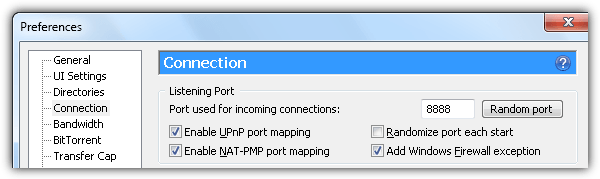
Fortunately most modern routers already support UPnP whereby the router automatically opens and forwards the required port when it is triggered by the software, saving you the trouble of manually accessing your router settings to forward a port. The only problem is, how do you know whether the port forwarding either manually created by you or automatically through UPnP worked? Here we have 5 web services which you can use to test if the forwarded port is open or closed.
1. YouGetSignal Open Port Check Tool
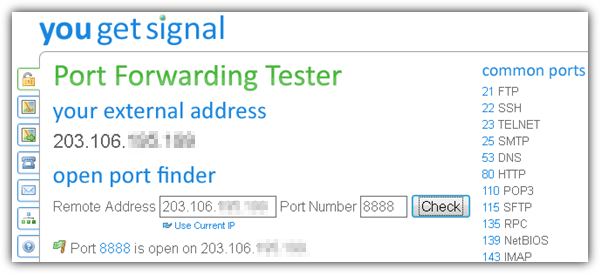
The open port check tool by YouGetSignal is a fast and easy to use port forwarding tester. Upon visiting the website, it detects your external IP address and automatically embeds it to the remote address box for your convenience. You can find a list of commonly used ports at the right hand side and clicking on it will instantly check the status of the selected port. You can also quickly scan all of the provided common ports by clicking on the “Scan All Common Ports” located at the end of the list.
Visit YouGetSignal Open Port Check Tool
2. Ping.eu Port Check
Ping.eu is a well known site that offers free web based network testing tools such as a ping test, traceroute, DNS lookup, WHOIS, reverse lookup, proxy checker, bandwidth meter, network and network mask calculator, detect country by IP, unit convertor and finally a port checker. Using the port checker is as easy as either entering an IP address or hostname, followed by the port number and clicking the Go button. Your IP address is detected and shown at the top of the webpage. Clicking on it will transfer the IP to the appropriate box for your convenience.
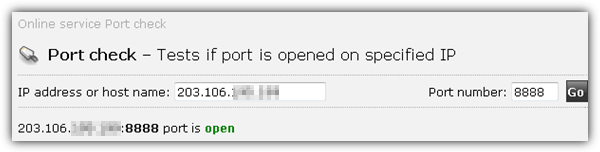
Ping.eu offers a great alternative to YouGetSignal because both are able to provide results in real time on the page without actually refreshing the whole webpage.
3. WhatsMyIP Port Scanners
As mentioned earlier, a port scanner can also be used to test if a port is open or closed. The difference between a port scanner and a port checker is the port scanner is able to automatically scan a range of IP addresses whereas a port checker is commonly used to check a single port on a single IP address.
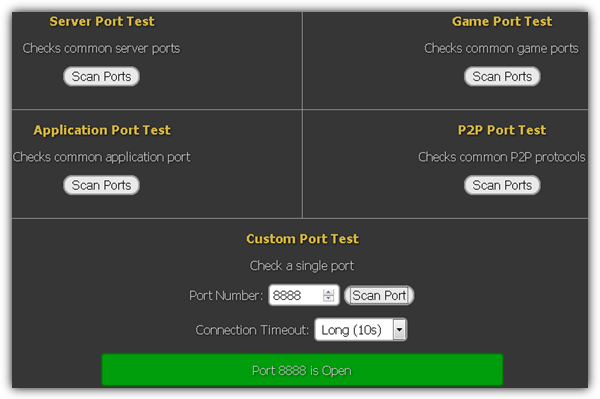
WhatsMyIP Port Scanners stands out by having 5 different categories to check on common server/game/application/P2P/Custom ports. An additional feature that is not normally found on other port checkers is the ability to select the connection time out. 3 options are available which is short (1 second), default (2 seconds), or long (10 seconds). For security purposes, WhatsMyIP Port Scanners only scans your IP address.
4. Network Port Scanner Tool
The Network Port Scanner Tool is a more advanced port checker if compared to the list mentioned above with two modes which is Normal and Advance. Basically the normal mode allows you to quickly scan a range of ports for an IP address while the Advance mode lets you choose the type of scan and ping with additional advanced options including detecting the operating system for the remote IP. The different scan modes especially the SYN Stealth is useful to scan a host with a firewall enabled.
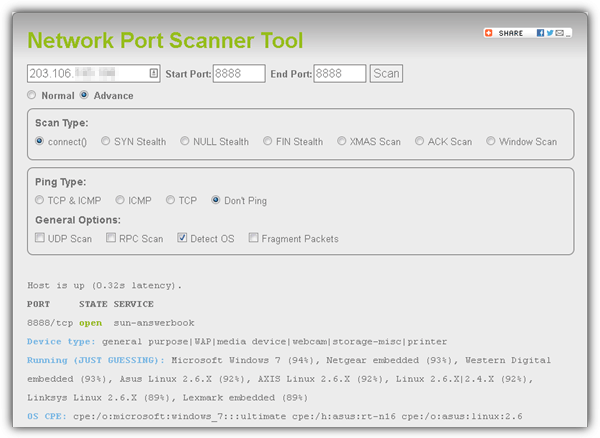
Network Port Scanner Tool has accurately detected that I was running Microsoft Windows 7 Ultimate operating system during the test.
Visit Network Port Scanner Tool
5. IPv6 Port Scanner
While most of the online port scanners or checkers will scan IPv4 addresses, here is one that scans connected hosts with an IPv6 global unicast address. 8 UDP ports are a must to scan while the 53 TCP ports can be excluded. You can also specify up to 4 custom TCP ports to be checked.
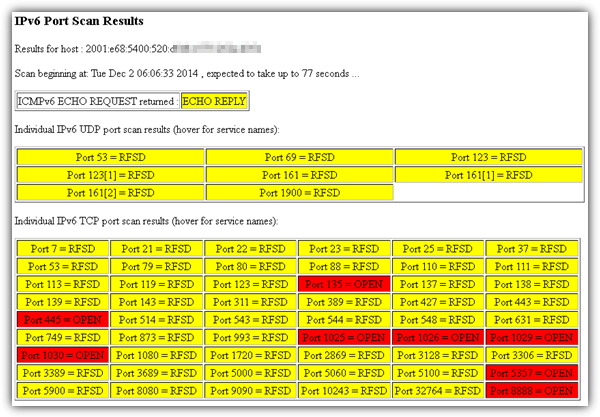
The scan results are displayed in real time using Javascript.
Additional Notes: The above online web services are only used to test if an external source can connect to you using the tested port. To test a local connection, you can either use a port scanning software or simply type “netstat -a” in command prompt.
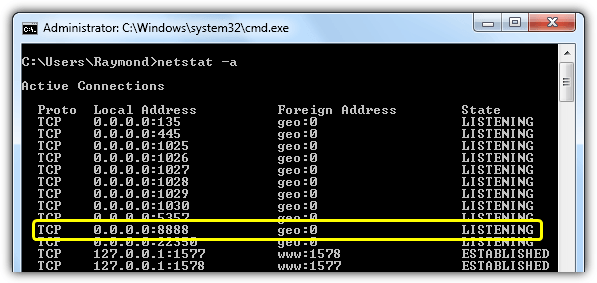
As you can see at the image above, the IP 0.0.0.0 means that the port 8888 is being listened on all IP addresses such as the localhost 127.0.0.1, private(internal) and public(external) IP addresses.



Improve this guide

User forum
0 messages