Donation Goal
Donate Now Goal amount for this year: 799 USD, Received: 100 USD (13%)
Please donate to help support this website. The funds will be used to purchase owned license of LiteSpeed Web Server Enterprise (2-CPU). It provides superior performance in terms of raw speed, scalability and anti-DDoS capabilities.

Tracking Registry and Files Changes When Installing Software in Windows

Posted By Raymond In Category: Computer // Music

Feb
28
2009

Usually an installation file comes in one setup file. When you run it to install the software on your computer, it actually extracts a lot of files to a default location, normally in Program Files. Some will even drop a few critical driver files in Windows folder. At the same time, it will add some keys in your registry if the software is programmed to read the settings from registry. When you want to uninstall the software, it has an uninstaller to automate the process but if the uninstaller is corrupted, manually deleting the software from Program Files can cause instability to Windows.

There are third party uninstall utility such as Revo Uninstaller but I never use it because I know for a fact that it is not a perfect uninstall utility that works all the time. The best way is to monitor and track the file and registry changes when you want to install the software. There are a few popular registry and file changes monitoring tool such as SysTracer, RegSnap, Tracker, WhatChanged and fileWATCH but they all cost money to buy the license key. I also don’t like to use FileMon, RegMon or Process Monitor because it logs everything and can be confusing. As an alternative, here are 5 free software that can be used to track file and registry changes.


Usually these tracking tools will create an initial snapshot and then compare them with a later snapshot to determine the changes being made by the software/installer.

1. Regshot 2.0.1.61 unicode
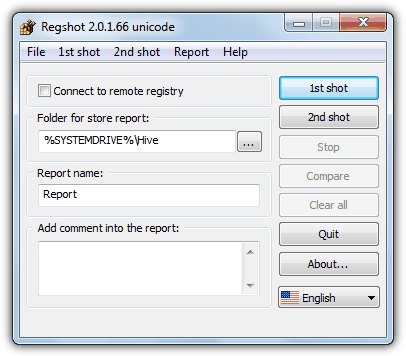
RegShot track registry and file changes
Regshot registry and file compare utility that allows you to quickly take a snapshot of your registry/file and then compare it with a second one. This unicode version of Regshot is an improvement of the Regshot v1.8.2. It is slightly faster and have more options. Initially Regshot can only track registry changes but since version 2.0.1.56, the developer has added Fileshot which can also track file changes. Fileshot is disabled by default and you’ll have to enable it Options. Fileshot checks for changes using MD5 or CRC32. After comparing 1st and 2nd shot, it’ll open up a detailed HTML log on what has changed on your browser.
Powerful but not so suitable for computer beginners.

2. InstallWatch Pro v2.5c
Installwatch
A utility that tracks changes made to your system during the installation or removal of software or hardware. Changes tracked include additions, deletions, or modifications to files and directories, INI files, and the Registry. All information is stored in a database so that it can be accessed later to generate reports. Last updated on July 2007.

3. SpyMe Tools v1.5
SpyMe Tools monitor installation
SpyMe Tools is very useful in detecting Registry and Disk changes. If any application installs spyware, adware, dlls, programs, files, or any other type of file, picture, or program, etc. or changes the Registry’s content, you will be able to see exactly where the modification occurred so you can take measures. Last updated on January 2005.

4. InstallSpy v2
Installspy track installation file and registry changes
This tool was intended to help you discover spyware. It can track any and all changes to the registry and file system, and also record all shell notification events (e.g. media inserted), when a program is installed, uninstalled, or run. This can warn you of programs trying to install new services, programs that are set to run on reboot, changes to your home page, etc. Last updated on December 2003.

5. SystemSherlock Lite v1.0.0
SystemSherlockLite GUI monitor file and registry changes
SystemSherlock Lite is a free command line utility designed to analyse changes made to the registry and file system on your Windows workstation. SystemSherlock Lite saves an image of the registry and all your files and folders. Later on – for example after installing some software – you can analyse in detail what changes have been made to your system. You will find out exactly which registry entries and files that have been created, deleted or modified. Because this tool is in command line, it could be tough to parse big log file and tedious to understand it. Here is a third party log reader that can display logs from SystemSherlock. Other than that, if you’re not comfortable in running command line apps, here is a GUI for it. Last updated on June 2003.

Regshot is my favorite if compared to the other four because it is small, portable, constantly being updated and more advanced. The rest are pretty much no longer in development, so it could be slower and probably don’t even support Vista. As for shareware, Total Uninstall is my favorite uninstaller. It has a Monitored Programs module that helps to monitor any changes made to your system during the installation of a new program. It allows you to perform a complete uninstall without having to rely on the supplied Add/Remove program which can leave files or changes behind. The developer of Total Uninstall strives very hard to make sure that cracks and keygenerators cannot be easily found in file hosting sites. The latest one is cracked by Revenge Crew (total.uninstall.5.2.0.148.full.incl.keygen.and.patch-rev).

Other than using registry and file changes tracker software for uninstallation, it is also possible to remove the trial period of a software in most cases. If you know how to reset Kaspersky trial period, you can see at the image below that Total Uninstall managed to capture the registry location that records if a trial license has been activated or not (Don’t ask me where is it because I can’t tell you here). In fact, this is how I managed to find out on how to activate the 6 months Kaspersky chinese license on English setup.

Kaspersky Registry Trial Reset


Related posts:
  • A Very Tiny Tool to Monitor Changes in Windows Files, Registry and Processes
  • RegDefrag: Does It Really Defrag Windows Registry Entries?
  • One Click Windows Registry Optimizer
  • How To Monitor for Registry and File Changes in Windows
  • How To Edit Windows Registry Key Values without Booting in Windows
    • webcadre

      when some thrash is left in your registry i think this is when the registry cleaner will enter like ccleane, pc tools, iobit and TU. :)

    • Roy Raay

      Total Uninstall is what I use, but thanks for rest of the softwares, great tips no doubt, cheers mate!

    • esseker508

      im the first one to post

    • esseker508

      i” try this

    • xje4bv

      This is great. Thanks a lot. I used to know about FileMon and RegMon only.

    • razor

      Nice info and you are really good in giving cracks, full programs and trial resetting information implicitly(tersirat). Good job. :-)

    • ha14

      Thanks for the tools and the reviews, indeed adding and removing files and softs can corrupt and changed registry with living the windows to run slower and even to prevent starting again. I tried for a while Active Registry Monitor
      and
      What Changed 1.06
      http://www.majorgeeks.com/What_Changed_d5018.html

      here is what that caught my attention sometme ago:
      RegNotifyChangeKeyValue
      http://msdn.microsoft.com/en-us/library/ms724892(VS.85).aspx

      http://delphi.about.com/od/kbwinshell/l/aa052003a.htm

    • http://tech-shinobi.com fr33mumia

      Another great compilation Ray.got another question for u n other commentator.is it possible to move installed applications by exporting folders/files & registry to other PC.tqvm in advance =D

    • Blackrose

      Thanks man, its great tutorial. I always wanted to keep my system clean and I am gonna use Total Uninstall.

      Thanks!

    • philips14c

      Since I began to use Total Uninstall (1 year ago) I never had to reinstall Windows! This program really removes everything! Windows will be in top shape no mater how many apps you install/uninstall! This kind of application is excellent to keep bloatware and crapware under control.

    • C

      Great prgrms. Really usefull. I used so far Trackwinstall, by Matthias Withopf. This tiny prgr alows you to track registry, file system change and even undo changes made to your computer by instalations. It does take some time for a snap shot. but is a great tool. http://www.withopf.com/tools/trackwinstall
      It does have an english version and english help files. Works with prgr that requires restart.
      Thank you for your work

    • Natella

      Thanks for the post Raymond! Have not you tried to use Ashampoo Magical Uninstall instead of Revo? This tool controls each installation and the smallest changes it makes to the system so that if users decide to uninstall the prog it would not leave anything behind and the system would be exactly the same as before installation.

    • mike

      thanks ray..

    • skp

      Thank you Raymond for all the great post’s…

      Guys,
      I have a question? Say I installed a trial ware which works for 30 days…used Total Uninstall and uninstalled it..if I install the software(the trial ware which I had) back..will it work again..just curious because it takes all the remnants back… Thanks…

    • billy13

      Thanks Ray!

    • Kissol

      To do a accurate uninstall I use, instead Total Uninstall (that is payware), the excellent ZSoft Uninstaller – freeware.

      It does a exceptional work to track installations and does a perfect uninstall.

      I advice it!

      Working with ZSoft since some years ago to keep a clean system.

    • mafia87

      Thank You…

    • Merlin_Magii

      I gave up in disgust with Regshot. Your link leads to a page in what appears to be Russian. I then Googled the name and selected translated page but nowhere could I find a download link that worked – only links to sites inviting voluntary payment – which didn’t work !

    • http://www.raymond.cc/ Raymond

      Merlin_Magii: I’ve been requested many times to stop posting direct links because it’ll be inaccessible if the developer changed the link. So I linked to the webpage instead…

      If you are so disgusted and can’t find the download link, try translating the page in Google, scroll right to the bottom and click on the Load button. Simple.

    • Manish

      @ Merlin_Magii: Click on the button titled “Загрузить”, right at the bottom of the page; it took me a while to figure this out, too.

      @ C: Thank you for suggesting Trackwinstall by Matthias Withopf. It is, I think, better than all the other freeware talked about here!

    • mk

      raymond u have missed scotty the patro..it has a free version and is wonderful in tracking the registry changes.
      by the way how about sending me a years licence for ip hider? never managed to get anything from your website giveaway despite being a loyal newsletter subscriber for a year..

    • http://madhabspace.blogspot.com sunkumarspace

      this will be usweful info. for us, thnks

    • Ahmad Maher

      you remind me by a tool that i used to use in the past called InCtrl 5 … it was great

      thanks for the new tools and info

    • Rossy

      Warning, I used perfect uninstaller and it changed my administration policies so I now cannot install other programs, I am a home user and not technical and now cannot change the administration policy back to allow installs. I have contacted Perfect Uninstaller twice and they have not/will not get back to me. WARNING!!!!

    • GL

      Thanks for the article/list of tools but do you really need to have a long url for this page? Excess urls are an epidemic on the internet and I would like to send this link to other people for example and it just looks like @#$% when URLs are 110+ characters long. Maybe you want SEO placement but there are other usability, readability, and etiquette issues with URLs.

    • rover3500

      i use regfromapp by nirsoft.Does it on the fly,no waiting.just pick an existing prog or a new one,then just save as,and it saves it as a reg file!excellent

    • Ed

      It took me couple hours to find a working download of the Regshot Unicode. I have no idea why it is so hard.
      Check this German site
      http://www.wintotal.de/Software/?id=4645
      This is 176KB file.

      There is a fake site regshot.ru that puts 5 MB dummy file on depositefiles site.

    • david roper

      GL

      GL, you would complain that your gold coin had scratch marks on it. Be thankful that Raymond allows you to read his articles.

    • David

      I would love to download regshot but the website doesn’t exist anymore, can you maybe upload it?

    • Stanley Lu

      Hello Raymond,

      Sorry, I posted on the wrong article. Please delete this message. (http://www.raymond.cc/blog/archives/2009/09/08/how-to-uninstall-refog-keylogger-without-knowing-master-password/#comment-451639)

      In this article:
      The link to “Regshot 2.0.1.61 unicode” does not seem to work anymore~

      Thank you

    • ggg

      install watch pro is, ironically, not very easy to install

    • Hani

      Raymond Rules….

    • BesT

      Does anyone know a tool that track registry and files changes and has sandbox capabilities ? i had one and forgot it`s name after i formatted my pc

    • vlad

      I use SysTracer – http://www.blueproject.ro/systracer because is the only utility that works on vista64

    • TDinDC

      This is all interesting, but what I’m hoping to find somewhere is a tool that understands changes made to the registry by installation of software subsequent to the Windows operating system install, that can restore the registry with those changes so as to avoid reinstallation of all the application and hardware support (drivers) software. What a pain it is that Windows never thought of, or did not provide this with a “clean install”. Repairing Windows doesn’t always solve its problems.

    • jack

      fix regshot url:
      it’s on sourceforge.net

    • http://www.danielmunoz.com.ar/blog Daniel Muñoz

      Regshot 2.1 URL is no here:
      http://regshot.ru/21/download.html

      You may translate the URL. The soft has many languages. Works fine.

    • Rajakumar

      Daniel Muñoz ,
      you are correct ,its downloaded as Russian language (default),after that ,we can change language as our wish…
      its very nice..

    • suja ram

      I remember the utility Regcleaner in windows98 period.
      It used to show any new registry entries separately. Anything like that available for win7?

    Copyright © 2005-2012 - Raymond.CC Blog