
5 Simple Tools to Display Hidden Remote URLs in Background or Web Installers


 8 min. read
  Published on

It’s becoming a growing trend these days that when you download a piece of software, you’re not actually getting the proper full setup installer. Instead you download a small front end executable that will download the real installer in the background when you launch it and proceed with an install. Although this method of supplying the software reduces the load on servers because you’re only downloading the full size installer when it’s required, it’s also frustrating because you need access to the internet when it comes to installation and not everybody has or wants web access all the time.
 Adobe Flash full installer downloads in the background
Thankfully, most of the time the web installer is only downloading the full setup executable file that’s usually hidden away or not immediately obvious on the developer’s website. Although you can’t normally view the full path and direct link of the application URL when the computer is downloading files in the background, there are ways to get around this problem with the help of a small piece of software. This will allow you to download the full setup file and install it on any computer at a later date.
Packet sniffing tools capture the incoming and outgoing packets on your network and are able to view the data which will usually include the direct URL to other installer files, executable’s or even media files. There are many network tools around that can do this type of task like Wireshark or Fiddler, but they are more powerful and advanced. Here we list 5 free tools that can capture network packets and are very easy to use only really requiring a few mouse clicks to discover the hidden URL you’re looking for.
1. URLSnooper
URLSnooper is a packet monitor tool that is able to directly sniff or snoop the full URL from a web installer or webpage. It uses the WinPcap capture driver for its sniffing tasks and you will need to install it manually from the folder if you’re using the portable version of URLSnooper. Here’s how to capture a URL:
Like all packet sniffing tools, it’s best to only start sniffing just before the file you’re trying to get the URL for is downloaded (or clear the history first), this way there is less data to trawl through to find what you’re after.
1. By default the program is setup to monitor only multimedia files and you need to go to the File menu -> Advanced and select “Show All” from the Protocol Filter drop down.
2. Click the Sniff Network button to start monitoring URLs on your computer and keep it running.
3. Run the web installer, program or click on the webpage link and let the main file download, or cancel after it’s started downloading. Go back to URLSnooper and click the Stop Search button.
4. Click the Protocol column to sort according to protocol type. Then look for a line with “GET exe file” (or “http exe file”) and you should see what looks like a link to an executable file. Double click to open it in your browser or right click and copy the URL to confirm it’s what you want. In the example below, the URL for the full 16MB Adobe Flash player installer is sniffed from the 2MB web installer.
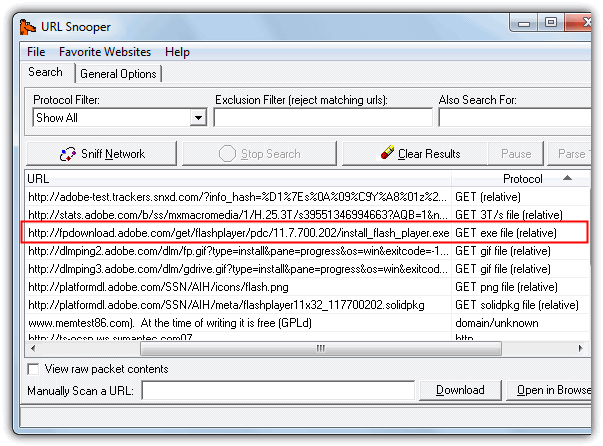
URLSnooper can also sniff out images and audio files etc, there’s specific mode to display multimedia links in the Protocol Filter.
2. HTTPNetworkSniffer
HTTPNetworkSniffer is a tiny and portable utility made by Nir Sofer (Nirsoft) which captures HTTP requests and responses between your computer and the server and displays them in an easy to understand view. A good thing about this program is it doesn’t rely solely on the WinPcap capture driver like many other tools do. It also supports Raw sockets which don’t need any third party driver, but requires the tool to be run as administrator. WinPcap is still an option if you have it though, as is the Network Monitor Driver by Microsoft.
1. Using HTTPNetworkSniffer is very easy, simply start the tool and it will ask you to select the network capture method of Raw, Winpcap or Microsoft Network driver, and the network adapter if you have more than one installed. Then click OK.
2. The program will start capturing automatically, and you now just need to launch the installer or click the webpage button etc to capture the URL. Then press the stop button and look at the URL column (far right) in the window to locate the executable. Alternatively double click on the entry to get the full URL you can copy along with other useful information. The image below extracts the full offline installer for Freemake Video Converter from its small web installer.
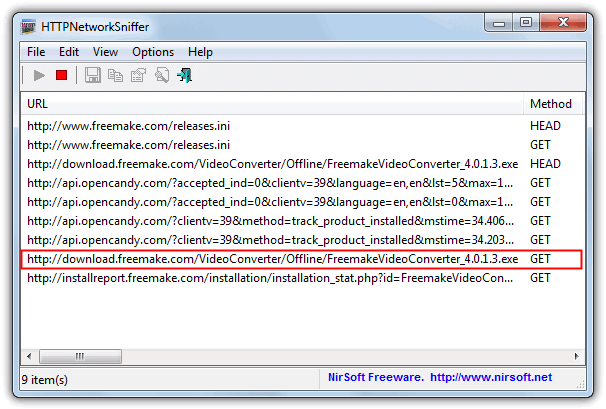
A handy thing about HTTPNetworkSniffer is it shows a lot of other packet information columns such as host name, method, user agent, response code & string, content type, referrer, encoding, content length, connection and much more. All columns can be turned on or off via the View menu.
If you want more than just the sniffing of HTTP requests and responses, then another NirSoft tool called SmartSniff is like a more advanced version of HTTPNetworkSniffer. It can also handle sniffing other protocols such as UDP, ICMP, SMTP, POP3 and FTP while providing other functions such as hex dumps etc.



Improve this guide

User forum
0 messages