
What is INFO2 File Hidden in Recycled or Recycler Folder?


 5 min. read
  Published on

Most of us know what the Recycle bin does and how to use it, and its internal workings have changed subtly over different Windows releases. Windows Vista and above now use meta data information to store the selected files and folders in a recycle folder called $Recycle.bin before being permanently deleted. Windows XP and below users will have differently named recycle folders on their drives called either Recycled or Recycler. What’s the difference between the Recycled and Recycler folders?
In fact, they have no real differences and you will have have either folder at the root of your drive. What determines whether you have Recycled or Recycler is actually due to which filesystem is present on your hard drive. If it’s a FAT32 Windows partition, you will get Recycled and if you have NTFS, you’ll have Recycler. Some people might even have both of the folders because they’ve previously converted their drive from FAT32 to NTFS. Likewise, it’s not uncommon for users of Windows 7 or 8 to come across Recycler on an external hard drive which has previously been plugged into a system running XP.

When you delete a file in Windows XP’s Explorer or My Computer, the file immediately appears in the Recycle Bin. This is what you see, but actually there is something going on in the background. The complete path and file or folder name is stored in a hidden file called INFO2 which is inside the Recycled or Recycler folder. This file is very important because if INFO2 becomes corrupted or removed, normally anything currently in the recycle bin could be lost lost unless you try to use a piece of data recovery software to get it back.
Let’s do a small test to understand better what happens.
I’m going to delete a file from the Desktop called “DeleteMe.exe” and let it stay in Recycle Bin. Once deleted, I can see from the Recycle bin icon that it now has trash. As the system partition is the NTFS file system, there will be a RECYCLER folder at the root of C. Inside the Recycler folder there’ll be a another folder with a name like “S-1-5-21-1078081533-1957994488-1343024091-1003” or similar. Inside there, the file that was just deleted (DeleteMe.exe) is viewable.
To see what’s really happening in the Recycler folder, we can’t use Windows Explorer as it doesn’t show all the files. Some are hidden and also have their System attribute set, but even enabling “Show hidden files” and disabling “Hide protected operating system files” from Windows Folder Options still doesn’t show everything. You can either use Command Prompt to get a full view of Recycler, or even better, use a File Management application. I’m going to use the excellent FreeCommander for this purpose because it shows all system, hidden and protected files and folders by default.
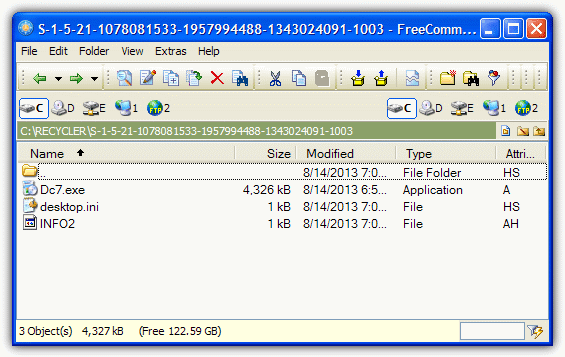
Checking what’s in the “Recycler\S-1-5-21…” directory through FreeCommander we can see the INFO2 file along with the the executable file that was deleted, although it’s been renamed Dc7.exe. If I actually dragged the file to the Desktop, it would change back to DeleteMe.exe, and then back to a Dc{number}.exe file again if I dragged it back. The same would happen to a folder sent to the Recycle bin.
If I delete the INFO2 file, something odd happens because the Recycle bin still shows it has trash, but opening the bin reveals there are no files in there. If I try to empty recycle bin though, it asks me “Are you sure you want to delete these 2 items?”
Going back to the Recycler folder and looking at what’s in there, the Dc executable is still there along with a new Dc file which is the previously deleted INFO2. Moving the Dc7.exe out of the Recycle bin this time, which renamed itself before, now won’t do that and stays as a Dc named file. As we can see from this little experiment, the INFO2 is important because without it, the Recycle bin doesn’t have a record of the original files, folders and paths when it comes to restoring them from the trash. When you empty the Recycle bin, the data in INFO2 gets emptied as well.
There seems to be no known way to actually edit the INFO2 file directly but there is a free tool around called rifiuti2 that is used to analyze INFO2 and was designed originally for Windows computer forensics. To analyze the INFO2 with rifuiti2, you need to copy INFO2 from Recycler to the rifiuti folder using FreeCommander and run the command “rifiuti INFO2” from Command Prompt.
It will then show you all deleted file and folder information held in INFO2. It won’t show all the files in a folder if you delete the folder itself, just like the Recycle bin doesn’t. It can however, show any files that are left in INFO2 but have been deleted from the trash, although usually these entries should be removed when the bin is emptied.
So what have we learned? Firstly, an original INFO2 file is not a virus and plays an important part in storing information about what is kept in the Windows Recycle bin, and where it goes if it’s restored. Also, it’s possible to recover files from the Recycle bin if the INFO2 file is corrupt or missing and no files are visible in the trash, even though the icon shows there’s something in there.



Improve this guide

User forum
0 messages