
10 Free Tools to Monitor Files and Folders for Changes in Real Time


 11 min. read
  Published on

With so many programs working in the background performing their own tasks, it can be quite difficult sometimes to know what is being written, deleted or modified on your drives. There always appears to be something making changes somewhere. Some operations you might be fully aware of such as file downloading, video encoding, antivirus scans etc, but there might also be something writing to the drive when you don’t really expect or want it to.
Being able to monitor files across the board would work, but isn’t really practical. As it would be a thankless task trying to keep watch over all this activity yourself, having a piece of software to help you find out what files are being created or modified could be a real time saver. Thankfully, there are tools around to help you out and keep watching these areas for you, here’s a selection of 10 free programs to have a look at. All tools were tested in Windows 10 and Windows 7 64-bit.
1. Watch 4 Folder
While performing the task of watching for a number of different actions such as file or folder create, delete, rename or change, Watch 4 Folder can alert you about the change in several different ways. There’s also a few other interesting functions such as watching for a file association change, whether the drive free space has changed and also if a CD/DVD (not USB media) is inserted or ejected.
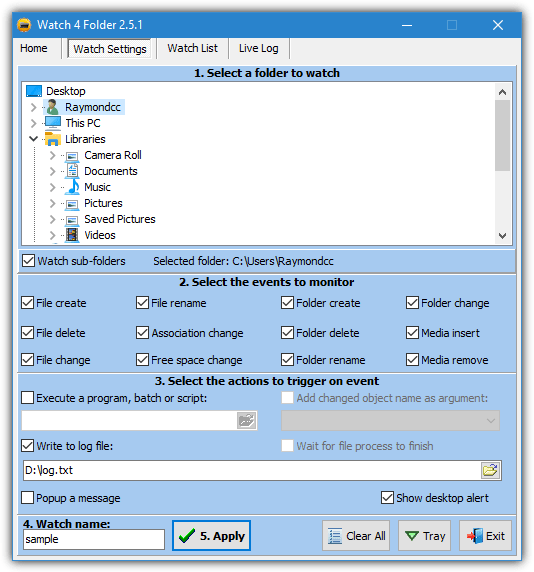
Trigger alerts can be an ordinary desktop popup window, a custom alert window that appears above the system tray, or executing another program with the changed object optionally supplied as an argument. The events can also be written to an external log file or viewed via the Live Log tab. Press Apply and then Start on the Watch List tab to begin monitoring.
The free version of Watch 4 Folder allows the monitoring of a single folder at a time. The paid version ($4.99) can have up to four folders monitored simultaneously. Watch 4 Folder is portable and compatible with Windows XP up to Windows 10.
2. Disk Pulse
There are five editions of Disk Pulse; four paid and a restricted freeware version. Annoyingly, there is no official information about what those restrictions are. We know from testing, there is a limit of three profiles while email notifications, database logging, and custom actions are disabled. However, file type monitoring, filters, categories, and rules are no longer disabled like they were in older versions.
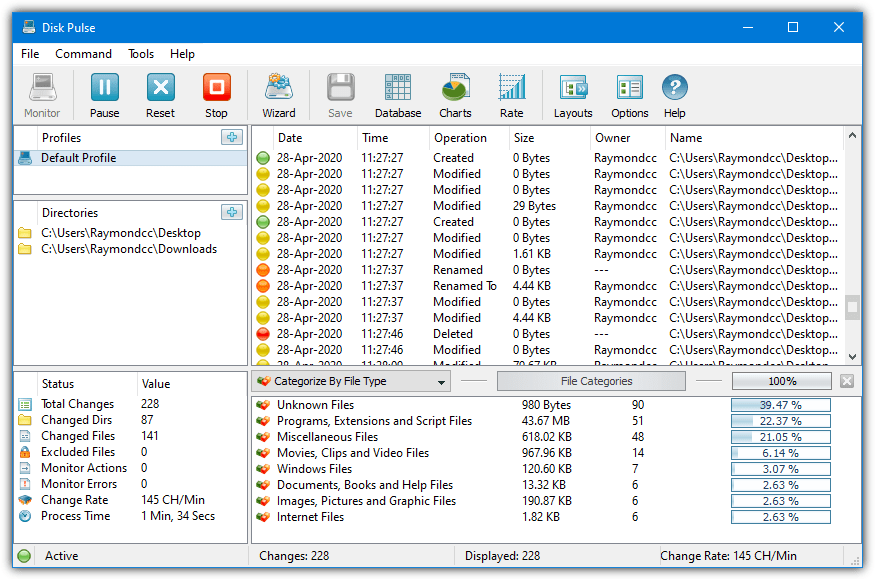
Disk Pulse will watch file and folder create, modify, rename, and delete changes. Finer controls like name, size, time, and attribute changes are in the profile options. Although there’s only three available profiles, multiple folders to monitor can be added to each. Double click a profile to enter its options. From there you can add multiple rules, exclude folders, and edit the events/main monitor type options.
The Charts option displays a nice bar or pie chart of the changes which can be printed, saved or copied to the clipboard. Save will create a report with several different output formats available. The Wizard button offers some profile presets that are pre-configured for certain scenarios, such as monitoring for image files, newly created files, or Windows system files.
Note: A possible bug we encountered is Disk Pulse will just quit without warning if it has to deal with several thousand events in quick succession, such as when unarchiving or copying. Try to make sure your selected folders won’t have this type of activity during monitoring.
3. TheFolderSpy
This program is able to handle the real time monitoring of multiple folders at once and is a very small portable executable of just over 120KB. TheFolderSpy can watch for creation, deletion, attribute changes, access date, and file size changes. Do note that the downloaded file is a RAR archive so you will need a third party tool such as WinRAR or 7-Zip to extract it. The .NET Framework 3.5 is required for Windows 10 users.
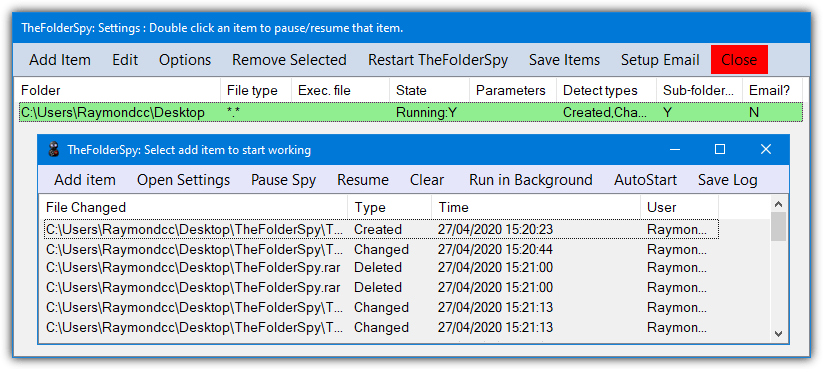
TheFolderSpy has a wildcard option to include certain types of a file although only one can be applied at once. Something that users may find quite useful is a built in email option that can mail you every time an event is triggered. Obviously, this is only suitable for rare events. Any triggered events will show in the main window, optionally a log file, a system tray balloon popup, and a file can be executed including an audio file.
4. Directory Monitor
Although the free version of Directory Monitor is still very capable, it has a huge amount of disabled functions reserved for the paid version. However, unlike Disk Pulse the restrictions are listed on the website. The restrictions include emailing, database options, sound events, printing, inactivity events, snapshots, user event monitoring, running as a service, executing programs in the background, and Growl notifications.
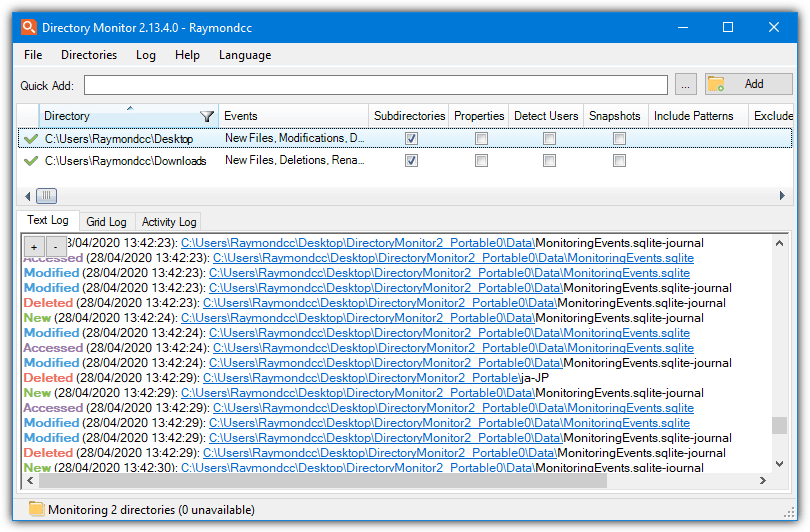
You can quickly add a folder for monitoring by using the text box or the browse button. The disadvantage is only new file events are monitored. To monitor more, either edit the folder or use the Add button which gives the available options when setting up a folder to watch. Then you can add file/folder deletions, modifications, renames, and file access. Multiple folders can be added to the monitor list including network shares.
The folder monitoring options also offer include and exclude wildcard patterns, logging to a text file, and executing a file on an event. Just about everything else there is disabled. If you don’t want the system notifications box appearing every time an event is logged, go to File > Options and turn it off or increase the interval. Directory Monitor has a portable, installer, and Chocolatey version available for download
5. Folder Monitor
Folder Monitor is another portable tool that can monitor file and folder events for creating, changing, renaming, and deleting. It’s only around 300KB in size but has some useful functions to trigger once a change has been detected. Windows 7 users will need .NET Framework 4.5 or above.
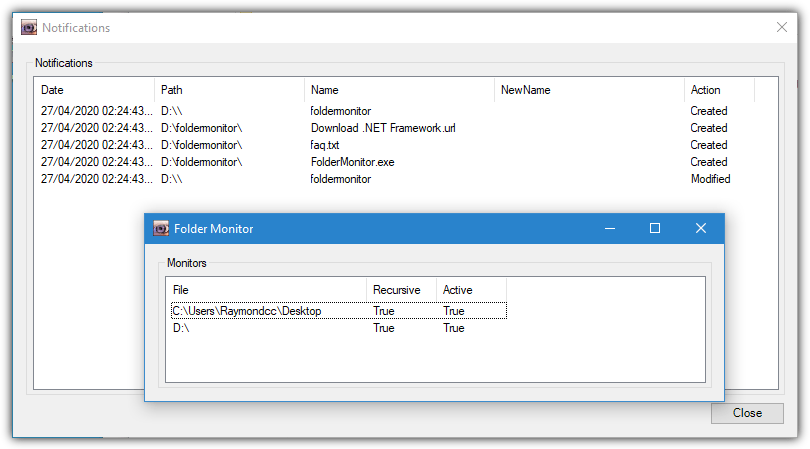
Click on the tray icon to open the monitored folder window, right click and choose “Add folder” to browse or “Add path” to paste or type a path in. Multiple folders can be added to the window. Right click on the entry and go to Options where you can choose which events are monitored, execute a command, or add an include/exclude filter using Regex. Each watched folder has its own options.
Other functions are found in the Options in the tray icon context menu. These are global and will affect all monitored folders. From this window, you can change the visual notification to visual (popup window) or balloon, and add a sound notification using a system or custom sound. Folder Monitor also supports a few command line arguments that are found in the About window.
The other remaining 5 file and folder monitoring tools can be found on the next page.



Improve this guide

User forum
0 messages