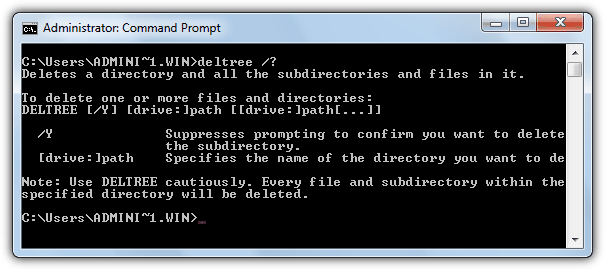
Just a short tip for today. I was required to create a batch to automatically remove a directory as well as all of its subdirectories and contained files. I remembered many years ago when I was using Windows 98, I could use the “deltree” command to delete a folder and everything in it.
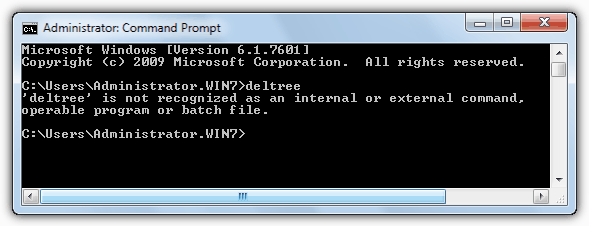
I launched command prompt(DOS), and typed “deltree /?” to display all the commands for deltree because I couldn’t remember the deltree parameters. I was quite embarrassed to see the error message “deltree is not recognized as an internal or external command, operable program or batch file.” It seems that the deltree command is no longer being used in Windows 200 and Windows XP.

After a little searching, I found deltree command replacement for Windows 2000 and Windows XP.
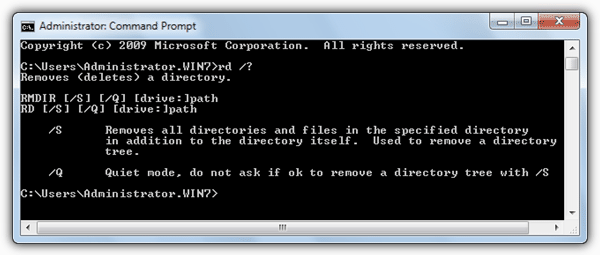
Windows 2000 and Windows XP do not have deltree command, but you can emulate it with the RD or RMDIR command.

For example, the following Windows 2000 or Windows XP DOS command deletes the C:\RAYMOND directory and all subdirectories WITHOUT ANY WARNING:
RD C:\RAYMOND /S /Q
/S = Removes all directories and files in the specified directory in addition to the directory itself. Used to remove a directory tree.
/Q = Quiet mode, do not ask if OK to remove a directory tree with /S.
I remembered back in Windows 98 time, the RD command is used to remove empty directories in MS-DOS. To delete directories with files or directories within them the user must use the deltree command. It looks like Windows 2000 and Windows XP has updated the RD command with the /S option. If you didn’t know, the RD and RMDIR command are internal commands for DOS. You couldn’t find a file rd.exe or rmdir.exe in your system.
DOS is still very useful to me. I get to automate task or even removing spywares or virus by running a DOS batch file.
Related posts:
Thanks, man.
I’m so lazy and set in my ways, I made a deltree.cmd file and put in my path. The super-simple 2 liner contains:
@echo off
rd /s %1 %2
this way you can use the quiet mode or not, depending on how confident you are. Thx again.
To clean up the “TEMP” folder during shutdown i use this two command in a gpo logoff script (it can be the local gpo for a stand alone computer)
@FOR /D %%i IN (“%TEMP%\*.*”) DO RMDIR /S /Q “%%i\”
@DEL /F /S /Q “%TEMP%”
Thx to David H. for the base command. I have just add the double quote “” in case of spaces in names of folders or files
Unfortuantely though in my experience you do not want to delete the directory itself only the contents.
e.g. I want to delete all files and subdirectories within c:\temp but i do not want to delete c:\temp.
with deltree it would have been deltree c:\temp\*.*
but now i would have to type:
RD c:\temp /s
MD c:\temp
ok i could write a batch file called deltree.bat and place it in my system path but i would prefer to use the original deltree, where has it gone and why??? its been about since MSDOS 5 after it was pinched from 4DOS.
That was a quick help dude.
Thanks Raymond
Moderator : Please run a spell checker over corruption weird meant rmdir Thanks
Hi, Good old Ubuntu Linux. I was able to delete an XP folder over my home network. The XP folder was a local Hardrive in NTFS format and had exceeded its file path length. A wierd corupption ment every time I renamed a long folder name it just kept on creating new repeat subfolders. No tinkering in Dos with rd or remdir would work. Linux just wiped the offending folder after I had copied the files I wanted to keep. Could have used a linux boot CD to achive same, but already had the drive accessible over the network. Of course you need to be cautious as this will wipe any folder on the windows drive with similar ease.
There is a way to use RD to delete a directory structure without removing the existing folder, but it requires a little trickery (not much, though). Create a .cmd file (or you can use .bat, but I prefer .cmd), and Chdir (or CD) into the directory you want to remove the contents from. Then run RD on the directory you’re currently in.
For example, if you want to delete everything under C:\Temp, then type:
CD \Temp
RD /S /Q C:\Temp
You’ll get an error saying:
“The process cannot access the file because it is being used by another process”.
This is normal, because you currently have the directory locked by running the command from the very location you’re trying to delete. However, while an error will occur, everything under that directory will be gone, and the original C:\Temp will still remain.
I know this is an older post, and the people who needed this have probably long moved on, but maybe it will help someone else out.
Hi I have an Ibm Laptop with Windows 2000 ,i want to replace this with XP. I have the xp disk .
What are the commands to do this? How do i get to Dos?
Thanks
Bob
thanks for this.
it’s amazing! thanks!!
long life h!
I’m looking for the same thing. Basically I want to delete EVERYTHING inside of:
C:\SomeDir
but I want to leave SomeDir alone.
rd and rmdir won’t accept wildcards either:
rd /s “C:\SomeDir\*”
What I would suggest is that you download the Unix utility “rm” (there are windows ports, or better yet install Cygwin) and use the command:
rm -Rf –preserve-root “C:\SomeDir\*”
Why does Microsoft suck? They even break their own software that worked perfectly fine.
Thanx Alot Sir
The deltree of Dos 6.22 that I’ve downloaded from allbootdisks.com doesn’t work if you try:
deltree.exe “c:\Folfer with space\*.*”
or any variations of it!
I’ll use the tip of David H. even creating a bigger and dirty script!
Thanks anyways ^^
You can use the following commands to delete all folders and files in a directory.
:Delete all folders in C:\Temp
FOR /D %%i IN (C:\Temp\*.*) DO RMDIR /S /Q %%i\
:Delete all files in C:\Temp
DEL /F /S /Q C:\Temp
Note: To manually run the first command from a DOS prompt use %i but change it to %%i when running the same command in a BATCH file.
thanks a lot.. :)
recently i used RD command, and it works fine
Thank you so much! I was hunting for this informaitn all over the place. Had to delete a folder with spyware programs and windows explorer refused to display hidden folders and files. This was the only way to do it.
What the difference of Deltree and RD is that, deltree can enter into a directory and provide the wildcard for flexibility to specify which files I want to reserve. However, RD command would wipe out anything and it should be used at your own risk.
Certainly we can use File Manager to achieve what we want, but it cannot eventually automate the file maintenance as what DOS does.
how can you kll a hardrive on a school computer
Deltree Command Replacement in Windows 2000 or Windows XP
RD is NOT a replacement for deltree!!!
With Deltree I can select to delete just one file or a group of files with the same extension from a folder like “C:\Windows” without touching any other file.
I can pick just one file out of a folder or delete the entire HD. RD just doesn’t have that flexibility.
MS has made some really big mistakes, but removing Deltree.exe was one of their biggest, in my opinion.
Alexi
thanks I will remember these commands forever thanks to you.
Perfecto…. funcionó perfecto….. muchas gracias!!!!
Genial!!!! :)! Me funciona perfectamente!!! Muchas gracias! :)
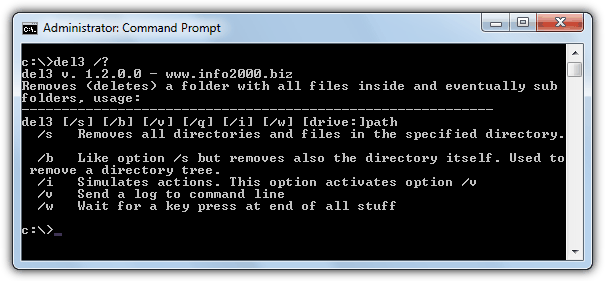
I just came across this, and the solution was to download a copy of deltree.exe off of the internet. It still works in XP and 2003 (although not the 64-bit versions).
I had a folder with special permissions, so deleting the folder and recreating it with RD /S and then MD wasn’t an option. Essentially Microsoft needs to update the RD command to function like deltree where wildcards could be used.
Hi all,
with the deltree command you could specify c:\\\\folder1\\\\*.* and it would delete all subfolders of folder1, however with the rd command that seems to no longer be the case as you have to specify which folder you want to delete.
What if I only want to delete the subfolder structure and NOT the parent folder? eg. users keep changing data within folder1 so I don\\\’t know what the names will be, but I want to delete them at the end of every week.
PS. want to script it on a 2003 server
Great article Raymond. It reminds me of the DOS stuff. I just would like to add a few comments. In Win2K or WinXP or newer Windows OS, the ‘DOS-like’ window is not called DOS anymore. DOS stands for Disk Operating System. It is an operating system used for versions of Windows prior to Win2K or WinXP. However in NT based systems such as Win2K/WinXP it is called a console window and an application running in a console window is called a console application (either 16-bit or 32-bit). Hope this will be useful. Thanks.
With windows 2000/XP there is no DOS anymore, just a way to run program,s that have no GUI, in a command prompt .
Thanx Mqn
[...] I launched command prompt(DOS), and typed “deltree /?” to display all the commands for deltree because I couldn’t remember the deltree parameters. I was quite embarrassed to see the error message “deltree is not recognized as an internal or external command, operable program or batch file.” It seems that the deltree command is no longer being used in Windows 200 and Windows XP. After a little searching, I found deltree command replacement for Windows 2000 and Windows XP. (more…) [...]