
4 Methods to Reset System and Hidden Attributes for Files or Folders Caused by Virus


 5 min. read
  Published on

Different viruses cause different types of damage on your computer. Most of the time, the viruses are programmed to disable Windows Task Manager, Regedit, Command Prompt, folder options and etc. These restrictions are meant to prevent a normal computer user from using these built-in Windows diagnostic tools such as MSCONFIG to disable the virus from starting up on your computer.
There are some viruses that will cause destruction such as encrypting recently used files so you are forced to buy the decryption key from the virus programmer. Then there’s another type of virus such as BDS.Mirc.Backdoor that will hide your document files by setting the hidden and system attributes to the file. You can still see the files if you set to show hidden files and folders plus disabling hide operating system files. Another trick is to use Google Chrome, Firefox or Opera to reveal the hidden files. If the virus is capable of restricting Folder Options, the chances are you think that your files have been wiped out by the virus but in fact they are perfectly safe and have just been hidden in your system.
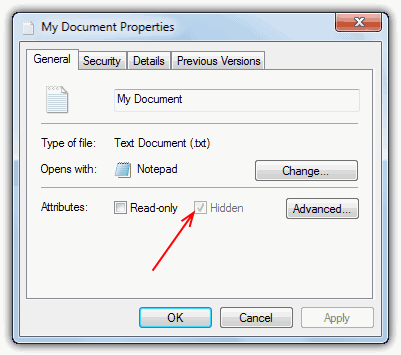
There’s still hope if you think that your files are gone because of a virus. Here’s how to check if the files are still around, and if they are, you can reset the attributes of the files to view them normally in Windows Explorer again.
How to show hidden files and folders or system files
1. Go to Control Panel and open Folder Options.
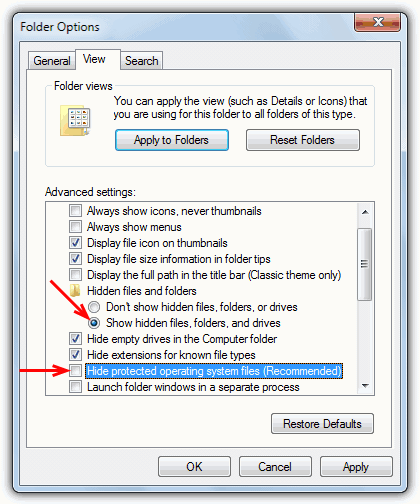
2. Go to the View tab and select “Show hidden files and folders”. Then uncheck “Hide protected operating system files”. Do take note that some viruses that are still active on the computer will revert the changes that you made. So make sure your computer is clean from viruses first by scanning with an antivirus program.
3. Try to look for your missing files on your hard drive. There is a tool called Random’s System Information Tool that is able to help you find files or folders created or modified in the last 1 to 3 months.
4. If you have managed to locate your files which are hidden but visible because you’ve configured the Folder Options to show them, then you’ll need to unhide the hidden files. Here are 4 methods to reset the system and hidden attributes.
1. Unhide using the Windows attrib command
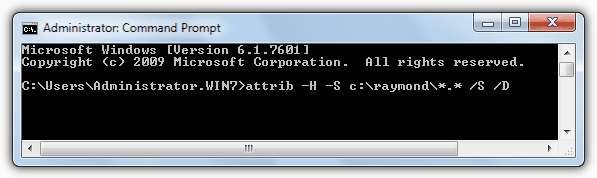
This is the old school method of doing it without using any software. Just run command prompt (Start -> Run -> CMD for XP, or for Vista and 7 Start -> type CMD in search box, right click and run as Admin), type the following command:
attrib -H -S C:\path\to\your\file.doc /S /D
You can also use the asterisk character to define multiple extensions. For example:
attrib -H -S C:\raymond\*.* /S /D
This would remove the Hidden and System attribute of all files in the raymond folder on the C drive. The /S and /D arguments are optional. /S will recurse down into all sub folders and /D will unhide the folders themselves if they have the System or Hidden attribute set.
Just to point out, it’s probably not the best idea to use something like “C:\*.*” as this will unhide the whole drive including files which Windows has set as hidden or system by design.
On the next page we’ll show you how to unhide/unsystem your files using even easier methods with the help software.



Improve this guide

User forum
0 messages