
4 Tools to Increase TCP/IP Half Open Connection Limit


 6 min. read
  Published on

The Microsoft Windows operating system has always been well known to be easily infected by computer viruses. This is why there are so many viruses that can infect a Windows machine, but very little in other operating systems such as Linux and Mac OS. Since viruses can spread quickly through the network, one of the efforts made by the Microsoft team in Windows XP is the half-open TCP connection limitation to slow the propagation of malware from the infected machine.
This feature was implemented in Windows XP Service Pack 2 but has been disabled since Windows Vista Service Pack 2. This would also mean that any Windows operating system later than Vista SP2 such as 7, 8 and even 10 will not have this half-open TCP connection limitation anymore.
The default number of maximum half-open connection is 10 and most people who download files using BitTorrent would normally want to increase it to 50. However most people don’t know that increasing the number of half-open connections does not increase the download speed, but it only decreases the time to connect to the maximum number of peers. Setting this limit too high may greatly slow down your router in making new connections. If you’re looking to increase the half open-connection limit, here are 4 tools to do that.
1. EvID4226Patch
This intelligent TCPIP.SYS patcher by LvlLord was one of the first, if not the first free tool to increase the maximum concurrent half-open connections for Windows XP. It is able to detect the current limit and allows you to increase the limit to 50 by pressing the Y key. You can specify your own number by pressing the C key followed by your preferred number of connections.
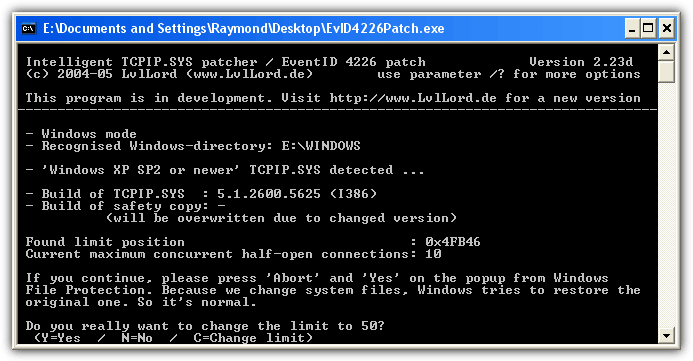
The patcher will then ask you to allow renaming the backup TCPIP.SYS file so that Windows will not be able to automatically restore the modified TCPIP.SYS file. Press Y key and a 15 seconds countdown will start. If you see a Windows File Protection dialog box appear asking you to insert your Windows XP CD, just press the Cancel button followed by Yes to keep the unrecognized file version. Press any key to close the EvID4226Patch and restart your computer for the changes to take effect.
To restore back the original TCPIP.SYS file, run the EvID4226Patch again and press the U key followed by Y twice. Do take note that the password to extract the ZIP file is “abc” without the quotes.
2. Universal Tcpip.sys Patch
This Universal Tcpip.sys Patch is an alternative to EvID4226Patch. They do the same thing which is intelligently patching the TCPIP.SYS file to increase the number of half open connections but has 3 advantages which are the graphical user interface, the support for Windows Vista and 64-bit version of Windows.
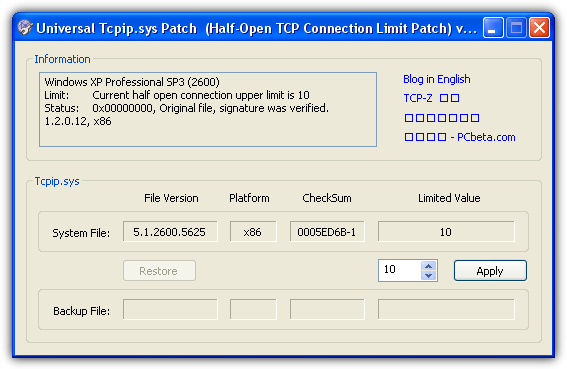
All you need to do is run the program, set the number of half open connections in the box, click the Apply button and reboot your computer. You can easily roll back the changes by clicking the Restore button. The status in the information box will show you if the limit has been modified or if it is still the original file.
Download Universal Tcpip.sys Patch
3. Half-Open Limit Fix
Half-Open Limit Fix is an easy to use and single portable tool to set a new limit for half open connections by patching the TCPIP.SYS file. It basically does the same thing as the first two tools mentioned above. It shows the current limit with the default recommended limit of 100. Clicking the “Add to tcpip.sys” button will instantly patch the tcppip.sys file. Reverting back the changes is as easy as clicking the “Restore original file” button.

A lot of languages are supported which can be switched by pressing the drop down menu and it works on both 32-bit and 64-bit without requiring to run a specially compiled X64 version.
4. TCP-Z
TCP-Z changes the half open limit using a different method which is by patching the kernel memory, rather than patching the system file. This method is very useful if you need to instantly increase or decrease the number of half open connection without the need to restart your computer because the changes take effect immediately. Obviously the modified value will be lost after restarting the computer. If you want a permanent effect, there is also an option to patch the tcpip.sys file.
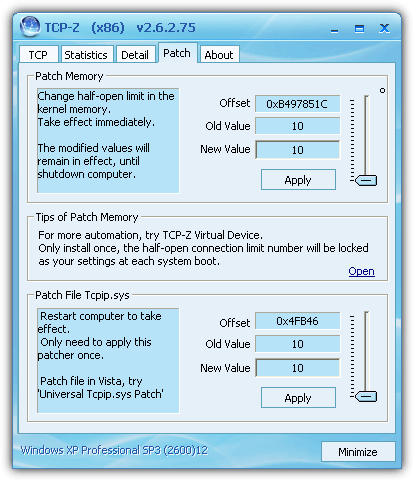
Other than just a regular half open connection limit patcher, it also comes with a useful chart showing the processes with an established connection and the half open connection. This way you can accurately tell if the half open connection that you’ve set is too high or low and make changes accordingly without guessing.
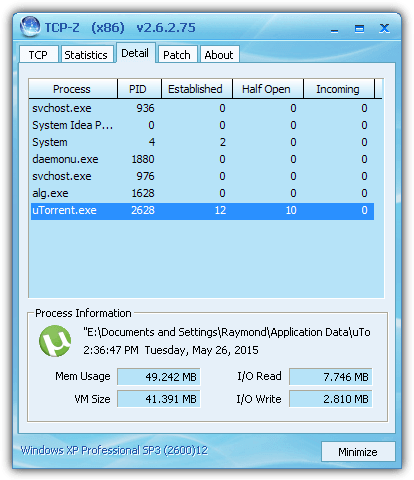
Do take note that it is necessary to restart the download from the download program after you’ve set a new limit in the memory to take effect.
Additional Notes: When Windows XP was still receiving updates, it is well known to reset back the half open connection limit from time to time when the TCPIP.SYS file got updated. Since Windows XP is no longer being supported today, there will be no more security updates provided to home users and this will mean that the file patching method will be permanent.
Even though these half-open connection limit patcher tools are no longer being updated, they still work perfectly on Windows XP and Vista. According to StatCounter Global Stats for April 2015, Windows XP is the second most used Windows operating system at 13.78% and it translates to more than 200 million users!
Here is an easy way to see if you need to increase the half-open connection limit. Go to Control Panel > Administrative Tools > Event Viewer. Click on System and search for a warning type with number 4226 at the Event column. Double clicking on the item will open the properties window for the event.
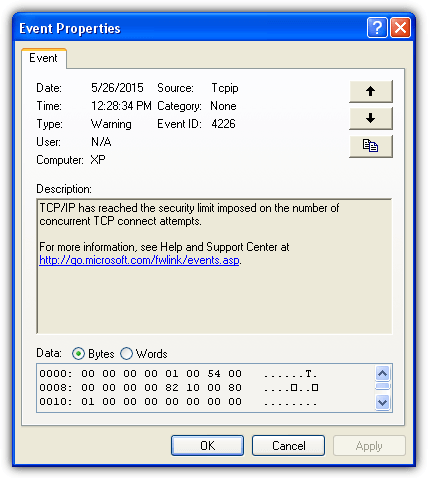
If you do not see any 4226 event, then you do not need to increase the half-open connection limit.



Improve this guide

User forum
0 messages